3

In visio 2010 there is a shape in the blocks called a 'curved arrow', which allows you to bend an arrow 90 degrees with a nice curved corner.

I would like to create an 'S' curve, but there is no equivalent curved bar that I can use with which to construct this out of. Ideally I would use an 'curved open/closed bar' so that I could create a seamless arrow with multiple curves.

I can't seem to find any existing shapes to do this or understand how to modify an existing shape to do this. Is there a good way I can go about it?

I have this, but I would like to remove the arrowheads from the intermediate sections and just have a seemingly contiguous shape.
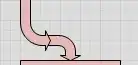
enter image description here

Tim
  • 183
  • 1
  • 2
  • 10
  • Sounds like you're looking for either an "arc" (just a curved line) or an "elbow" (curved pipe). – sawdust Aug 08 '13 at 22:46
  • Any chance you could elaborate? I'm looking for the thick colored pipes, so I don't think I want an arc, if those are just lines. When I search for shapes called elbow I see several, but I don't see anything that looks like a curved bar. – Tim Aug 08 '13 at 23:29
  • Can you select the arrow and open a Properties window?  If so, look for an option to change the arrowhead style.  The might be an option for “none.” – Scott - Слава Україні Aug 09 '13 at 00:27
  • I didn't see any such properties window when I right click on it, or anywhere in the ribbon bar. – Tim Aug 09 '13 at 01:36

1 Answers1

2

Not sure if there is a better way, but I was able to do this by copying the curved arrow shape, and then editing the shapesheet to remove all the lines which makeup the arrowhead.

Open the shape, then edit the shapesheet, and then for all the line segments of the arrowhead, replace "line to" with "move to", so now the arrowhead is not drawn:

enter image description here

Tim
  • 183
  • 1
  • 2
  • 10