4

Please help me, how reverse/sort row in text file with batch in Windows?
Example:
I have text in this format

15/04/2013-07:10:30 lalala
15/04/2013-07:10:30 Text text
15/04/2013-07:10:30 1 lala Text

15/04/2013-07:10:36 8 text lala X
15/04/2013-07:10:36 A text lala 1

17/04/2013-10:11:12 B bext lala 4
... (other rows)

and I need reversed it in this format

17/04/2013-10:11:12 B bext lala 4
15/04/2013-07:10:36 A text lala 1
15/04/2013-07:10:36 8 text lala X
15/04/2013-07:10:30 1 lala Text
15/04/2013-07:10:30 Text text
15/04/2013-07:10:30 lalala
... (other rows)

Thank You for Your help!

Hennes
  • 65,142

5 Answers5

13

Maybe it's not the prettiest way, but it's just simple and works as you want.

echo. > output.txt

for /f  "delims=@" %%j in (yourfile.txt) do (
    type output.txt > tmp
    echo %%j > output.txt
    type tmp >> output.txt
)

del tmp

Don't use the example above if you want to process large files. It's really time and resources consuming solution. Here you have faster version I just prepared:

setlocal enabledelayedexpansion

set I=0

for /F "tokens=*" %%k in (yourfile.txt) do (
  set /A I=!I! + 1
  set LINE!I!=%%k
)

for /L %%c in (!I!,-1,1) do (
  echo !LINE%%c! >> out.txt
)

Reversing 40kb file (10k lines, 1 character in each) took ~1 minute on my machine. Remember it's still only batch. There are many better scripting or programming languages that would be better to perform that operation.

ghost
  • 231
  • 4
    Just imagine how long this will take for a large file! This feels like Towers of Hanoi text processing! – David Heffernan Apr 15 '13 at 11:38
  • 2
    Well, I told it's not the best way. I just came with a simple idea for processing small files. It's his problem that he wants to use batch for such an operation :) The worst choice in my opinion. –  Apr 15 '13 at 11:43
  • I've edited my post. New code is much faster comparing to the first one. –  Apr 15 '13 at 12:15
  • 2
    Nice. Have a +1. Batch is just masochism. – David Heffernan Apr 15 '13 at 12:16
  • GHOST: It is work very well! It is it what I need. Thank You for your help. –  Apr 15 '13 at 12:44
2
perl -e "print reverse <>" file > file_reversed

Note that on Windows you will have to use double quotes instead of single quotes to delimit the perl string.

Matthew Lock
  • 4,691
Kjetil S.
  • 549
  • 1
    Windows has no perl command. The question specifies Windows. –  Jan 20 '17 at 14:00
  • Three other people mentioned perl here so I assumed it was ok. – Kjetil S. Jan 21 '17 at 19:09
  • Answers in this website must be self-contained. That means you are obligated to mention that perl is not included in Windows and optionally, include a hyperlink to download and install it. But most importantly you should have stated the prerequisites for running a script with perl. –  Jan 22 '17 at 05:39
  • I had perl on my Windows system so this was handy. – Matthew Lock Jun 26 '17 at 06:37
  • Thank you - in spite of the by-the-book complaints this is the best answer here. – Michael Burr May 02 '18 at 21:10
1

I thought I would add this as a second approach, as it might work better for some:

If you are open to something you can call, instead of batch logic:

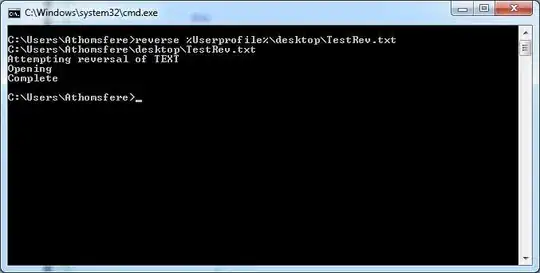
This is a .NET application that you drop to %Systemroot% and call just like any other command in a batch, .bat, .cmd etc.1

Usage looks like: Reverse "C:\Path\File.txt" enter image description here

And, yes, I own the thing. It seems easier to me to call this than write the logic out. It will replace the file contents, at present at least and not create a second file.

1

sort /r yourfile.txt > out.txt

This will put out all lines in yourfile.txt in reverse alphabetical order. Note that this may differ from putting out all lines in yourfile.txt in actual reverse order.

C.O.
  • 103
-1

exactly 10 lines perl, taking into account that nothing will be done if output file already exists:

#!/usr/bin/perl
usage() if( !$ARGV[0] );
my $f_out = my $f_in = $ARGV[0];
$f_out =~ s/(\..{1,3})?$/.reverse$1/i;
open(TXTIN, "<$f_in") || usage("Can't read file [$f_in]");
my @in = <TXTIN>; close(TXTIN);
usage( "File already exists, nothing done [$f_out]" ) if( -e $f_out );
open(TXTOUT, ">$f_out"); print TXTOUT join( '', reverse( @in ) ); close(TXTOUT);
print "File reverse written [$f_out]\n";
sub usage { print "$_[0]\nUsage: [perl] rev2.pl (filename)\n"; exit; }
Toby Speight
  • 4,967
  • 1
    Can you provide some explanation on what this code does? Please see [answer]. – Burgi Dec 07 '16 at 15:20
  • 1
    Welcome to Super User! While this may answer the question, it would be a better answer if you could provide some explanation why it does so. – DavidPostill Dec 07 '16 at 15:31
  • Please explain what your perl script does exactly. You should also properly format the script, please make the code readable, over making it compact. – Ramhound Dec 07 '16 at 16:01
  • Also, Windows doesn't have PERL, so you'll need to explain why it's necessary to install extra software if a default program will work. – music2myear Jan 20 '17 at 22:16