0

I have the club3D HD7950 RoyalKing which has a standard clock of 880MHz and a standard boost of 930MHz. When I'm running a game, BOINC or a benchmark the GPU will use the boost frequency for a few seconds and then reverts to the standard clock.

  • It isn't a problem of heat, the GPU runs at 50°C under full load.
  • The PSU is probably not an issue either, got 550 Watt. The GPU uses the boosted clock for a while, so if the PSU is the problem, it shouldn't work at the boosted clock anyways. (am I correct here?)
  • I've googled a bit, and others report being stuck at 500MHz when running flash. This was fixed by turning flash hardware acceleration off. I've tried this too, but it doesn't help.

I'm using the latest stable drivers for ATI cards (13.1)

Any idea what might be wrong? Are there any other troubleshooting steps I should take?

EDIT: I was monitoring my performance with MSI afterburner, and I found something interesting. It runs at boost frequency (at 1000MHz at the moment). Until the GPU usage reaches 100%. Then the core clock is constantly adjusted. Or well, it could actually be the other way around. The core clock gets adjusted and thus performance reaches 100%. FPS in game also drop from 90 to 70 at that point.
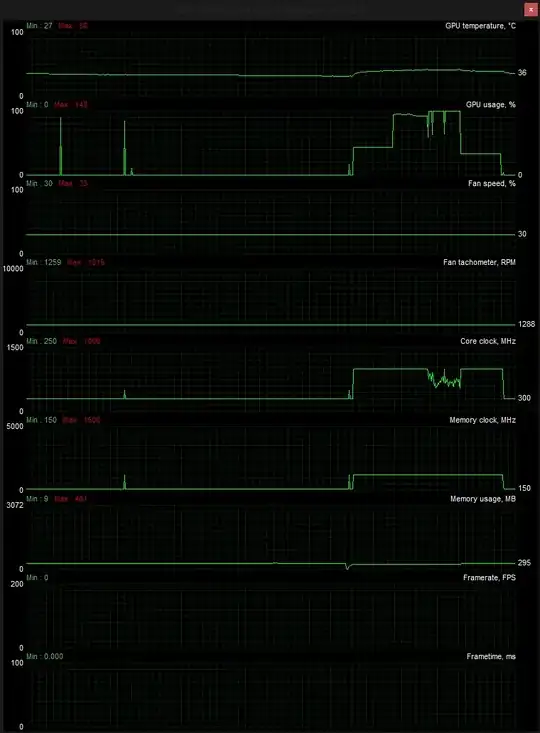
enter image description here

  • If it boosts up to the correct frequency i don't understand the problem. It won't remain at that frequency no matter what you try. – Ramhound Feb 21 '13 at 20:01
  • It only boosts for the first few seconds and then won't go boost anymore. I intend to overclock this card, and you can only modify the boost frequency. With the current issue an overclock won't be used. – Simon Verbeke Feb 21 '13 at 20:02
  • Are you experiencing reduced performance? The card doesn't need to run at the boosted 930MHz if it is passing all the data it needs to at 880MHz or even 500MHz. – Enigma Feb 21 '13 at 20:04
  • There are times where I do need the extra performance. Large group fights in certain games, where my FPS will drop below 20fps for example. Also for BOINC, I run some GPU projects on there. Besides, I'm not using VSYNC or any other FPS-limiting technology, so there's no reason for my GPU to limit its clock. – Simon Verbeke Feb 21 '13 at 20:07
  • Other hardware can also limit your performance. What CPU do you have and how much RAM? – Enigma Feb 21 '13 at 20:15
  • Intel i5 3570K and 16GB RAM @ 1800MHz. The BOINC projects run purely on GPU and VRAM. So I don't see how my other hardware could be a problem for BOINC. – Simon Verbeke Feb 21 '13 at 20:18
  • "Some BOINC-based projects have applications that run on GPUs." - https://boinc.berkeley.edu/wiki/GPU_computing - assuming you're sure this is the case, it could potentially be that your power supply is reaching its limit. 550W is a modest PSU but for an i5 and 16GB of ram, you may be stretching it. Try setting a max of 880MHz or lower and see if it maintains that for the duration of the test. – Enigma Feb 21 '13 at 20:24
  • According to online PSU calculators, I should need about 350W with all components under full load. So even with a good margin of error, 550W should enough. Tried running at 800MHz, and it's running consistently now. – Simon Verbeke Feb 21 '13 at 20:31
  • It would be helpful to use an inline wattage calculator. My PC burns up to 500W with a triple core phenom @ 2.6GHz, 8GB of 800MHz RAM, and a geForce 550 ti. The consistency is a good place to start. It might be that your card is somewhat of a lemon and unable to run much higher or the issue is attributed to power demand. BOINC may also be trying to use the GPU clock sparingly. – Enigma Feb 21 '13 at 20:42
  • I am testing some more at the moment. I found an ATI setting that allows your card to use more power. BOINC can run at 850MHz before the core clocks starts fluctuating now. Guild Wars is able to use the stock speeds without problem now. And unfortunately, I don't have an inline wattage calculator. – Simon Verbeke Feb 21 '13 at 20:50
  • It's a very useful tool that you can grab for about $30. It really sounds like either hardware defects on the card or power limitations. Most power supplies have an overpower or burst threshold that allows it to go over its rating for a little while. This could be whats happening resulting in a drastic reduction all of a sudden on GPU clock when it pulls back. – Enigma Feb 21 '13 at 21:11
  • I'll see what I can do. In the meantime you can add this as an answer, as it does appear to be a problem with the power supply. – Simon Verbeke Feb 21 '13 at 21:43

1 Answers1

2

It sounds like either hardware defects on the card or power limitations. Most power supplies have an overpower or burst threshold that allows it to go over its rating for a little while. This could be whats happening resulting in a drastic reduction all of a sudden on GPU clock when it pulls back.

Enigma
  • 3,391
  • Thank you! I'm thinking that it might be that my 12V rails don't give enough power. There are three, so I'm going to try to switch them around. Perhaps there is one cable that delivers some more power. – Simon Verbeke Feb 21 '13 at 21:53
  • Sure, it's possible individual lines may have degraded. You could also try using an external PSU to power just the GPU. – Enigma Feb 21 '13 at 23:11