18

An e-mail from a colleague contained the character at the end of a sentence, in a context where one might expect punctuation or a smiley.

What is this character? It has zero google results and unicodelookup.com doesn't make me wiser either.

Does it have a meaning? If not, how could someone enter such a character as a typo?

gerrit
  • 1,618
  • 3
    It probably means that specific character wasn't supported by the encoding, so the computer used the closest one it could find / a default replacement. – cutrightjm Dec 07 '12 at 18:21
  • 1
    I'd consider it equivalent to :p – Mikey Dec 07 '12 at 19:14
  • All I see is a square. I was wondering, "is this going to be a question about why sometimes a square character shows up, or is it a character that my computer doesn't know?" – nhinkle Dec 12 '12 at 03:21
  • Whoa. It shows up right in the window title though... – nhinkle Dec 12 '12 at 03:22
  • interesting question. it shows as a square in the window title but as a smiley in the question title and the body of the post (cc @nhinkle) – studiohack Dec 12 '12 at 03:26
  • For me, the smiley shows everywhere - window title, question title and body of the post. Firefox 17 on Windows 8 – pratnala Dec 12 '12 at 04:03
  • Hmm, when I was at work it didn't show, but at home it does... – gerrit Dec 16 '12 at 16:26

4 Answers4

24

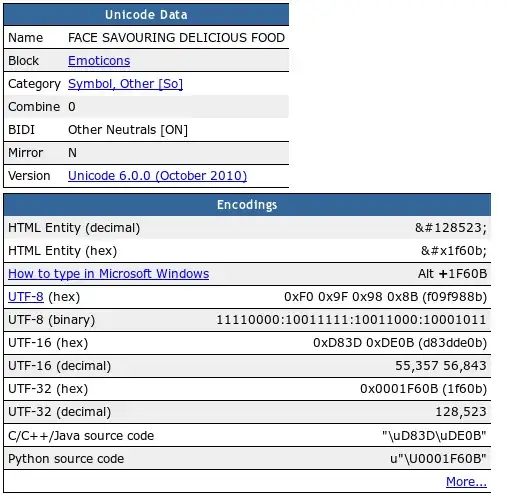
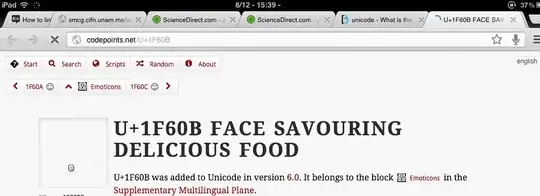
According to this page it is the "Unicode Character 'FACE SAVOURING DELICIOUS FOOD' (U+1F60B)":

enter image description here

enter image description here

in general, searching for smileys and strange characters like this is better on http://duckduckgo.com which is a great search engine anyway.

UPDATE

I did some more testing following the discussion in the comments. I don't think the rendering differences depend on the font. The following is a screenshot showing the character written in different fonts in Libre Office (Linux)

enter image description here

This is the character as displayed on my linux box by firefox (Chromium and Opera show the same):

enter image description here

On my iPad, it is first displayed as a smaller (placeholder?) glyph as shown below but then resolves itself to the same image as those above:

enter image description here

So, I don't know how these Unicode glyphs are encoded, but they don't seem to be font dependent. I don't imagine most fonts include a specific rendering of emoticons, so there must be a shared way of displaying them that is platform/system dependent and not tied to a specific font.

terdon
  • 53,403
  • What is the point in showing the character in different fonts when it's the same glyph anyway? :P – slhck Dec 08 '12 at 15:30
  • @slhck Since the discussion in the comments has been about whether or not the glyph's appearance depended on the font used, I wanted to demonstrate that it doesn't change with the font. What, you would have taken my word for it? :) – terdon Dec 08 '12 at 15:38
  • 7
    I'm the author of codepoints.net, and the icon looks the same on codepoints.net and fileformat.info, because we both use the same font to render it, Symbola. I'm using the CSS @font-face technique, therefore it is a real character, not an image. By the way, thanks for pointing me to the iPad issue, I will investigate it ASAP. :-) – Boldewyn Dec 08 '12 at 23:31
  • 2
    It doesn't vary with the font used because fontconfig is backfilling it with the same (other) font since the current font doesn't provide a glyph for it. – Ignacio Vazquez-Abrams Dec 12 '12 at 05:45
  • @IgnacioVazquez-Abrams ah, so whenever a font has a character or glyph missing it will fallback to whatever is the default configuration in a particular system and display that? I would have thought it wouls simply no be displayed (as in the dingbats example in my answer). – terdon Dec 12 '12 at 13:54
  • 1
    The Dingbats font claims that it has the glyph, but is lying. – Ignacio Vazquez-Abrams Dec 12 '12 at 13:56
  • If you use gucharmap it'll tell you what font its actually coming from. Here, both Symbola and DejaVu Sans (at least) provide it, and they look slightly different. – derobert Dec 12 '12 at 17:41
5

 as png
As seen in Segoe UI Symbol, 72 pt

Louis Waweru
  • 24,631
  • 40
  • 135
  • 202
  • 3
    This one is slightly different, note the upwards tilt of the tongue. – terdon Dec 07 '12 at 18:30
  • @terdon I just copy/pasted from the OP's question. – Louis Waweru Dec 07 '12 at 18:34
  • Weird... I see a tongue protruding upwards in your answer and downwards in the original question ... – terdon Dec 07 '12 at 18:36
  • @terdon haha, I just checked, they are the same character. I think they have the wrong image on fileformat.info. I mean the upward tongue says "mmm savory deliciousness". The downward tongue is more like teasing. – Louis Waweru Dec 07 '12 at 18:42
  • Fair enough but then, why did we get different characters when copy pasting? – terdon Dec 07 '12 at 18:45
  • @terdon I say we didn't. I think that fileformat.info is simply using a different picture to show the character. I can also see the character in the browser title, the tounge is pointing upwards: http://i.stack.imgur.com/44PKo.png – Louis Waweru Dec 07 '12 at 18:50
  • curiouser and curiouser... http://codepoints.net/U+1F60B – terdon Dec 07 '12 at 18:58
  • @terdon I see, maybe Microsoft (and my system) made it different on their own. – Louis Waweru Dec 07 '12 at 19:05
  • 8
    The exact visual appearance of a character depends on the font, and the styling of the tongue surely falls into the realm of reasonable variation. But for the record, the reference glyph (suggestive, not normative) has a downwards-pointing tongue: http://www.unicode.org/charts/PDF/U1F600.pdf – Jukka K. Korpela Dec 07 '12 at 19:09
  • @terdon: Sometimes a 0 will have a slash through it, sometimes not. But the end result has nothing to do with whether the zero you cut had a slash through it or not. – David Schwartz Dec 07 '12 at 22:50
  • @DavidSchwartz, of course, I am familiar with the concept of fonts :). I just would not have expected a font to change an emoticon to such an extent as to cause it to depict a different emotion. – terdon Dec 08 '12 at 14:04
  • @DavidSchwartz I don't think this depends on the font, see my updated answer. – terdon Dec 08 '12 at 14:47
3

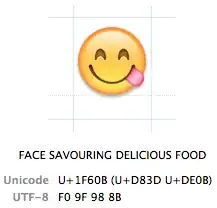
UNICODE: FACE SAVOURING DELICIOUS FOOD

(Image from Mac OS X Character Viewer. I take no credit for the info in the image.)

On Mac OS X, I think Lion and above. Testing in TextEdit reveals that it is unaffected by font, as the Character Viewer appears to state in the font variation section of its entry.

Speculating on why your colleague used it, it's relatively simple to insert on Mac, using the Character Viewer/Special Characters under the emoji section (funny enough, this one's not in Messages' list of smileys). It's also easy to insert on iPad, using the Emoji "international" keyboard. There are definitely other ways to do it, and on other platforms, those are just the ways I've found to type them that aren't too hard to find. Who can't resist typing fancy colored emoticons that they found looking through random features of their system?

It might be something interesting to ask your colleague about.

Emoticon in tab for this page

This is what inspired me to make this post. Just noticed it randomly. It isn't rendered in the web page, just the tab title and the tab's hovertext. (this is on Mac 10.8 with Chrome 23)

TheCrab
  • 136
  • Not the same... The tongue here is down, the one in the OP's question is tongue up. – studiohack Dec 12 '12 at 03:27
  • @studiohack: I'm seeing it down in both cases. – Ignacio Vazquez-Abrams Dec 12 '12 at 05:46
  • @studiohack: I looked up Unicode U+1F60B, from terdon's answer, in Character Viewer to get the first screenshot. It's a different rendition of the same character, at least the same character as terdon's answer. The second screenshot is also an unmodified view of what I see as the title of this post. – TheCrab Dec 12 '12 at 08:33
0

It was historically available as an Extended ASCII character in DOS terminal fonts, as the answers to this codegolf challenge illustrate. 1,