I have the Firefox addon Scrapbook and have saved a site to my hard drive. How do I navigate to the site now that I have saved it, I cant find the link anywhere?
Asked
Active
Viewed 2,270 times

1 Answers
1
The screenshot from the add-on page shows a ScrapBook sidebar:
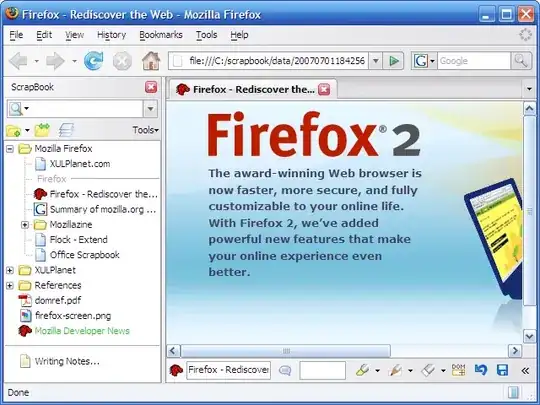
So press Alt to display the FF menu, then check under View / Sidebar or View / Toolbars or even under the Tools menu for the relevant option to display the ScrapBook sidebar.
Edit: As per this page, you can access it via:
- Clicking
 in Firefox toolbar
 - Firefox menubar, [View] > [Sidebar] > [ScrapBook]
- Firefox menubar, [ScrapBook] > [Show in Sidebar]
- Keyboard shortcut, Alt + K

Karan
- 56,477
-
You are a life saver. Amazing. You can add to your answer that after the clicking the Alt key it shows you that Alt K is the shortcut for Scrapbook. Thanks a lot! – In God I Trust Oct 15 '12 at 19:27
-
Glad I could help. Also, your comment is visible to everyone, so the extra info. you provided can be easily seen by other readers. :) – Karan Oct 15 '12 at 19:30
-
Cheerio ;) (15 Chars) – In God I Trust Oct 15 '12 at 19:34