30

I am terrified of accidentally sending a reply before I'm finished editing it. Usually what I do is either:

  1. copy the email into word, edit in word, then hit reply-to-all in outlook, paste in my text, and send.
  2. hit reply-to-all, delete the recipient names, edit, add the recipient names, and send.

Is there a way to 'lock' the email so I can't send it while I'm making edits in Outlook? I hate having to switch between programs just so I can edit.

Oliver Salzburg
  • 87,539
  • 63
  • 263
  • 308
dan
  • 433
  • 4
    IMHO that's more a matter of "psychological inhibition" rather than a real technical limitation. I also read my emails carefully before sending them (more than once if they are really important) but I'm not afraid of pushing the wrong button. Sometimes it just happens: you delete a piece of text by mistake, you scramble it, but you can almost often ctrl+Z. Sometimes you send out incomplete text (by mail, WhatsApp, social networks or whatever) but it's normal. It may happen to everyone. Just don't make it a habit. – Avio Jun 25 '12 at 20:17
  • 15
    Don't fill in the email address until the last thing. Or, on mailers that have the feature, enter a bogus email address that the mailer will choke on and refuse to send to. – Daniel R Hicks Jun 26 '12 at 01:27
  • 3
    @Avio I understand I will accidentally click the wrong button from time to time. But when I am sending a sensitive business email, why should I tolerate human error--especially if it can be prevented? For example, I often hit CTRL+Enter by accident because I want to paste text (ctrl+V) followed by a newline. Unfortunately this sends the email in Outlook. – dan Jun 26 '12 at 02:40
  • 2
    Good, now i have a new anxiety! – Fabio Filippi Jun 26 '12 at 12:56
  • 1
    Microsoft, go add one more button called "Lock/Unlock 'Send'". No one would accidentally unlock the 'Send' button and then click 'Send'. – bmm Sep 26 '13 at 08:48

6 Answers6

60

Type "zzz" (or something else that won't resolve to a valid email address) into the CC or BCC field. Outlook won't let you send the email until all the email addresses are resolved.

matthewk
  • 953
  • 2
    Good idea, but not as effective if you are replying, or worse, replying to all. With a single-recipient reply, you could delete the user and re-add them at the end, but for a multiple recipient email, you may find it to be troublesome to do this. – Jeff Olson Jun 29 '12 at 02:34
  • No, it's acutally very effective @JeffOlson. You have your whole list of addresses, and you ADD a single invalid one. As long as that one is there, the email won't be send out! – Blitz Apr 18 '14 at 12:48
44

I create a client-only mail rule called "Defer Send".

  1. Create a new rule, starting from a Blank Rule "Apply Rule on messages I send"
  2. Have it process for all sent mail.
  3. Select "defer delivery by a number of minutes"

Sometimes I'll add "except if it is marked as importance" as well.

This way, if you accidentally send, you can go and reopen it from your outbox, and it won't be sent.

N West
  • 566
35

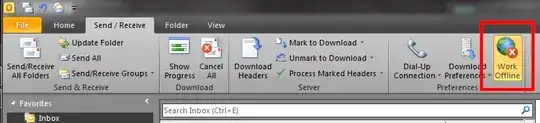
While I would prefer to go with CharlieRB's solution any day, a quick way to achieve a similar effect is to simply go offline for a while:

enter image description here

Then go back online once you've finished writing your mail.

Oliver Salzburg
  • 87,539
  • 63
  • 263
  • 308
  • clever idea +1 :) – Devjosh Jun 25 '12 at 19:11
  • Very clever. Has the benefit of being able to retain the recipient list without having to recreate the list or configure additional rules in your Outlook. Downside is you are composing for a while or simply forget to turn it off then you can't receive email either. – techturtle Jun 25 '12 at 20:06
  • 2
    @techturtle Not necessarily a downside. You should finish that email before you starting reading something else! – benzado Jun 25 '12 at 21:18
  • I like this answer more because this method is simple, and therefore works, for example, in Windows Live Mail too. – Malcolm Jun 25 '12 at 23:08
  • 1
    @Malcolm: ...and in Thunderbird and perhaps other clients, too -- without configuration! – krlmlr Jun 26 '12 at 11:45
  • But not in those cheap and nasty webmail interfaces. – David Tonhofer Feb 07 '14 at 17:34
13

Delete (or don't type) anybody's name or email address in the To: or Cc: fields. Then you can't send it until you enter that info.

Fran
  • 5,403
12

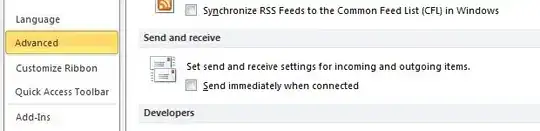
There is an option in to "not send immediately". It is located from the File tab, then select options. Choose Advance and scroll down about half way. There under Send and receive you will see a check box for "Send immediately when connected" (this is checked by default).

enter image description here

This doesn't "lock" the email, but by removing the check, the messages go into your outbox to wait until the next scheduled send/receive session rather than being sent immediately. In the event you send before you are done editing, you can simply go into the outbox and open the email you were working on.

CharlieRB
  • 22,754
4

Add some invalid character to the email address of the recipient until you're done editing. Like two consecutive at (@) signs.