I have a PC which has windows 7 license but I installed windows from an image I downloaded and it is already activated. For validating genuine Microsoft, I need to enter my own product key but the necessary activation tools do not exist in my windows folder. What should I do?
I googled stuff but because the keywords are too broad I couldn't find a useful tool.
DAZ doesn't work, activation button doesn't show up.

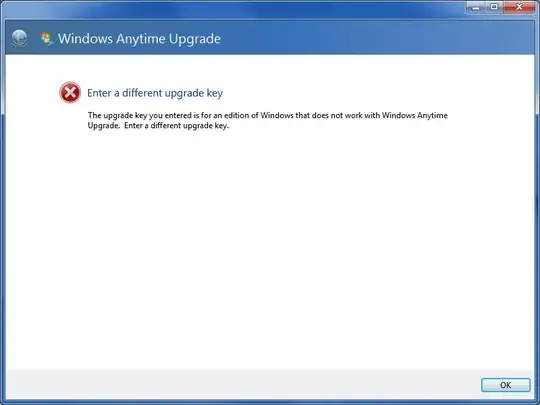
When I enter my original key to Windows Anytime Upgrade, I get this error:
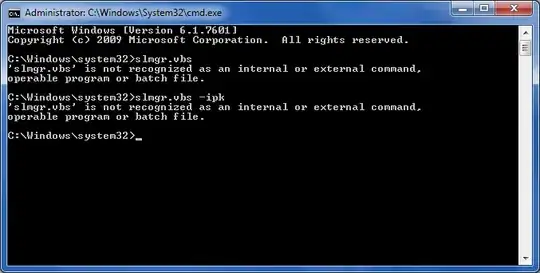
When I attempt using slmgr, I get this error:
I used sfc /scannow


Now slmgr is existing, I entered slmgr.vbs -ipk XXXXX-XXXXX-XXXXX-XXXXX-XXXXX (replacing X es with the cd key) the operation successful. Now I have installed Microsoft Security essentials, which means the problem is solved.
Main steps are here
- Open command prompt (cmd) in admin mode
- Enter "sfc /scannow"
- Enter slmgr.vbs -ipk XXXXX-XXXXX-XXXXX-XXXXX-XXXXX
- Success


unattend.txt, in which case you would need to deactivate it.) Also, the edition (Home, Pro, Ultimate, etc.) of the version you installed from the image must match the one your license is for. – Synetech Jun 18 '12 at 01:02I've had a few home users PCs get slapped by it after I updated the system. Would be my first step, as it's quicker than downloading and reinstalling a fresh copy from Microsoft.
– Amicable Jun 20 '12 at 14:18_You can download full ISO files legally from Microsoft. I don't understand your reference. _ Where are they exactly? Also I'm just curious how you can trust a preactivated main product like OS. Isn't it possible they has inserted other malicious codes through OS to do dangerous things like sending your data to their servers?
– DummyBeginner Sep 09 '13 at 18:18