I was wondering if there was a way to display a notification or something from the command line at a certain time. Like when the clock strikes 4:00pm. It would be nice if it would display it using Ubuntu's notify-osd tool:
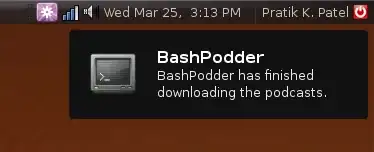
I was wondering if there was a way to display a notification or something from the command line at a certain time. Like when the clock strikes 4:00pm. It would be nice if it would display it using Ubuntu's notify-osd tool:
As many of the other commenters said, the best way to do this on a daily basis is to use cron, but if you are only wanting to do it for one day, or sporadically, you can use the at command:
echo 'notify-send "Work day is done!"' | at 4:00PM
You can use at in a variety of ways, including as a tea timer:
echo 'notify-send "Get your tea!"' | at now + 3 minutes
echo 'notify-send "Meeting in 1 hour with the big boss!"' | at 1pm tomorrow
It's quite useful for those one-off commands.
Check the at manpage for more syntax goodness.
echo 'notify-send "Work day is done!"' | at 4:00PM
– Ryan C. Thompson Sep 09 '09 at 23:06/etc/crontab
– Kredns
Sep 10 '09 at 17:08
at or cron.
Type this: echo 'export DISPLAY=:0; notify-send "Enjoy!"' | at 04:00 PM.
– user3439968
Apr 26 '19 at 22:52
notify-send works from there but echo and at does not seem to.
– nocibambi
Jul 21 '21 at 06:47
Use notify-send to send the notification. Set it up as a cron job.
notify-send requires some env variables whichr are not available from cron by defaualt?
– Kunok
Mar 11 '18 at 00:33
You can send commands to notify-osd like so:
notify-send "Go to bed!"
A crontab for daily notification at 4pm would look like so:
0 16 * * * /home/username/notify.sh
DBUS_SESSION_BUS_ADDRESS environment variable before running notify-send. See https://askubuntu.com/a/346580
– Andrej Herich
Sep 14 '18 at 11:07
if you use a program like anacron (warns you even if the computer is not running so useful more than cron for desktops and notebooks etc ) um then i use Zenity its a notification program here is my site for it with a few examples http://sites.google.com/site/venvirupa/yadandyin
You can always set up a cron job to run a script @ 0400hrs. The tricky thing here, is to find out what command to use to popup a window (ala net send for windows), or to do anything to notify you to go off to bed.
notify-osd doesn't seem to support command-line prompt generation, you might want to try LinPopup2...

Looks like you are using gnome-do. There are a few plugins there that can be used - remember the milk (RTM) is one.


