Is there a tool or Firefox addon which could save already viewed video from YouTube?
I'm aware of services like KeepVid which downloads a video link. But I don't want to download again the video I have viewed using services like Keepvid.
Is there a tool or Firefox addon which could save already viewed video from YouTube?
I'm aware of services like KeepVid which downloads a video link. But I don't want to download again the video I have viewed using services like Keepvid.

Since none of the answers really address your problem (or at least not correctly) I'll give it a go.
The browser caches youtube videos as Flash (.flv) although the extension is not apparent. With Internet Explorer, you can see the cache in Tools -> Internet Options -> Settings -> View Files. With Firefox you can type about:cache into the address bar, and under Disk Cache Device, click List Cache Entries. Viewing the files in Firefox makes it far less cryptic so you can determine the contents easier.
With IE an explorer window will open, you can simply sort the files by size or date modified, and look for files that start like this: videoplayback?ip=0.0.0.0. Use the timestamps to determine if it's the right one. You can simply copy that file to desktop and rename it with the .flv extension.
With Firefox on the disk cache page, press Ctrl + F to bring up the Find dialog and type in videoplayback, you should come to an entry in cache. Check timestamps to determine if the video is the right one, if it is click on it, if not click next in the find dialog until it is. There will be a link on the next page, right click it and select "save target as" and point it to your desktop. It should save instantly since the video is in your cache. Rename the extension to .flv if required. Since this process is a little extensive, here it is step by step:
1

2
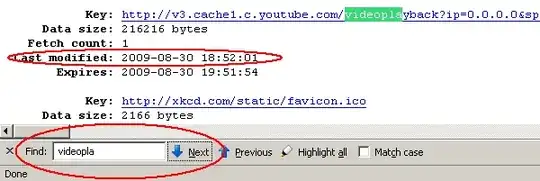
3

As far as programs and add-ons go, I don't think there currently is one for this.

I'm afraid you can't reuse the viewed video, because it wasn't really downloaded. Such videos are streamed by the server and what you see in the browser is what is being streamed at the moment from the server site. Unlike images, the browser does not store videos in its cache.
Therefore you are obliged to re-download the video you have watched. There are many such downloaders available as FireFox extensions, just go to the extensions page and search for "video download".
Personally speaking, I prefer the video downloader installed by RealPlayer, which adds a Download button above the watched video and is real easy to use, doing everything in my own computer.

On my Linux box with Firefox, I can do the following. Start playing the video on YouTube, wait until it pre-loads the whole content, then open /tmp folder, and there you find the video file in FLV format which you can immediately play with, for instance, MPlayer.
# /bin/ls -tr /tmp | grep  Flash
FlashLVBu97
# cp /tmp/FlashLVBu97 ~/Desktop/some_video.flv
# mplayer ~/Desktop/some_video.flv

I believe there is a Greasemonkey script which allows you to do that. I think it's this: http://www.openjs.com/scripts/greasemonkey/download_youtube_videos .
GreaseMonkey in turn is an addon which allows or rather extends Firefox functionality a lot by allowing user-made "scripts" to customize pretty much anything in Firefox.

Better YouTube by Gina Trapani at lifehacker.com has an option that adds a download option to youtube. You may also consider DownloadHelper.

I was looking for audio recording of streams and found Appian's Ask Toolbar which also does video saving.
The audio recording worked very well, though I haven't tried the video yet, so I don't know whether it copes with the already viewed part of your requirements.
Their blurb states:
This recorder is called the Ask & Record Toolbar and can record and convert video from 1000's of sites (including YouTube) and can save audio from ANY website.
It's not very intrusive and seems easy to uninstall so you could just give it a try.

DownloadHelper is exactly what you need. This Firefox addon saves the already downloaded video from Youtube. -Just a happy user.

