What are the best (i.e. bug free) Multi-tab command prompts in Windows?
They have them for Linux but Windows never seems to come out with one.
What are the best (i.e. bug free) Multi-tab command prompts in Windows?
They have them for Linux but Windows never seems to come out with one.
Sorry for the self-promotion, I'm the author of another Console Emulator, not mentioned here.
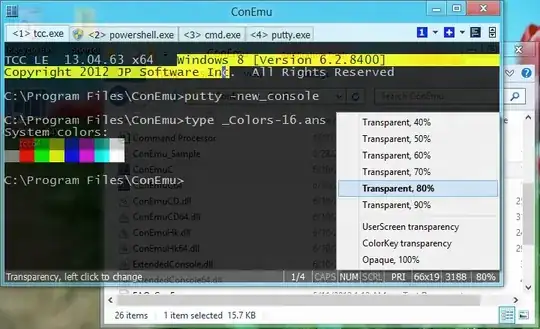
ConEmu is opensource console emulator with tabs, which represents multiple consoles and simple GUI applications as one customizable GUI window.
Initially, the program was designed to work with Far Manager (my favorite shell replacement - file and archive management, command history and completion, powerful editor). But ConEmu can be used with any other console application or simple GUI tools (like PuTTY for example). ConEmu is a live project, open to suggestions.
A brief excerpt from the long list of options:
Far Manager users will acquire shell style drag-n-drop, thumbnails and tiles in panles, tabs for editors and viewers, true colors and font styles (italic/bold/underline).
Try it. You may read some comments on StackOverflow.
<Ctrl-R> option you are talking about refers to bash and GNU readline. The terminal emulator, like ConEmu or xterm, shouldn't affect its operation. <Ctrl-R> is totally separate and unrelated to this.
– Ehtesh Choudhury
Jan 28 '13 at 06:43
user.name@pc_name before the folder. Can I remove that? And for rename a consola the shortcut say Apps-R I now windows key but which one is Apps?
– Juan Carlos Oropeza
Jan 17 '18 at 19:01
Check out Console.
Console is a Windows console window enhancement. Console features include: multiple tabs, text editor-like text selection, different background types, alpha and color-key transparency, configurable font, different window styles


I realize this is 6 years after you posted the question. I've found PowerShell ISE to be an elegant solution.
There's a slight 2 second delay to start it up, but it's incredibly powerful and suitable as a tabbed command prompt in a Windows 7/8/10 environment.
It has a cleaner UI than many of the alternatives listed above, and it's built for PowerShell.

I think PowerCmd is a nice multitab cmd prompt software as well. It is shareware and has all the features I expected.
You can get it from http://www.powercmd.com/


What about cmder? It seems to be very popular.

Windows Terminal and Windows Terminal Preview are distributed by Microsoft, so they are really worth mentioning.
For Windows Terminal or Windows Terminal Preview:
For me, the installation didn't work (I think because my pc is not connected to a Microsoft account), so I went to Microsoft's Github and installed the lastest release from an .msi:
.msiBonus - Add to Context Menu:
If you want to add Windows Terminal or Windows Terminal Preview to the context menu, use the PowerShell script linked in this StackOverflow great answer.

winget install Microsoft.WindowsTerminal This is the successor of the old Console app.
– Roland
Mar 06 '24 at 18:29
My recommendation (favorite commands is a killer feature):
Features:


cmd.exe) 2) Try BACKSPACE key: it will even erase the prompt C:\Windows> etc. I didn't go further but it seems that there's lot of little UI oddities.
– Basj
Jan 23 '18 at 15:55
I recent but very mature already entrant to the Windows Consoles arena is Babun https://github.com/babun/babun It works similar to what you would find in a Bash-based console on a *nux machine but on any Windows OS, as a big plus all the familiar tools as ls, find, grep and more are there.


