2

I added default "android apps" folder but my application windows is empty. Why? I can see "localapps.xml" in that folder.

I tried:

  • Uninstall YouWave. Delete all relative things.

  • Restart. Reinstall. Restart.

It still doesn't load apps.
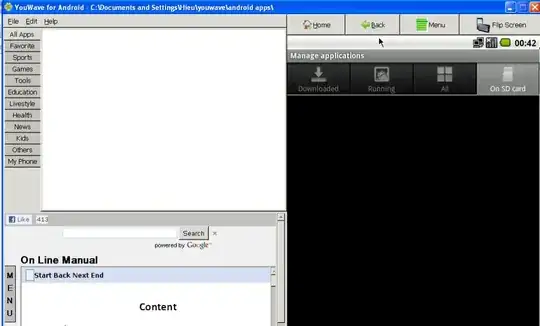
enter image description here

  • 2
    What apps should be showing? Are there any apks in the folder – admintech Jun 17 '11 at 16:06
  • Yes, there are many apks in the folder. "android apps" folder appeared when I installed YouWave. I made a detailed question here but he hasn't answered yet. http://youwave.com/forum/index.php?topic=364.0 – emeraldhieu Jun 17 '11 at 16:16
  • I suggest maybe backing those apk's and moving them out of the folder, delete the 3 xml files and go to Edit > Refresh Icons. Get a brand new APK and place that in and then go to Edit > Refresh Icons and see if you get the same error. – admintech Jun 17 '11 at 16:29
  • I have just tried it. I deleted all files, moved a new apk into that folder, restarted YouWave. The file is "ForaDictionary.apk". >> http://ng-comp.com/fora/android.htm I am quite surprised because YouWave doesn't use log file. – emeraldhieu Jun 17 '11 at 18:11
  • Sorry for the late reply, i installed YouWave to see if i could get the same error. One last suggestion is to move the apps directory directly to the C:\ and change it within YouWave (File - Select Apps Dir) – admintech Jun 20 '11 at 08:26
  • Tried but not work. If I cut that folder and move to other place, YouWave doesn't open. I tried to remove all things and reinstall it and I notice that the log file says "Info: could not parse file C:\Users\HIEUGIOI\youwave\android apps\apps.xml Info: could not parse file C:\Users\HIEUGIOI\youwave\android apps\localapps.xml". – emeraldhieu Jun 20 '11 at 14:35
  • The content of apps.xml: C:\Users\HIEUGIOI\youwave\android apps\0.2AppsOrganizer1.5.2.apkC:\Users\HIEUGIOI\youwave\android apps\AppsOrganizer1.5.2.apkAppsOrganizer1.5.2.apk – emeraldhieu Jun 20 '11 at 14:35
  • <pixbuf_ptr>0</pixbuf_ptr>01mx300021260100(YouWave.com)_2429.apkC:\Users\HIEUGIOI\youwave\android apps\mx300021260100(YouWave.com)_2429.apk<act_name></act_name><app_name></app_name><internal_name>mx300021260100(YouWave.com)_2429.apk</internal_name><pixbuf_ptr>0</pixbuf_ptr>01OpenSudoku-1.1.4-01.apkC:\Users\HIEUGIOI\youwave\android apps\OpenSudoku-1.1.4-01.apk – emeraldhieu Jun 20 '11 at 14:38
  • <act_name></act_name><app_name></app_name><internal_name>OpenSudoku-1.1.4-01.apk</internal_name><pixbuf_ptr>0</pixbuf_ptr>01Target_1_3.apkC:\Users\HIEUGIOI\youwave\android apps\Target_1_3.apk<act_name></act_name><app_name></app_name><internal_name>Target_1_3.apk</internal_name><pixbuf_ptr>0</pixbuf_ptr>01<is_portrait>1</is_portrait><portrait_mode_state>0</portrait_mode_state> – emeraldhieu Jun 20 '11 at 14:38
  • OK create a app folder on the c:/ set Youwave to that new location and let it refresh everything. Then download that app and place it inside and see if that works. (Didn't think it wouldn't open if you moved the app folder) – admintech Jun 20 '11 at 15:12
  • Do you have virtual box installed? – admintech Jun 20 '11 at 16:14
  • Good news, I have just installed new release (2.0) and it works. I think the developer team fixed it. :) – emeraldhieu Aug 16 '11 at 19:16

2 Answers2

0

Create a app folder on the c:/, set Youwave to that new location and let it refresh everything. Then download that app and place it inside and see if that works. (Didn't think it wouldn't open if you moved the app folder)

Edit:
Must be a user permissions error. What OS are you running? I suggest (if possible) to log in as the pc administrator re-install Youwave and then right click and "Run as Administrator". Check permissions on all folders and make sure "Everyone" has full permissions

Edit again:
Making sure all those permissions are correct, uninstall the software (removing all references) > Download the setup again > Right click on the setup and run as administrator and re-install

admintech
  • 7,042
  • I tried your new solution, it doesn't work. I create a new folder "working_directory" in C:, select app dir pointing to that folder, put apk into it, restart YouWave, refresh it, a new localapps.xml is created but the app dir still empty. – emeraldhieu Jun 20 '11 at 17:10
  • Must be a user permissions error. What OS are you running? I suggest (if possible) to log in as the pc administrator re-install Youwave and then right click and "Run as Administrator". Check permissions on all folders and make sure "Everyone" has full permissions – admintech Jun 21 '11 at 08:14
  • I'm using Windows 7 Ultimate 86x, logging as administrator. The "Users" folder has Administrator as owner. I granted Everyone full permission on "Users" folder. The default app dir again is "C:\Users\HIEUGIOI\youwave\android apps". It still doesn't work. – emeraldhieu Jun 21 '11 at 16:20
  • He got the same problem >> http://youwave.com/forum/index.php?topic=125.0 – emeraldhieu Jun 21 '11 at 16:22
  • Making sure all those permissions are correct, uninstall the software (removing all references) > Download the setup again > Right click on the setup and run as administrator and re-install – admintech Jun 22 '11 at 07:43
-1

you need to sign the app,then only the youwave runs it....after siging with debug key it worked http://developer.android.com/guide/publishing/app-signing.html

see this link to sign...

vinay
  • 1
  • YouWave comes with included "Signed" apps, these weren't showing and worked for me when i installed it. Check the 2nd comment for the question – admintech Jul 01 '11 at 09:47