1

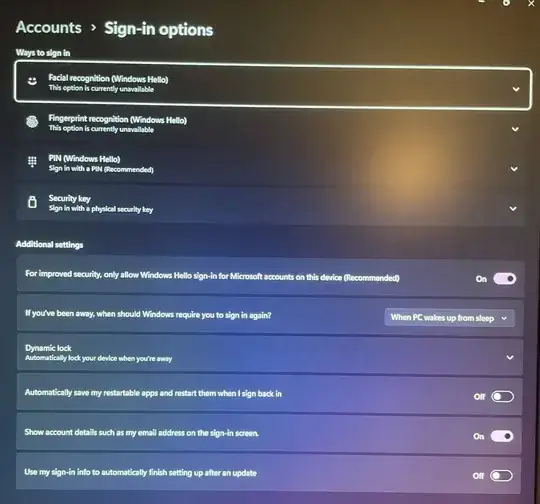
Sign-on screenshot

I can no longer connect to PC via RDP and PIN. RDP requires password but does not recognize the password.

Windows 11 Pro, 10.0.22631 Build 22631
RDP v.10.9.5 on MacOS

Locally can connect with Microsoft account, authenticates with PIN, MS authenticator.

Under Sign-in options: NO password sign-in option, Slider 'Hello sign-in' is 'On'

'Hello sign-in' can't be turned off (slider to 'off', close window, reopen window, slider is back to 'on')

Group policy 'Turn on convenience PIN sign-in' disabled - no effect

Any suggestions on how to enable password logon (even locally) is welcome.

Update

Somehow Windows had the account moved (?) to only online. In the profile, simply changing the account to local account fixed the issue. Under Account Settings the account can be set to Local or Microsoft Account, which might have been moved in a previous update (I did not move them).

Rohit Gupta
  • 3,499
  • "RDP requires password but does not recognize the password." - Have you properly identified the name of the local account that is connect to the Microsoft Account? remote Desktop access to a local account linked to an MA absolutely is possible. However, you must specify the machine and the username in order to do so. Be as specific as possible of what username and machine name you are trying. Futhermore screenshots are key to trying to diagnose your issue. – Ramhound Jan 04 '24 at 18:18
  • Windows 11 by default requires the first account created on the machine to be linked to a Microsoft Account. So the question I have what username are you using and what is the username Windows is expecting? – Ramhound Jan 04 '24 at 21:21
  • The Microsoft account and the local username are identical (aka. email and abbreviated username). As I said, RDP let me logon previously, so even if a local account never existed on the machine I was able to connect up to very recently. – Geo Vogler Jan 04 '24 at 21:34
  • You might think they are identical, but that actually, very likely is not the case or specifically the username length is often shorter than the username of the Microsoft Account. This likely is relevant – Ramhound Jan 04 '24 at 22:39

1 Answers1

1

Use Windows 11 Settings, Accounts, Sign In options to set a password on the local account. This works - I do it.

You may need to (temporarily if you wish) disable the Additional Setting "For improved security, only allow Windows Hello ..."

With the setting above, you can easily create a password and then RDP will work.

It may require you change your password to be successful.

Windows 11 Password

If the option is not there, You may need to run DISM / SFC

(1) Open cmd.exe with Run as Administrator.

(2) DISM.exe /Online /Cleanup-image /StartComponentCleanup

(3) DISM.exe /Online /Cleanup-Image /Restorehealth

(4) SFC /SCANNOW

(5) Restart when all the above is complete and test.

John
  • 49,923
  • There is no option 'Sign in with your account's password'. Or any password option, even after searching. Creating a new local user account without MS account works. – Geo Vogler Jan 04 '24 at 16:41
  • There should be. All of my Windows 11 Local and Microsoft Accounts work this way. Local accounts in particular work fine with password. – John Jan 04 '24 at 16:47
  • Don't forget to use just the password line in Sign in Options. I have checked all machines. – John Jan 04 '24 at 16:53