3

I'm using Windows 10 and often find my programs being choppy, so I had a look at causes; since it happened often when I had multiple BlueStacks instances open, I suspected RAM usage and I was right, when my windows felt choppy, it was due to a lot of hard faults.

I'm starting to figure out how to monitor my RAM usage, but I can't figure out how ~12GB of paged memory, or 5GB of working set, would equal being left with 300MB of free memory in a system with 16GB of RAM.

  • I used the following Powershell commands to find that out:
    Get-Process | Measure-Object -Property *memory*,WorkingSet -sum | Format-List Count, Sum, @{Label="GB";expression={$_.Sum/1GB}}, Property
    Get-Counter -Counter "\Memory\Available MBytes"
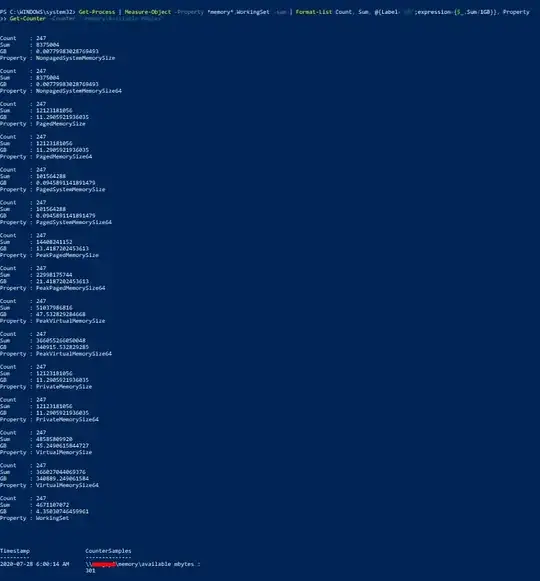
    
    Screenshot of result

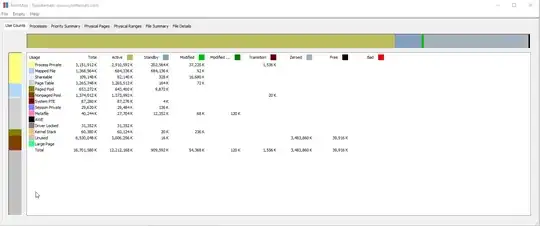
  • RAMMap:
    RAMMAP screenshot

I've heard of disk caching or superfetch, but superfetch is disabled and I would hope disk caching gives up a bit of RAM if another process needs it.

What else could be using the missing RAM?

JW0914
  • 7,865
  • 2
    Download RAMMap from sysinternals (Microsoft) to give you a very good insight in what is using your RAM. Disk caching is the same as superfetch afaik and I wouldn't disable it. The only time we had issue with that was on a Windows 2008 Server where superfetch was not releasing memory when needed as described here – Lieven Keersmaekers Jul 28 '20 at 12:28
  • I've added a rammap screenshot and I see that there is a lot of memory that is unused yet active, from this microsoft forum post, I would think that unused active memory is not a good thing. My page table also seems a bit high, would that be an issue? – yi fan song Jul 28 '20 at 13:22
  • 1
    I have no technical knowledge about this subject, but do recall from another answer that Windows does reserve a large portion of RAM in certain environments that is normally not shown when using typical methods to detect RAM usage (I don't recall what answer or why this occurs, or whether this would even apply to the issue being experienced). – JW0914 Jul 28 '20 at 14:42
  • 1
    @yifansong - You have 3,5GB zeroed and 3GB unused active memory. I assume you have no issues at the moment? If you have, it's not a memory issue. – Lieven Keersmaekers Jul 28 '20 at 14:47
  • 1
    The Page Table usage looks pretty high though. Perhaps check out this pointers. If you select the Processes tab and sort on Page Table, what does that look like? – Lieven Keersmaekers Jul 28 '20 at 14:54
  • @Lieven, yes no issues when I have that much ram available, but that screenshot of RamMap is on system boot. – yi fan song Jul 28 '20 at 15:38
  • 1
    Make a screenshot when you have an issue or save as a rmp and share it privately. – Lieven Keersmaekers Jul 28 '20 at 16:00
  • 1
    @Lieven, Thank you for your time, I've managed to fix the issue doing similar steps to the answers from here. – yi fan song Jul 28 '20 at 16:28
  • 1

1 Answers1

1

I've found the process creating a ton of page table entries, as well as hogging unused memory, using the steps outlined in this question:

  • It was synergy.exe and syntool.exe from Synergy, which created lots of page table entries only 32KB long, but enough of them to take up to 3GB of RAM.

    I should have noted the version before uninstalling, but I rushed through the uninstallation hoping it would work.
JW0914
  • 7,865
  • 1
    You can accept your answer if it solves your question but I would wait a few days to make sure it's really solved. Glad it worked for you. – Lieven Keersmaekers Jul 28 '20 at 16:58
  • 1
    Sounds to me like Synergy forgot to disable the debug compiler option for finding buffer overflows. For doing so each memory block allocated by the process gets it's own page and is allocated at the end of the page. Next to the page is an invalid page so that reading or writing beyond the allocated buffer results in a page error. – Robert Jul 28 '20 at 18:31
  • @Robert, I get the logic behind that but doesn't that also imply they have a memory leak? Do you happen to have a link for that compiler option? I only know/heard of canaries and heap tagging. – Lieven Keersmaekers Jul 29 '20 at 06:10