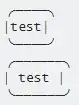
Your box consists of left and right edges (1 character width)... but you have 4 characters along top and bottom between the edges, and 5 characters of content (test and a space). You need to ensure that the same number of characters are used for alignment - don't add spaces for alignment.
Additionally, you're using U+2501 for the top / bottom, when U+2500 "looks better" / doesn't look too thick.
╭────╮
│test│
╰────╯
╭──────╮
│ test │
╰──────╯
These boxes both render fine for me in Chrome, Firefox and Edge on Windows 10.
Drawing boxes with special characters isn't really recommended for exactly these reasons - if you're rendering to a terminal, then it may work better.
The above text renders as shown below (on Chrome on Windows). I'm using 100% zoom in Chrome, and 100% scaling in Windows.

From your screenshots, it looks like you're using some scaling, however I've tried using a non-100% setting in both Chrome and Windows, but it still seems to render well for me.
It is very possible that the font is causing the issue... above is rendered using Consolas, but below is rendered using Lucida Console: