1

I'm running Windows XP Pro x64 SP2. I have a directory on an NTFS drive that was created by a Maven build. A subsequent build attempted to delete this directory and failed. I now get the error "Access is denied" whenever I try to do anything with that directory: change to it, delete it, rename it. This happens both in Windows Explorer and from a command prompt. The properties dialog in Windows Explorer doesn't even contain the Security tab.

I created the directory, so I don't think this is truly a permissions issue. I've occasionally had this error happen in the past is well. I believe the error is misleading, but the question is: what is the real problem and how do I fix it?

niton
  • 1,816
EMP
  • 4,998
  • Similar issue i.e. possible solution here? http://superuser.com/questions/229563/windows-xp-how-to-delete-files-and-folders-that-cannot-be-deleted – glenneroo Jan 18 '11 at 13:41

5 Answers5

3

Another application (or the system) could have an open handle to that folder (or a file/folder it contains).

The easiest way to find these is the find handle function of Process Explorer.

Richard
  • 9,022
  • Indeed. It turned out that explorer.exe itself had a handle open and when I closed that handle (in Process Explorer) the directory immediately disappeared (ie. I did not have to delete it again). – EMP May 17 '10 at 22:55
2

Sometimes no one has rights to delete something, except the System user. This is how to execute a command prompt as System user:

AT HH:MM /Interactive CMD.EXE /K

where HH:MM is 1 or 2 minutes in the future.

When the clock ticks, a prompt will open. Use that window to delete the file, or start Explorer.exe. You may also need to grant the system user access right to the file or folder by executing the following command:

cacls "filename" /T /G system:F
Indrek
  • 24,424
Xen
  • 21
0

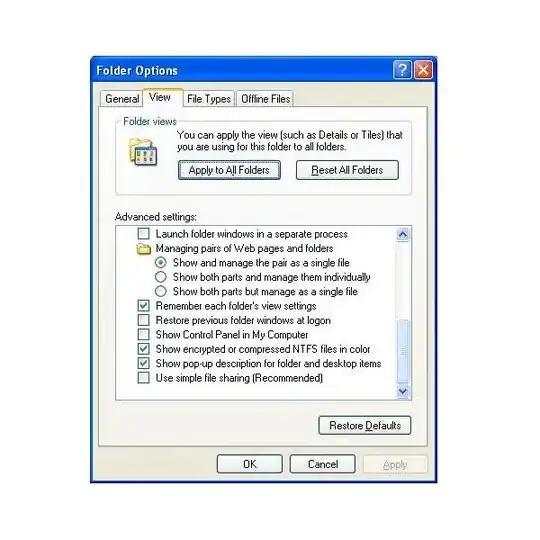
The fact that you don't have a "Security" tab might be because you're having "simple file sharing" enabled? Make sure that item is not checked in the folder options dialog:

alt text

Gareth
  • 18,809
fretje
  • 10,702
  • Good thinking, but no. I do have a Security tab for other directories, just not that one. – EMP May 17 '10 at 07:10
0

I've since experienced similar issues many times and the solution is usually to close all Windows Explorer windows. If that doesn't help then check in Process Explorer as per Richard's answer.

EMP
  • 4,998
-2

If you have administrative rights on the computer, check the access rights to that directory (right click -> Security...). You may also check your permissions to the parent directory (you need write access tere, too).

If you don't have administrative rights, contact your administrator.

petersohn
  • 2,672