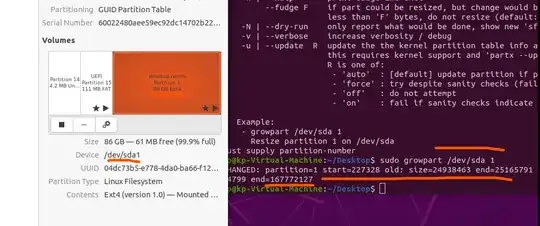
This worked for me, didn't need to disable checkpoints. Thanks to Anton Karl Ingason for his blog-post
Note that this doesn't solve the exact presented problem "on creation" but this might be even better - as this can be done at any point after the installation while other "regular non HyperV" methods didn't work for me.
These steps fix the problem:
- Turn off the VM.
- Use Hyper-V Manager to select the Settings of the Virtual Machine, select the Hard Drive option and Edit under Virtual hard disk. (If this option is disabled, you need to go back and delete any checkpoints for the VM in the Hyper-V Manager; just select the VM and right click the checkpoint in the checkpoint field below.)
- Use the GUI to expand the drive to something reasonable, like 128 GB. Ubuntu now has space to expand into.
- Start the VM again. Install Guest Utils:
sudo apt install cloud-guest-utils
- Expand the sda1 partition into the free space:
sudo growpart /dev/sda 1
(Note the space between sda and 1!)
- Finally run resize2fs:
sudo resize2fs /dev/sda1
(No space between sda and 1 here!)
- Now your Ubuntu drive is 128 GB.