6

I am trying to remove all the properties\personal information from a set of media files in a bunch of different folders. So far the only way I have found is by clicking into each folder, selecting all files and doing the process manually like this.

Does anyone know of any free apps, or scripts that can do this across multiple file locations?

Oliver Salzburg
  • 87,539
  • 63
  • 263
  • 308

5 Answers5

4

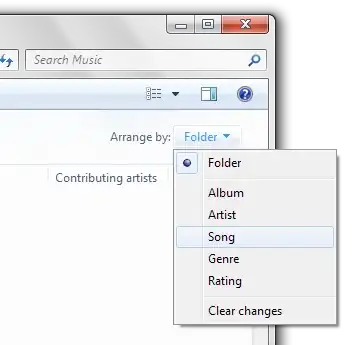
Go to your Music Library. Click the dropdown labeled "Arrange By" at the upper right. Choose "arrange by song".

enter image description here

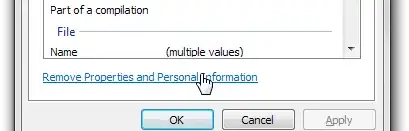
You will now have a listing of every song in your music library. Select all those you wish to remove the properties from; then right-click and choose properties. Go to the details tab and click "remove personal info". Voila!

enter image description here

Make sure to change your "view" setting back to "folder" when you're done, otherwise you'll have a hard time sorting through all your music.

Gareth
  • 18,809
nhinkle
  • 37,390
  • I get 'there are no details in common' when doing this. – javamonkey79 Apr 21 '10 at 16:41
  • Make sure that you select only media files of the same type when you do this. So, you would have to do all of the mp3 files together, all of the .avi files at the same time, etc. You can't just select every single file; that won't work. I tested it with a selection of mp3's though and it worked. – nhinkle Apr 21 '10 at 16:57
3

You will need separate tools for different types of files, to gain the control you seek.

To batch remove image EXIF metadata, use Irfanview (and more here)

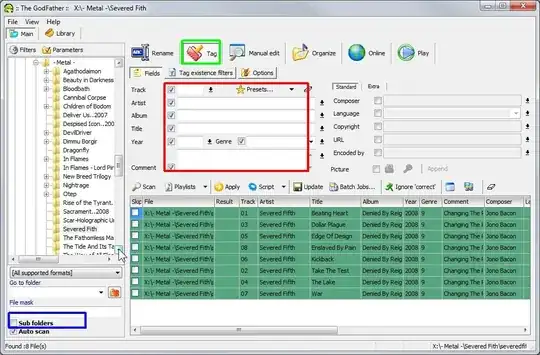
To batch remove MP3 metadata, use The GodFather. Although I'm not too sure why you'd want to remove your ID3 tags?

MP4's can contain anything from lyrics to album art, but I'm sure it won't contain any personal info, unless you put it in there specifically.

Update: To blank with TGF, scan the songs you want to clear, onthe Tag tab (green) check all the fields to blank (red) and click the Apply button, then click Update.

enter image description here

Gareth
  • 18,809
invert
  • 5,006
  • The Godfather did not work, however, your comment on ID3 tags lead me to search and find ID3 killer (and some fix apps too). Even though you didn't find exactly what I was looking for you lead me down the right path, this you win the bounty, thanks! – javamonkey79 Apr 21 '10 at 16:56
  • Sorry to hear TGF didn't work for you, it's amazing when you get to know it :) – invert Apr 22 '10 at 10:39
1

For JPEG images, my favourite tool is EXIFCleaner by Superutils.

ExifCleaner is a batch Windows utility that lets you to remove individual Exif tags or to strip Exif data entirely. This protects your privacy, helps you to hide unneeded or sometimes sensitive information -- about the image, photographer and location.

It's free for 30 days, but works like a charm even after the trial period ends.

0

You can probably do it just with Windows Explorer by running a search which produces all the files you want to scrub, selecting all and using the properties dialog as you have been doing.

Hugh Allen
  • 9,890
-1

This article has your answer :

http://www.makeuseof.com/tag/how-to-remove-the-metadata-from-your-photos-windows-only/

Montag451
  • 698