I'm on an HP Envy m7, with 16GB of RAM.
I recently did a clean install of Windows 10 on this computer. But for the past month, i've noticed that when Idle, the system uses way too much RAM.
I have checked for both malware and rootkits (MalwareBytes, Bitdefender, Avast, Kaspersky (for rootkits), and none have been found.
When I checked the processes on Task Manager, the used memory simply doesn't add up.
I then used RamMap to determine it.

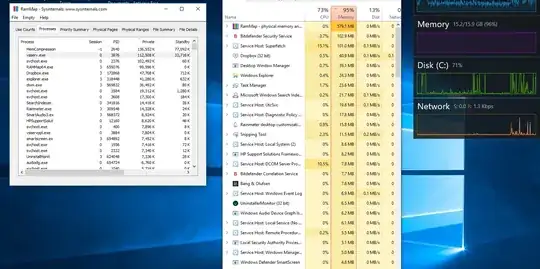
While RamMap shows that the vast majority of my RAM is being used for Process Private and Page Table, I am still at a loss. When I check the processes tab on RamMap and check the Private Tab, the Usage still doesn't add up to the 15GB being used on my system.
Can anyone help diagnose this issue? Could this be a memory leak in some software? I am running out of options here.


My main concern is why I can't see the processes that accumulated to so much RAM usage.
– koreamaniac101 Feb 05 '18 at 18:19