Ok, on my system
Version
~$cat /etc/fedora-release
Fedora release 25 (Twenty Five)
Window manager
~$env | grep -i desktop
DESKTOP_SESSION=gnome
GNOME_DESKTOP_SESSION_ID=this-is-deprecated
XDG_SESSION_DESKTOP=gnome
XDG_CURRENT_DESKTOP=GNOME
Keyboard settings
~$setxkbmap -print
xkb_keymap {
    xkb_keycodes  { include "evdev+aliases(qwerty)" };
    xkb_types     { include "complete"  };
    xkb_compat    { include "complete"  };
    xkb_symbols   { include "pc+us+ru:2+us:3+inet(evdev)"   };
    xkb_geometry  { include "pc(pc105)" };
};
with more or less accurate physical representation of the keyboard (PC105)
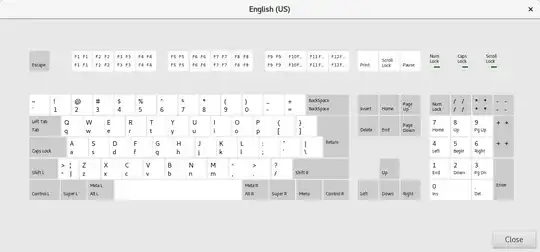
The command
setxkbmap -option altwin:ctrl_win
replaces 'win' key and makes it 'ctrl' key.
What has been changed after the executions is
~$setxkbmap -print
xkb_keymap {
    xkb_keycodes  { include "evdev+aliases(qwerty)" };
    xkb_types     { include "complete"  };
    xkb_compat    { include "complete"  };
    xkb_symbols   { include "pc+us+ru:2+us:3+inet(evdev)+altwin(ctrl_win)"  };
    xkb_geometry  { include "pc(pc105)" };
};
I have one display, setxkbmap have display and device options, it may be important.
to clear options 'setxkbmap -option'
to restore options later seems to be better to use 'setxkbmap -query' instead of 'setxkbmap -print' before
more sophisticated replacement tricks with setxkbmap in the answer Adding custom setxkbmap options and in the complicated article.
Other possible replacements, according to the answer from Rebind Alt key to win using setxkbmap? are available to see with:
grep alt /usr/share/X11/xkb/rules/evdev.lst | grep win


control Control_R (0x69), Control_L (0x85)
mod4 Super_L (0x25), Super_R (0x86), Super_L (0xce), Hyper_L (0xcf) so looks like it changed nothing. I also tried this option: altwin:ctrl_win. The same result – user2889981 Mar 22 '17 at 08:49