0

I am to get an integer radius from a user and then display the area and circumference of the circle. If the user enters a negative integer or something other than an integer (a or 5.6) it asks the user to re-enter.

Below is the code for catching the wrong inputs, but it is using Scanner and I need to use JOptionPane.

import java.util.Scanner;

public class GetCircle {
public static void main(String[] args) {
Scanner input = new Scanner(System.in);
    int radius = 0;
    System.out.print("Please enter size of radius (Must be integer): ");
    while (true){
        if(input.hasNextInt()){ 
        radius = input.nextInt();
        if (radius < 0){
            System.out.println("That is not a valid number, please try again :");

        }   else {
        System.out.println("The radius is: " + radius);
        }
        } else {
            System.out.println("That is not a valid number, please try again :");

            input.next();

        }
    }   
}
}

I do not know how to use hasNextInt with JOptionPane....can anyone help?

here is what i have for JOptionPane for now:

import javax.swing.JOptionPane;

public class Radius
{
public static void main(String[] args)
{

   String radius = JOptionPane.showInputDialog(null,"Enter 
Radius","Radius",JOptionPane.QUESTION_MESSAGE);

   Integer.parseInt(radius);

   JOptionPane.showMessageDialog(null,"the string you entered is: " + radius, "results",JOptionPane.PLAIN_MESSAGE);

    }  
}
YCF_L
  • 51,266
  • 13
  • 85
  • 129
Brow
  • 63
  • 1
  • 12
  • your question is a little unclear, what is the relation between JPanel and hasNextInt and and, what did you want to do exactly? – YCF_L Jan 07 '17 at 08:28
  • When i use JPanel, I do not know how to only accept the positive integer like I do with scanner and hasnext.Input – Brow Jan 07 '17 at 08:33
  • you mean `JOptionPane` and not JPanel right? – YCF_L Jan 07 '17 at 08:36
  • yes , thank you, i made the changes to the question..my apologies . as you can tell i am a beginner – Brow Jan 07 '17 at 08:38
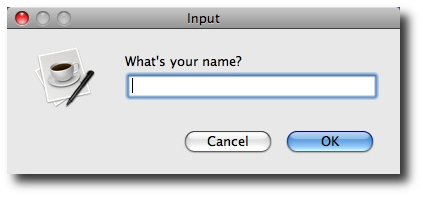
  • So if u understand you need something like this? http://alvinalexander.com/sites/default/files/users/user3/joptionpane-show-input-dialog-example-1.png – YCF_L Jan 07 '17 at 08:40
  • I have that part , i need to figure out how to give the same error messages when i use it.... i posted what i have with JOptionPane in the question now – Brow Jan 07 '17 at 08:41
  • i put an answer hope it can help you :) – YCF_L Jan 07 '17 at 08:49
  • Re-asking this question [here](http://stackoverflow.com/q/41526992/522444). Again, please **DON'T DO THIS**. – Hovercraft Full Of Eels Jan 07 '17 at 21:56

3 Answers3

0

I think you need something like this:

you need to check your input, if the input is an integer then show the success message, else show the error message:

I think your code should look like this:

public static void main(String[] args) {
    while (true) {
        String radius = JOptionPane.showInputDialog(null, "Enter Radius", "Radius", JOptionPane.QUESTION_MESSAGE);
        if (radius.equals("#")) {
            break;
        } else {
            if (test(radius)) {
                JOptionPane.showMessageDialog(null, "the string you entered is: " + radius, "results", JOptionPane.PLAIN_MESSAGE);
            } else {
                JOptionPane.showMessageDialog(null, "the string you entered is: " + radius, "results", JOptionPane.ERROR_MESSAGE);
            }
        }
    }

}

public static boolean test(String s) {
    try {
        Integer i = Integer.parseInt(s);
        return true;
    } catch (Exception e) {
        return false;
    }
}

N.B

If you want to exit you need to check with a specific String for example #

Edit

public static void main(String[] args) {
    while (true) {
        String radius = JOptionPane.showInputDialog(null, "Enter Radius", "Radius", JOptionPane.QUESTION_MESSAGE);
        System.out.println(radius.length());
        if (radius.equals("#")) {
            break;
        } else {
            if (test(radius, 10)) {
                if(Integer.parseInt(radius)<0){
                    JOptionPane.showMessageDialog(null, "Negative int: " + radius, "results", JOptionPane.ERROR_MESSAGE);
                }else{
                    JOptionPane.showMessageDialog(null, "the string you entered is: " + radius, "results", JOptionPane.PLAIN_MESSAGE);
                }

            } else {
                JOptionPane.showMessageDialog(null, "the string you entered is: " + radius, "results", JOptionPane.ERROR_MESSAGE);
            }
        }
    }

}

public static boolean test(String s, int radix) {
    Scanner sc = new Scanner(s.trim());
    if (!sc.hasNextInt(radix)) {
        return false;
    }
    sc.nextInt(radix);
    return !sc.hasNext();
}

You can learn more about that here : Determine if a String is an Integer in Java

Hope this can help you.

Community
  • 1
  • 1
YCF_L
  • 51,266
  • 13
  • 85
  • 129
  • thank you kindly sir. Unfortunately I am a beginner and we haven't learned try and catch yet and i don't think i should use it yet. i was hoping there was a similar way i did it with Scanner that i could do it with JOptionPane... – Brow Jan 07 '17 at 08:53
  • @Brow i edit my answer you can now check that i test the input with Scanner, hope this can help you. – YCF_L Jan 07 '17 at 09:01
  • @Brow i already checked for the negative int, you can check now, good luck – YCF_L Jan 07 '17 at 09:59
0

the first solution is Scanner you want to it graphic user interface,so want to use JPanel?the key is Scanner's next() or hasNextInt() is identify by blank, so can repeat input or test,but in JPanel like LAIDANI Youcef show http://alvinalexander.com/sites/default/files/users/user3/joptionpane-show-input-dialog-example-1.png it can only input once.

basycai
  • 1
  • 1
0

An Integer#parseInt(String s) throws unchecked exception NumberFormatException if the string is not parseable integer. This is what you need.

try{
    int radiusInt = Integer.parseInt(radius);
    // everything's OK, it's an integer 
} catch(NumberFormatException e){
    // it is not an integer 
}
Denis
  • 6,414
  • 4
  • 30
  • 48