29

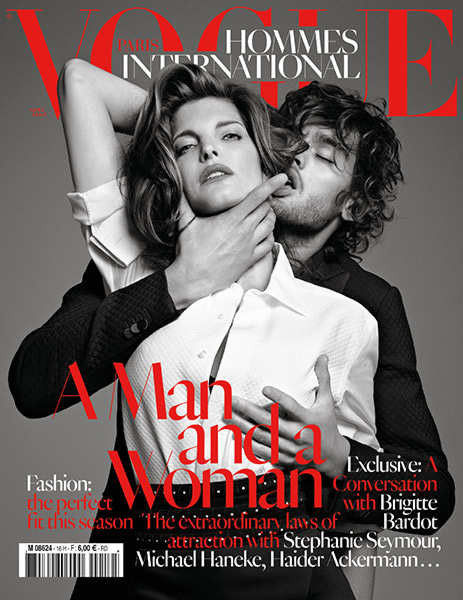
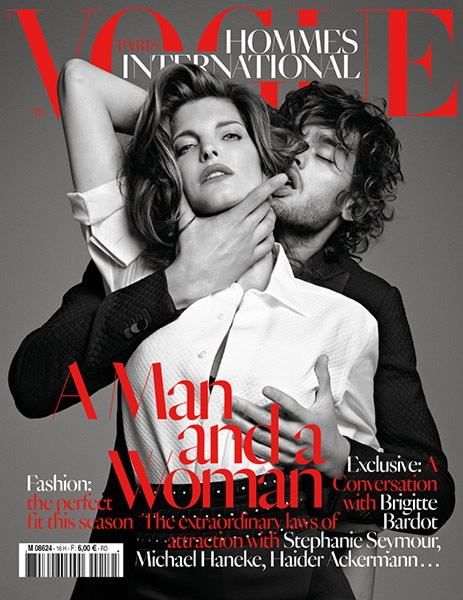
The JPEG images created with PIL (1.1.7) have very poor quality. Here is an example:

Input: https://s23.postimg.cc/8bks3x5p7/cover_1.jpg

Output: https://s23.postimg.cc/68ey9zva3/cover_2.jpg

The output image was created with the following code:

from PIL import Image
im = Image.open('/path/to/cover_1.jpg')
im.save('/path/to/cover_2.jpg', format='JPEG', quality=100)

The red text looks really awful. Saving the image with GIMP or Photoshop does not even come close to the bad quality created by PIL. Does somebody know why this happens and how it can be solved?

Cœur
  • 34,719
  • 24
  • 185
  • 251
Pascal
  • 1,139
  • 1
  • 9
  • 21
  • 1
    You're saving a JPEG of a JPEG. You're losing information twice. Are you sure that GIMP and Photoshop are actually processing the JPEG again and not just saving it as is (because the programs recognize it as a JPEG and, therefore, do nothing to it)? – John Oct 10 '13 at 18:42
  • Thanks for your quick reply. I am aware of the fact that I'm losing information twice. It is just a very simple example. In production I am resizing the image as well :). Also if I resize the image in GIMP or Photoshop the resulting image looks much sharper. The two persons look almost the same in the two pictures but the red text looks really different. – Pascal Oct 10 '13 at 18:49
  • I'm not doubting that it looks sharper from GIMP / Photoshop. But is it any *different* from the input image? After you save it as JPEG from GIMP / Photoshop, is anything changed? If the answer is no, then PIL just might look "bad" because it's actually applying the JPEG compression, while the other isn't. See what I'm getting at? – John Oct 10 '13 at 18:53
  • Your edit to my answer looked really familiar so I did a search - this isn't the first time I've answered this question, and there's a comment with the same information. http://stackoverflow.com/questions/15481062/pil-jpeg-how-to-preserve-the-pixel-color – Mark Ransom Oct 10 '13 at 19:20
  • @MarkRansom That's where I got the solution from :) – Pascal Oct 10 '13 at 19:44
  • @John _"You're saving a JPEG of a JPEG. You're losing information twice."_ - Re-encoding a JPEG as JPEG, assuming no processing in between and using the same encoder settings, does _not_ lose information twice. The JPEG process is deterministic, and applying it twice gives the same result as applying it once. [This video](https://www.youtube.com/watch?v=yBX8GFqt6GA) has a decent explanation (crucial statement at about the 5:00 mark). – marcelm Dec 14 '21 at 12:25

1 Answers1

51

There are two parts to JPEG quality. The first is the quality setting which you have already set to the highest possible value.

JPEG also uses chroma subsampling, assuming that color hue changes are less important than lightness changes and some information can be safely thrown away. Unfortunately in demanding applications this isn't always true, and you can most easily notice this on red edges. PIL doesn't expose a documented setting to control this aspect.

Edit by Pascal Beyeler:

I just found an option which disables subsampling. You can set subsampling=0 when saving an image and the image looks way sharper! Thanks for your Help Mark!

im.save('/path/to/cover-2.jpg', format='JPEG', subsampling=0, quality=100)

Edit once more:

The subsampling option is finally documented, but I don't know how long that's been the case. Looks like you have the option of either an integer argument or a string; I still recommend 0 as shown above.

https://pillow.readthedocs.io/en/stable/handbook/image-file-formats.html#jpeg

Note also that the documentation claims quality=95 is the best quality setting and that anything over 95 should be avoided. This may be a change from earlier versions of PIL.

Mark Ransom
  • 286,393
  • 40
  • 379
  • 604