2

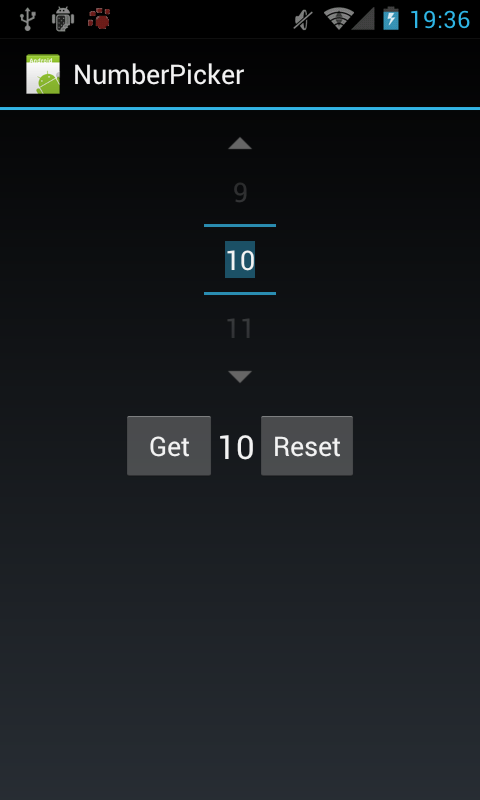
I found 2 built-in NumberPickers:


(source: techbooster.org)

By default, it's the first one, but when I add android:theme="@android:style/Theme.NoTitleBar" in AndroidManifest.xml, it becomes the second one.

How can I put this line (I need it) and still get the first NumberPicker?

Glorfindel
  • 20,880
  • 13
  • 75
  • 99
Mageek
  • 3,758
  • 5
  • 36
  • 56
  • Have you looked at this: http://stackoverflow.com/questions/5998565/how-to-add-multiple-theme-attributes-to-the-same-activity-on-android-manifest – WSBT Sep 24 '13 at 18:53

5 Answers5

2

The problem is that @android:style/Theme is the Android theme for devices on API version 10 (2.3) and lower.

If you want to keep Holo support, you should use @android:style/Theme.Holo.

If you need to support devices without Holo as well, you will need to create asset folders for those devices and specify the theme there.

Bryan Herbst
  • 65,094
  • 10
  • 126
  • 115
1

you are setting the non holo theme so you get the non holo numberpicker.

see this as reference, its basically the same thing you asked

Remove titlebar in xml

Community
  • 1
  • 1
tyczj
  • 69,495
  • 52
  • 182
  • 280
1

You can use:

android:theme="@android:style/Theme.Holo.NoActionBar" 

if you don't want to display the ActionBar and still get Holo-styled NumberPicker.

Vikram
  • 50,508
  • 11
  • 88
  • 119
0

Have a superclass named as BaseActivity which gets extended by all the activities in your app. In it's onCreate call this

requestWindowFeature(Window.FEATURE_NO_TITLE);

It'll remove the title bar from all of your activities and you can use whatever theme you want. The only drawaback you'll get is the title bar will appear for a fraction of second when launching your app, but won't be seen again.

noob
  • 18,447
  • 20
  • 113
  • 179
0

Additionally you can change also the following properties:

Your numberpicker definition in exampleActivity.xml

<NumberPicker
<!-- ... -->
android:background="@drawable/customshape" />

The drawable/customshape.xml

<?xml version="1.0" encoding="UTF-8"?>
<shape xmlns:android="http://schemas.android.com/apk/res/android" android:shape="rectangle">
<gradient
    android:startColor="@color/numberpicker_color_range_start"
    android:endColor="@color/numberpicker_color_range_end"
    android:angle="270"/>
</shape> 

solidColor ... is the main holo color and a background with a customshape to get additional coloring:

Michael
  • 1
  • 1