What criteria must I consider when selecting one of these two controls?
Asked
Active
Viewed 8.1k times
79


-
Also there is [RichTextBox](https://msdn.microsoft.com/en-us/library/system.windows.controls.richtextbox.aspx) – User Mar 21 '17 at 11:39
2 Answers
116
Common to both TextBlocks and TextBoxes:
- Can be used to display text
- Can be set to specific Height and Width or be set to Auto so that they grow in size with the text.
- Can set font size, font type, font styling, to wrap and to range left, right or centred.
- Can have opacity set and have Pixel Shaders applied.
TextBlock:
- Used for displaying text more focused typographically.
- Can contain text set to different colors, fonts and sizes.
- The line height can also be increased from the default setting to give more space between each line of text.
- Text inside a TextBlock cannot be made selectable by the user.
TextBox:
- Used for displaying text more focused for content input or when content is needed to be made selectable by the user.
- Can only be set to one colour, one font size, one font type etc.
- Have fixed Line Spacing.
- Can also be set to a fixed height and width but also have scrollbars switched on to allow content to expand.


-
How is text focused? Oh, okay; it took me a while to understand that focused is describing the control, not the text. – Sam Hobbs Oct 12 '21 at 22:38
22
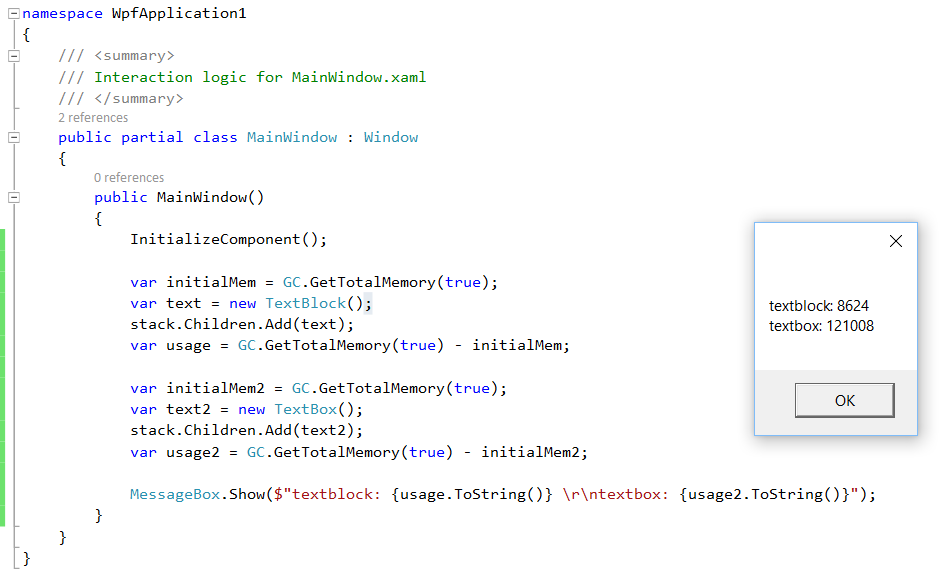
TextBlock is more lightweight control for displaying text and TextBox is used when you require user input or edit existing text. Proof for mem usage.


-
1
-
2Hello Mike, sure - in terms of memory usage textbox is way heavier: https://s22.postimg.org/qse9gxfch/memusage.png – VidasV Nov 26 '16 at 11:02
-
4In case the proof image at some future point is gone. Your example shows a 14x difference in memory usage. Code used GC.GetTotalMemory(true) before and after doing a stack.Children.Add on a new textblock and textbox respectively to check how much memory differed. – Alex Telon Sep 11 '18 at 10:56