9

I find it annoying to have to type the entire list of Stack Exchange sites to include every single time I make a new userscript. Furthermore, jQuery isn't automatically included by default.

Is there a template I can use in order be able to start writing code (including jQuery), drag it into my browser, and have it Just Work™?

Brock Adams
  • 12,901
  • 5
  • 38
  • 64
Doorknob
  • 1,299
  • 8
  • 19

3 Answers3

9

template.user.js

// ==UserScript==
// @name Stack Exchange Userscript (Template)
// @grant none
// @match *://*.stackexchange.com/*
// @match *://*.stackoverflow.com/*
// @match *://*.superuser.com/*
// @match *://*.serverfault.com/*
// @match *://*.askubuntu.com/*
// @match *://*.stackapps.com/*
// @match *://*.mathoverflow.net/*
// ==/UserScript==

var userscript = function($) {

// INSERT YOUR USERSCRIPT CODE HERE

};

var el = document.createElement('script');
el.type = 'text/javascript';
el.text = '(' + userscript + ')(jQuery);';
document.head.appendChild(el);

This template will

  1. Guarantee that your script can only run on Stack Exchange sites
  2. Run on all Stack Exchange sites (as of 7-10-2014, will be updated as necessary if new sites with unique URLs are added)
  3. Allow you to reliably use $ as jQuery within your userscript
  4. Be compatible with all major browsers (really not that fancy; should work virtually anywhere)
Nathan Osman
  • 23,286
  • 11
  • 60
  • 107
Doorknob
  • 1,299
  • 8
  • 19
4

Here is a one for css too:

// ==UserScript==
// @name          changeMe
// @namespace     http://use.your.homepage/
// @version       0.1
// @description   addSomethingUseful
// @match http*://*.stackoverflow.com/*
// @match http*://*.serverfault.com/*
// @match http*://*.superuser.com/*
// @match http*://*.stackexchange.com/*
// @match http*://*.askubuntu.com/*
// @match http*://*.answers.onstartups.com/*
// @match http*://*.mathoverflow.net/*
// @match http*://stackapps.com/*
// @copyright  2014+, You
// @grant none
// ==/UserScript==


function addGlobalStyle(css) {
    var head, style;
    head = document.getElementsByTagName('head')[0];
    if (!head) { return; }
    style = document.createElement('style');
    style.type = 'text/css';
    style.innerHTML = css
    head.appendChild(style);
}

addGlobalStyle (function(){/*
    //Add your code below.  

*/}.toString()
   .slice(14,-3))  
Mohammad
  • 213
  • 1
  • 9
3

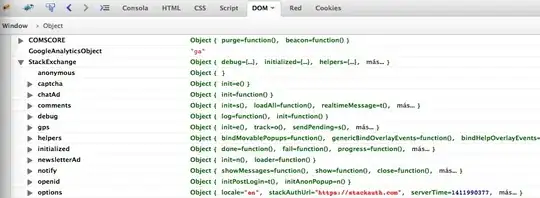
I'm detecting which page we are using the StackExchange object:

object contents

The property StackExchange.options.routeName can be (among other values):

  • Questions/Show (/questions/POST-ID)
  • Questions/List (/questions)
  • Questions/ListByTag (/questions/tagged/TAG-NAME)

So, to run a script only when viewing an individual post:

var userscript = function($) {

    if( ( StackExchange.options.routeName.indexOf('Questions/Show') === -1 ) ) 
        return;

    // INSERT YOUR USERSCRIPT CODE HERE
};

PS: I don't know why, but Chrome detects the object at the root of the userscript, but Firefox only inside our userscript function. Inside our function works on both browsers.

brasofilo
  • 992
  • 7
  • 22