29

Not using Firefox?

Don't worry, Stack Alert is available for other browsers as well. Visit the appropriate page for your browser below:

Screenshot / Code Snippet
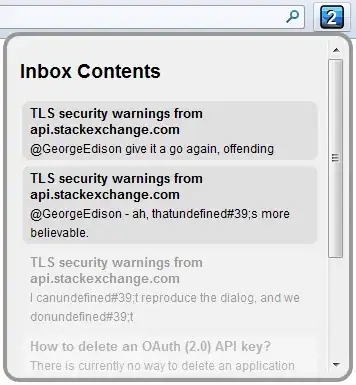
enter image description here

About

What better way to keep an eye on your inbox than with a Firefox add-on? Now you can tell at a glance how many items are in your inbox without worrying about having a tab open to a Stack Exchange site.

License

GPL version 3

Download

You can install Stack Alert from the Mozilla add-on page here:
https://addons.mozilla.org/en-US/firefox/addon/stack-alert/

Platform

Any platform that runs Mozilla Firefox 8-10

Contact

I can be reached at admin@quickmediasolutions.com.

Code

The extension is written in JavaScript.

You can get the code here: https://github.com/nathan-osman/Stack-Alert
(look in the firefox/ folder for the Firefox-specific code)

Nathan Osman
  • 23,286
  • 11
  • 60
  • 107
  • this doesn't seem to work with the current version of Firefox. When I attempt to give it access to my account it just comes to a complete stop at the "Authorizing Application" page, and doesn't proceed any further. I tried closing firefox and clearing my cache/history/logging in, but it didn't resolve the problem. I was able to get it working in Chrome though. – Wipqozn Feb 03 '12 at 21:46
  • 2
    @Wipqozn: I can reproduce your problem. I will look into this as soon as possible and let you know when it is fixed. – Nathan Osman Feb 03 '12 at 21:55
  • I can also confirm it's error in version 10 of Firefox. Hopefully its nothing major.. – Simon Sheehan Feb 03 '12 at 22:11
  • 1
    @GeorgeEdison Appreciate it. – Wipqozn Feb 03 '12 at 22:16
  • @Wipqozn: I have fixed the bug in v0.23 which should make its way to your machine within the next day or two. – Nathan Osman Feb 04 '12 at 03:52
  • @George will reinstalling the plugin fix it now? (assuming your last comment means an update was pushed) – Simon Sheehan Feb 04 '12 at 04:06
  • @SimonSheehan: No. It has to be approved by Mozilla first. That may take from a few hours to a day or two. – Nathan Osman Feb 04 '12 at 04:24
  • This addon wasn't working for me on FF 8.x but I recently upgraded to 10.0.1 and it just started working. – slm Feb 17 '12 at 14:20
  • @slm: That's correct - FF 8.x is not supported by Stack Alert. – Nathan Osman Feb 17 '12 at 19:03
  • It doesn't work in ff 10.0.2. It always says that "an error has occurred" after I authorize it, and then it doesn't display any new notifications. I'm using linux. –  Feb 25 '12 at 22:35
  • @Christofian: I will look into it and let you know what the problem is. – Nathan Osman Feb 25 '12 at 22:49
  • well, it does display a number one when there is a new notification, but when I click the button it says an error has occurred. –  Feb 25 '12 at 22:58
  • @Christofian: What happens when you click OK to dismiss the error? Does it work after that? Does the error come up again shortly after? – Nathan Osman Feb 25 '12 at 23:23
  • when I click OK, the pop up that is supposed to display the inbox messages is blank. –  Feb 25 '12 at 23:56
  • 1
    @Christofian: That's definitely a bug. I'll look into it. – Nathan Osman Feb 26 '12 at 00:21
  • 1
    @GeorgeEdison the bug appears to be fixed now :) –  Mar 03 '12 at 16:45
  • 2
    @GeorgeEdison I'm still getting that bug (blank popup). – C. Ross Mar 15 '12 at 12:28
  • There's an issue on Windows 7, Stack App window hides behind Taskbar, when it's on the right side of screen. more here – GwynBleidD Apr 15 '13 at 16:02
  • Oops! We can’t find that page. link is invalid :https://addons.mozilla.org/en-US/firefox/addon/stack-alert/ – Behrouz.M Mar 21 '19 at 13:06

2 Answers2

11

In my opinion, the icon is too large at 24 x 24. Other Firefox toolbar icons are 16 x 16. I used the following CSS in my userChrome.css file to make it the correct size:

.stackalert-button *
{
    width: 24px !important;
    height: 16px !important;
}
iglvzx
  • 211
  • 2
  • 6
1

StackAlert not showing inbox

You can see that StackAlert only pops a grey-bordered shadowed white box on my screen, not showing my inbox as it should. This does not happen only when I have 0 unread items, and sometimes it errors with a message.

Any solution/workaround is highly appreciated, 'cause I don't want to switch tabs to see anything else than the number of unread inbox notifications.

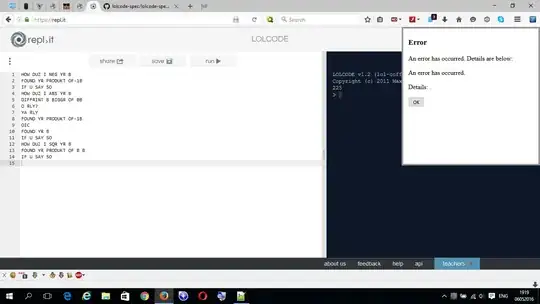
Edit: This is the error I'm talking about here.SASAFF Error:

If I click the OK button, close and reopen the box, the error disappears leading, again, to the white box pictured above. I don't know what causes this problem (possible add-ons: ABP, Ghostery).

EKons
  • 191
  • 9