Looking for Maintainer
I have not had the capacity to maintain this project in any meaningful way, but the source code is quite clear and reasonably well documented. If you would be interested to maintain this project, please apply on GitHub via an issue.
This project has currently fallen so behind Stack Exchange, that it currently doesn't do anything useful. Former description follows:
There's been an onslaught of rather difficult to read questions on SO lately. A lot of them are just plain close-fodder, but many are just from d ppl ,who spk teh internetz lingo and hence make my eyes bleed are pretty much incomprehensible without extensive parsing/editing. They also somehow do not manage to grasp basic markdown. Now manually editing all these answers can often be a massive pain, so I wrote this extension.
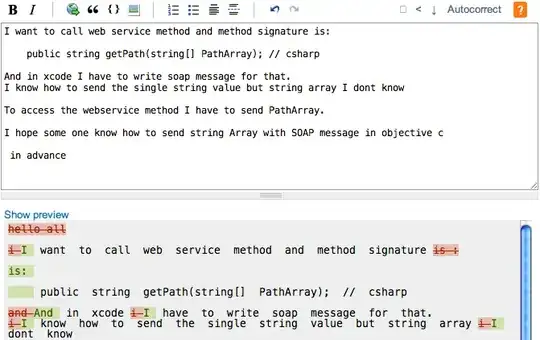
It adds a few more buttons to the SE edit pages (so no distractions when just posting) that aid in making these sites awesome.
Autocorrect
This is the main tool of the suite. It is in fact a huge collection of regexps that correct the most common mistakes people commonly make on SO. These include (see the source for full details):
- correcting capitalization (
how do i do jquery. help.=>How do I do jQuery. Help.) - correcting use of apostrophes (
im cant hasnt=>I'm can't hasn't) - correcting basic punctuation (
what ? how.does......this=>What? How. Does... This) - deleting unnecessary greetings or signs of gratitude
Note: These are Regexps, not any smart NLP so check the post so that you don't screw anything up. For that it provides:
Realtime diff
There's a handy link provided that toggles between the realtime preview and a realtime diff of your changes and the original version. All of the automated functions also automatically display the diff after execution.
Lowercasing
Sometimes people JUST CAN'T HELP SHOUTING! There's a handy button that converts selected text to lowercase, or finds sequences of shouting and lowercases them automatically.
Search & Replace
Sometimes a simple regexp can fix a lot of problems instantaneously. Click on the search button and get the Search & Replace interface:

JS regexp support. Did I mention insta-diffing?
Code-sanetm
Sometimes people Copy-paste their code and it gets all messy. This replaces tabs with four spaces and realigns all code to the four space offset, making reformatting it a breeze. Also autoindents C-like languages to further ease the pain.
Where can I get it?
Note: I no longer have the resources to maintain the suite. I'm sure that making this a working user script would not take too much effort so pull requests with fixes are most welcome.
- Download the Safari Extension.
Get the Userscript version (by George Edison, see below, now auto-built from the Safari source).(No longer working, abandoned by Mr. Edison)- Fork the source on GitHub.
- Issue tracker for bugs and suggestions.
Gotchas
- Autocorrect and Lowercase ignore code so be sure to mark stuff as code before you apply them.
- Autocorrect also applies to the title of the post, be sure to check that as well.
- Filenames sometimes get autocorrected. Mark them as code or correct them back (some common extensions are checked for, but this is by no means comprehensive. If the post is full of filenames, consider not using Autocorrect).
Version History
- 1.1.0 released 16/3: Fixes a few bugs, adds support for C-like languages to Code-sane, adds quite a few product capitalizations and some determiner handling (
an hash a apricot=>a hash an apricot).
BTW does the auto-update system work?


