Screenshot
About
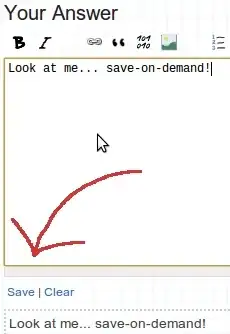
This small script adds a save button to the editor bar that allows you to instantly save the contents of the editor as a draft. Although this happens automatically every minute or so, now you can force it to save the contents whenever you want.
...and now you can also clear the saved draft with the touch of a button too!
License
Download
http://files.quickmediasolutions.com/userscripts/draft.user.js
// ==UserScript==
// @name          Manual Draft Save
// @author        Nathan Osman
// @namespace     http://quickmediasolutions.com
// @description   Adds a button for manually saving a draft
// @include       http://stackoverflow.com/*
// @include       http://superuser.com/*
// @include       http://serverfault.com/*
// @include       http://meta.stackoverflow.com/*
// @include       http://stackapps.com/*
// @include       http://askubuntu.com/*
// @include       http://*.stackexchange.com/*
// ==/UserScript==

// Here I borrow a (slightly modified) function I wrote for another
// UserScript that makes it easy to provide functions
// with complete access to the page.
function EmbedFunctionOnPage(function_contents)
{
    var exec_script = document.createElement('script');
    exec_script.type = 'text/javascript';
    exec_script.textContent = "(" + function_contents.toString() + ")()";
    document.getElementsByTagName('head')[0].appendChild(exec_script);
}

// Now here is the function that we embed on the page.
EmbedFunctionOnPage(function() {

    $('.fl').first().append('<a href="javascript:void(0)" onclick="heartbeat.ping();">Save</a> | <a href="javascript:void(0)" onclick="$(\'#wmd-input\').val(\' \'); $(\'#wmd-preview\').html(\'\'); heartbeat.ping();" style="margin-right: 35px;">Clear</a>');

});
Platform
Since this little 'app' is a UserScript, it can be installed as-is in Chrome. Firefox users can use GreaseMonkey and Opera users can follow these instructions.
Contact
I can be reached at... admin@quickmediasolutions.com
Code
Nothing but JavaScript and jQuery!


{site}/posts/{postid}/edit. Otherwise this is basically what SO should have had in the first place. Even works for new questions too. :) – Jeff Mercado Feb 21 '11 at 04:00