6

I've been trying to find a USB-powered mixer. Something with 2 or 3 microphone inputs. I've seen the Mackie VLZ's and the Alesis MultiMix, but all of them require bulky power supplies.

Is there anything on the market like these but with the added functionality of being bus-powered?

Thanks.

4 Answers4

6

It was bound to happen before long: -

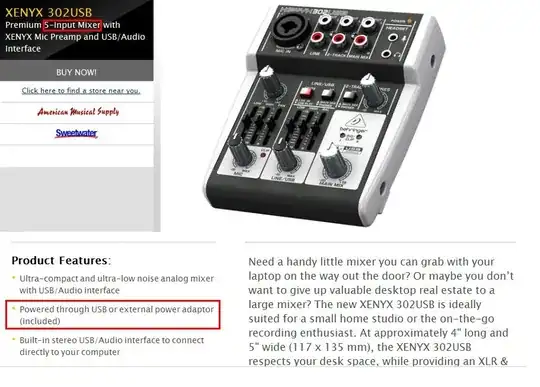
enter image description here

Not easy to achieve technically and I can't vouch for its quality but I know two guys who have facebook "liked" this product and one of them does live gigs.

The trick is to efficiently take a slice of the 5V offered from the USB and efficiently convert it to a higher voltage that is more practical for audio mixing such as 12V or 15V. There have been really cool advances in this technology from companies such as Linear Technology, Analog Devices and Texas Instruments.

The next trick is finding the silicon (op-amps) that work close to the power rails without distorting or introducing much noise. Again there is a recent plethora of op-amps that fit the bill and 5 years ago they probably wouldn't have been avaialble. And like the power chip inverters the same companies are involved.

Andy aka
  • 2,136
  • 10
  • 11
  • I stand corrected, though I'd be highly wary of how well it might work compared to other options. If you get it, I'd love to know though. It does apparently not have full 48v phantom power though. One of the reviews said it barely pulled 15V phantom. – AJ Henderson Oct 01 '13 at 19:17
  • Interestingly, the specifications claim that they pull it off at 500mah (.9W) for the USB power pull (which will require being the only device on many USB hosts), but the power adapter provides 4 times that much power at 3.6W. Guess it could be due to how they are handling voltage conversions. – AJ Henderson Oct 01 '13 at 19:25
  • @AJHenderson Yeah I think USB limit is specified at 100mA so they are probably using up 5 slots worth! – Andy aka Oct 01 '13 at 20:22
  • no, 500mA is the USB2.0 limit. The 3.0 limit actually raises it (considerably if it is a USB3 charging port), but still, it isn't much to work with. – AJ Henderson Oct 01 '13 at 21:36
  • @AJHenderson I'm an electronics designer (analogue stuff primarily) and I think something decent could be designed for 5V at 500mA. I might delve into this a bit more. I can see the attraction of such a product! – Andy aka Oct 01 '13 at 21:43
  • Thanks for the responses. I'm not following the lexicon entirely here (my main Stack Exchange account is over on Stack Overflow), but I can see that the answer is essentially "no" (bar some chopped-liver with 1 Mic pre-amp). It's very surprising though, as I would have thought that this would have been achievable with USB 3.0 having been standard for some time now? The market is surely rife with people wanting to just take a laptop, a compact mixer and a USB cable. I'm not huge on lowering quality for convenience, but there are plenty of people out there who do it unscrupulously. –  Oct 01 '13 at 22:02
  • For the record I did clock the mixer you've posted when I was initially searching. Perhaps I should have mentioned it but I didn't feel it met my spec. Having said that, this will probably be the accepted answer. I'll wait a day and if nobodies provided an alternative I'll mark as correct. –  Oct 01 '13 at 22:04
  • @shennan - seeing as this thing isn't even powerful enough to provide full phantom power, I'm expecting you won't find anything else. It honestly comes as a large shock to me that even this was possible. There aren't a lot of high power USB3 ports out there. There is the charging port standard and the standard port, the standard port doesn't have to provide that much more power from what I can recall, so it would probably still be limiting. 12V is much more sound board friendly power and doesn't have to worry about isolation from electrical noise originating from the computer's 5v line. – AJ Henderson Oct 02 '13 at 00:56
  • @AJHenderson This is interesting stuff. Is it possible the slight hum from my bus-powered ZOOM H4N could be interference from my laptop's 5v line? I need to get to know the tech I'm using a bit better. –  Oct 02 '13 at 01:21
  • @shennan if the sound you are getting is a low hum then it's likely to be induced hum from your AC power wiring or an earth that could be better somewhere. The sort of noise you'd get from the laptop's USB 5V line will be much higher in frequency (more of a buzz) with possibly an element of what might sound like white noise. There could also be a repetitive feature in the noise too happening about every second or so. – Andy aka Oct 02 '13 at 10:40
  • @Andyaka I've just had a listen back to a recording with the H4N and it is indeed a whiter noise than a hum. I would describe it as static. In regards to the question, I think I'm going to have to go ahead and get myself something with AC power. I'm thinking about the Mackie 402VLZ4. –  Oct 02 '13 at 10:45
  • @shennan please be sure about your diagnosis before spending your presumably hard-earned cash. Can the H4N be powered from another source (like an AC adapter) without USB being plugged-in - if the static disappears then you can be more sure it is noise on the USB power. However, if powered from an AC adapter and plugged-in to your laptop is static still there despite the USB no longer powering the H4N? Does that make sense? – Andy aka Oct 02 '13 at 11:42
  • @Andyaka Yes but reasoning for buying a mixer is regardless of H4N issues. We're doing podcasts and the H4N isn't cutting it in so-far-as controlling individual channel levels and tactile interface. I also want line-inputs for music. I have a pair of Rode Procasters which need to be given the respect they deserve. Plugging both into the H4N mixes into a single channel separated by left/right. I was thinking it would be much better for me to get a mixer, and use the H4N as a third microphone/field microphone. –  Oct 02 '13 at 12:37
  • @Andyaka As a side note, if I was to further test my H4N setup with the methods you've described - does the fact that I'll still be using a USB to connect it to the laptop (but getting power from AC) mean I was still get interference from the 5v line? –  Oct 02 '13 at 12:40
  • @shennan I was thinking about that just the same as you. My thoughts are that if the external AC is powering the H4N then there should be no-need for current to be taken from the USB power and hence no interference. That's the theory anyway. The noise you might be hearing could be the analogue op-amps not being as good as they could be of course - what does it sound like on line-out to an amp - can you hear that noise? – Andy aka Oct 02 '13 at 13:00
  • @Andyaka I will do a test tonight and report back. –  Oct 02 '13 at 13:20
  • @shennan - the H4N does not take power from the USB port. It is powered internally from the batteries or from the AC adapter. How bad is the hum? There is generally a very slight signal noise with the H4n, worse on the unbalanced line inputs, particularly if impedance mismatched, than the balanced inputs. (I say this as someone who has and regularly uses an H4n.) Great device for the price, but certainly not the cleanest option out there since it is pretty much the cheapest option available with balanced inputs. – AJ Henderson Oct 02 '13 at 13:28
  • @shennan - you know that you can use the 4ch mode on the H4n to be able to have 4 channels of input? I don't know if you can do it while hooked in to the computer and it is limited to 48khz sampling, but it works pretty well. You still get two stereo files, but they are trivial to split. I can understand wanting to have a sound board for the independent volume knobs or even sliders though. Just wanted to make sure you knew that you could use the H4n as an environmental mic while also recording to the two XLR inputs though. – AJ Henderson Oct 02 '13 at 13:33
  • I also believe the H4n noise is less severe when on battery rather than AC. I don't recall for certain though. I know one of them is better than the other by a significant margin, but I can't remember which way is better. (I always use battery because I'm always using it on location and have better gear for use at home when I don't need portability.) – AJ Henderson Oct 02 '13 at 13:34
  • @AJHenderson the H4N does take power from the USB port when it is connected via the audio interface (which is how I generally use it). But the it doesn't actually have line inputs as far as I'm aware. That coupled with no tactile interface renders it less than fit for the job, in my eyes. –  Oct 02 '13 at 15:28
  • @shennan - you can pad a line input to the unbalanced quarter inch (or transformer it if you prefer). Reduction in power is far easier than amplifying. I use a reasonably cheap stereo transformer personally for getting decent results with an added benefit that it can run to balanced out. The limit of having to work with the wheel for volume is annoying, but is still roughly as tactile as a knob based mixer, which is what most of the cheap soundboards will be. I do greatly prefer faders though. I do see you are right about USB bus power though, I stand corrected on that. – AJ Henderson Oct 02 '13 at 15:35
  • Please take longer discussions to chat! Comments are more meant to be used more like post-it notes than a forum thread. – Warrior Bob Oct 02 '13 at 21:48
1

I use my Xenyx 302USB mixer every weekend for 8 hours on Saturday And 7 hours on Sunday as a Busker in the Strip District in Pittsburgh, PA. I am 63 years old and have the chops to master tech and Music. I power it with a Zagg Power Brick or my HP Elitebook 2760P if I am useing Reaper to record. With the Boss VE-8 Harmonizer, I sound darn good for an old fart. The 302 has never let me down and even runs in the rain. I am A. J. Fronce and I approve this mixer.

A J Fronce
  • 11
  • 1
0

Most soundcards these days include some sort of mixing functionality on-board. The snag: it's a digital mixer with the controls having to be sent through USB. The necessary A/D+D/A conversion incurs delays (since downsampling and the necessary digital aliasing filtering happens in the converters, otherwise one could mix the non-downsampled signals and be much faster). Also you need some software running on your computer, and optimally a Midi control device since those are a lot more hands-on than a mouse.

Mixers with digital recording outputs (like the Mackie Onyx 820i with Firewire) tend to have their own internal power supply, and for good reason. As do larger soundcards, by the way. It's just the more reliable option.

0

I use a Tascam US-122L. It's a somewhat dated sound card with two microphone/line inputs with 96kHz/24bit specs, there are big dials for the respective two gains, one for setting the ratio of the main output (RCA jacks) between monitoring and computer, and one for headphone/main output volume. In a pinch, this will serve as a USB-powered mixer.

It's built like a tank and has no digital mixing circuitry included. So hanging it off some power supply instead of a computer (though no harm done by using a computer or powered hub) will land you with a minimal analog mixer and/or headphone amp. Frankly, it's probably heavier and bulkier than a more modern component and a power brick together, but then you can just stuff it in your bag without much of a worry that it wouldn't survive.

The gain dials don't go down all the way to zero, though.