141

I have a very difficult time focusing on what I'm doing (programming-wise) when something (compilation, startup time, etc.) takes more than just a few seconds. Anecdotally it seems that threshold is about 10 seconds (and I recall reading about study that said the same thing, though I can't find it now). So what typically happens is I make a change and then run the program to test it. That takes about 30 seconds, so I start reading something else, and before I know it 20 minutes have passed, and then it takes (if I'm lucky!) another 10+ minutes to deal with the context switch to getting back into programming.

It's not an exaggeration to say that some things that should take me minutes literally take hours to complete.

I'm very curious about what other programmers do to combat this tendency (or if I'm unique and they don't have this tendency?). Suggestions of any type at all are welcome - anything from "sit on your hands after hitting the compile button", to mental tricks, to "if it takes 30 seconds to start up something to test a change, then something's wrong with your development process!"

BЈовић
  • 14,031
  • 8
  • 62
  • 82
Jer
  • 2,576
  • Its quite common, just be aware of it, and focus that time into helping your fellow programmers – Ryathal Apr 05 '12 at 15:37
  • 24
    I have a similar problem (hence this comment :) ). I found what really helps is less coffee in the morning, or none at all. I also try to work in the morning and schedule meetings in the afternoon. Hope that helps .... oh look a kitty. – DevSolo Apr 05 '12 at 15:37
  • 7
    You are dealing with a form of procrastination - the enemy of knowledge workers from all over the universe. – Aditya M P Apr 05 '12 at 15:40
  • 130
    Arrrg!! I'm doing it now -- thanks for the reminder -- back to work. – mjhm Apr 05 '12 at 15:42
  • 8
    I usually spend this time on SE sites, reading questions, answering what I can to help other developers, and learning something new in the process. – Bernard Apr 05 '12 at 15:45
  • @Bernard - I do too, but while that is certainly more productive than other stuff I can be doing, I still am spending sometimes 30 minutes not doing my work! I'm really looking for suggestions on how to keep working without stopping... – Jer Apr 05 '12 at 15:53
  • @DevSolo - do you mean that if you drink less coffee you find it easier to sit still and just wait for the time it takes to compile/startup? – Jer Apr 05 '12 at 15:53
  • 1
    @aditya - I don't know if I'd call it procrastination (though believe me, I'm great at procrastinating too!), because if there were not this 10+ second "wait time", I'd keep going without stopping... – Jer Apr 05 '12 at 15:53
  • 1
    @Ryathal - what do you mean? How do help other programmers in ~20 seconds? – Jer Apr 05 '12 at 15:53
  • @Jer: Actually, yes. I do find that when I'm less caffeinated, I'm more patient, less twitchy, and I can sit still while waiting for a 20-second compile. – FrustratedWithFormsDesigner Apr 05 '12 at 16:16
  • @Jer This may not apply to you, but I try to do more click once unit testing with mocking so I get near instantaneous results. Much less painful than compiling the whole project and running it, thats for the birds man! – maple_shaft Apr 05 '12 at 17:03
  • @Jer, yeah. For me, to more coffee (I don't drink pop/soda) I drink, the less fidgety I get. I'm sure I have adult ADD/ADHD, so on days I know I need to concentrate, I try to cut out the caffeine. – DevSolo Apr 05 '12 at 17:27
  • 1
  • 2
    I play EVE online. Since that game has a wealth of ways to make you wait and wait, the lull reminds me to go back to my executed code! – hexparrot Apr 05 '12 at 18:52
  • 1
    How about making the browser take ~20 seconds to startup, so that your attention wanders and you arrive back at your original code? – Robert Martin Apr 05 '12 at 21:27
  • 2
    Can't help but link http://xkcd.com/303/ – Nicholas Apr 05 '12 at 21:28
  • 6
    You should start developing for SharePoint b/c there you actually have to wait 20 minutes :) – kev Apr 05 '12 at 22:30
  • 1
    Your deadlines are not deadly enough... –  Apr 06 '12 at 11:04
  • You have http://en.wikipedia.org/wiki/Adult_attention-deficit_disorder – JoelFan Apr 06 '12 at 11:49
  • I've had the same issues in the past, and I've found that getting into work at a reasonable hour (8:30) combined with exercise in the morning gives me the best chance of staying focused throughout the day. – Greg Jackson Apr 06 '12 at 16:07
  • 2
    Just 30 seconds? Be glad you are not compiling SLOBOL: SLOBOL is best known for the speed, or lack of it, of its compiler. Although many compilers allow you to take a coffee break while they compile, SLOBOL compilers allow you to take a trip to Bolivia to pick up the coffee. Forty-three programmers are known to have died of boredom sitting at their terminals while waiting for a SLOBOL program to compile. – hlovdal Apr 06 '12 at 17:29

21 Answers21

116

I wrote a little commandline utility called 'alert' which will cause the computer to beep / play a sound / etc. Then, when I have a lengthy command to run such as a make, I run make; alert. Where I can, I will also have it take an argument so it makes a different sound depending on the argument. Thus I can do make; alert $? and I'll know a) the build is done, and b) it passed or failed. You don't have to be that fancy with it; just an echo -e "\a" can be enough.

If you wanted to get really fancy/annoying, use some text-to-speech package and trigger a dialog popup.

The main idea here is to interrupt your distraction as soon as the work-related task completes.

retracile
  • 991
  • 6
    Quick example: MSG="back to work" && xmessage -buttons ok -default ok -nearmouse "${MSG}" 2> /dev/null – sakisk Apr 05 '12 at 16:26
  • @faif: you don't need the &&; having it means you're setting a variable in one command, then running a command that uses it as a second command. If you remove the && you will set the variable for the xmessage command only, and you won't have a left-over MSG variable hanging around in your shell. – retracile Apr 05 '12 at 17:16
  • @retracile That's true, but normally the part after the && will be a function and the variable will include something more useful like the output of the executed program instead of just "back to work". For example you'll do something like make && show_message "myprog build $?" – sakisk Apr 05 '12 at 17:25
  • 6
    @faif In that case, you want to use ; instead of &&. Your second example will only run show_message if make succeeded, which isn't quite what you want. To be clear: I do like the example you gave, I'm just being picky about the implementation details. ;) – retracile Apr 05 '12 at 17:28
  • @retracile That's correct -- using ; instead of && is more appropriate in this case since you always want to execute the second part :) – sakisk Apr 05 '12 at 17:30
  • 2
    I wrote a quick command line program that emails me when a certain task is finished - so if I leave the room to do some IT stuff in my waiting time, my phone will beep at me to tell me to come back to my office and finish what I was doing. – Phil Apr 05 '12 at 18:22
  • Wow these ideas are great! – orlp Apr 05 '12 at 18:24
  • 7
    +1 for distracting you from distraction - fight fire with fire! That way you don't get fired! – corsiKa Apr 05 '12 at 18:36
  • 1
    Ubuntu has a nice alert alias setup in .bashrc. It depends on libnotify, but if it is installed, you can do command; alert and it will give you a desktop alert when finished specifying which command it was that finished. Really useful for lengthy compilations or tests. – Leo Apr 05 '12 at 18:54
  • I did a variation on this idea: anytime there's a command that takes more than 60 seconds, the alert is shown automatically (in my case by zsh). Great thing. – liori Apr 05 '12 at 19:47
  • Thanks for the idea! make; say $? is what I use now (say is a nice command available on OS X). – Anton Strogonoff Apr 06 '12 at 01:45
  • @Leo: I believe you can customize libnotify desktop alerts by calling the notify_send utility: notify_send title message and it also has options for icons, how long it should persist, etc. – UncleZeiv Apr 06 '12 at 06:51
  • I'm using zenity to this, but playing any beep is also a good idea :) – Hauleth Apr 06 '12 at 12:45
  • Hah, I have this pattern, but I use xeyes for this. – SingleNegationElimination Apr 06 '12 at 17:10
  • I've got a little timer that I can use for this, not that I actually do :) – Mike Dunlavey Apr 06 '12 at 19:33
104

I have the same problem, and the solution for me has been to spend the time doing something which will not get you sucked in. For me, this is usually either (1) filling up a water bottle, or (2) standing up and taking a 30-second walk around the office to stretch my legs, which need the movement anyway. You can get lost browsing the internet; you rarely get lost walking around your own cubicle.

eykanal
  • 1,674
  • 37
    +1 for taking a quick walk/stretch. It’s something we should all do more often. – Jon Purdy Apr 05 '12 at 17:03
  • 2
    This works well in combination with my answer... set your speakers loud enough to hear it across the room in your walk so you can cut it short. (Such as that 10-minute build that terminates after 30 seconds due to a syntax error.) – retracile Apr 05 '12 at 17:20
  • 1
    +1, do something that takes no more than 10s. Drink. Grab a chewing-gum. Look by the window, if you're lucky enough something might be happening outside. If you're listening to music, check what's coming in your playlist or add some tracks. – Laurent Couvidou Apr 05 '12 at 17:48
  • 2
    I'll also add, use the restroom :) Oftentimes, when I first stand up after a long coding session, I find I really need to use the plumbing, as they say, as they say. Use these breaks to take care of yourself. – eykanal Apr 05 '12 at 18:52
  • 4
    Until you talk to the dev in the next seat/cube over... now it's a 20 min chat instead of 20 mins browsing. – Steven Evers Apr 05 '12 at 20:29
  • Have you guys seen the Scott Pilgrim movie (or presumably, read the graphic novels)? "I'm going to go pee due to boredom." Yeah, that's my strategy. – Chris Allen Lane Apr 06 '12 at 18:39
29

Do something for your health:

Standup, walk away from your computer and do some hand and arm stretching exercises. This will take 2-5 minutes max. Your future self not suffering from RSI will thank you for this.

Also, regarding the 2-5 minute break, have a read through the Pomodoro technique. This is based on the idea of having frequent short breaks to take your mind off your current task and let things sink in a little. It's a short enough break not to loose your train of thought completely but long enough to give your brain a breather.

Peter Mortensen
  • 1,045
  • 2
  • 12
  • 14
  • 10
    And you don't even have to get up - just closing your eyes to rest them for 30 seconds will help keep them moist and less tired. – JBRWilkinson Apr 05 '12 at 17:08
  • 1
    This is a great answer (helps to burn off nervous energy) and the pomodoro technique can work if you are disciplined enough. – DevSolo Apr 05 '12 at 17:32
  • 1
    +1. Having a height-adjustable desk helps, too. I've found that when I'm standing I'm far more productive since during those short pauses (compiling, etc.) I pace around a bit thinking about what I'm working on and as soon as the task is complete I go right back to working. Perhaps it's just me but I like to move around a lot when I'm thinking and pacing helps. – Paperjam Apr 05 '12 at 19:39
  • 1
    Never heard of Pomorodo but I've long been a supporter of the idea that you need to take occasional breaks to give your more conscious mind a rest and let your back burners sort some things out for a while. There's a reason a lot of a-ha moments happen in the shower and the bathroom. – Erik Reppen Apr 05 '12 at 22:56
25

Development is a creative process. You can't be constantly productive, especially if there are lots of distractions in your office. That's why the Joel Test suggests quiet working conditions.

Joel Spolsky also explains what it means to "not being in the zone". Each time something prevents you from doing your work, you have to spend ten minutes, often more to get back in the zone and become productive again.

There are lots of distractions:

  • A phone call from your wife,
  • A phone call to the business person in the office space close to yours,
  • A colleague asking you for help,
  • Being hungry,
  • Having personal problems,
  • Having to work on legacy code written by an inexperienced developer ten years ago and never refactored,
  • Having a slow PC or a slow Internet connection,
  • Having a long compile process,
  • etc.

There is nothing to do with it. The only thing you can do is to remove the distractions themselves:

  • No phones in your office,
  • Quiet working conditions,
  • Fast computer and Internet access,
  • Fast compile process,
  • etc.

In your case, if it's the compiler which distracts you, try to reduce the compile time by:

  • Reducing the size of your program (some IDEs for example let you unload some projects from a solution, strongly reducing the compile time),
  • Using nightly builds and compiling less during your work,
  • Buying a faster machine (if there is nothing else to do),
  • etc.
Peter Mortensen
  • 1,045
  • 2
  • 12
  • 14
9

I guess I'll be the one to say it but you should just sit there and wait for it to finish.

You need to retrain yourself to not feel the need to be constantly on and actively doing things. This is a very detrimental issue that affects not just developers but all people. Society has become obsessed with the need for constant stimulation (visual, audio, mental). It seems no one can stand to be idle for more than 30 seconds without pulling their phone out and texting, surfing the web, checking facebook, etc.

If you hit compile and it's going to take a minute or so consider that a great opportunity to just sit and let your brain relax. Resist the urge to do something stimulating and just enjoy a moment of non activity.

With time it will become easier and you'll find you will have a much better work experience when you stop trying to keep your brain firing at 100% all day long.

  • I have to wonder if the hatin' on multitasking is really justified, or if it's perhaps a but of generational misunderstanding. Sure, studies have found a loss of productivity when multitasking, but maybe it's simply a skill that some people have developed. For any new technology or process, I'm sure there were studies that found them to be terrible for productivity, before people really learned how to use them effectively –  Apr 06 '12 at 15:56
  • @JonofAllTrades It's not about the technology or learning, it's a known fact that the human brain is not biologically designed to allow us to to continuously multitask multiple conscience thought streams. We are able to juggle a couple of disconnected thoughts for short periods of time but beyond that the whole balancing act falls apart. It's not healthy as you will mentally and physically wear yourself down. Ever wonder why so many are sick and tired? We all work to hard. – Alan Barber Apr 06 '12 at 22:38
  • Ah, but concentrating on one thing is also exhausting, and our attention quickly wanders. As always, there's a happy medium. I suspect once can learn to multitask better, and that the ideal workflow for, say, a 40-year-old born in 1950 is different from a 40-year-old born in 1990. I don't buy that we're any more sick and tired now than 100 years ago; if anything, we can afford the luxury of being conscious of it! –  Apr 07 '12 at 04:54
8

I agree with what @retracile is suggesting, but note that according to the Zen programming rules you should focus on only one task at a time. Answering to phone calls, browsing the Web, social networking, or even doing multitasking will most likely decrease your productivity. Use the short waiting delay to think about the existing task/solution and what you can do to improve it.

sakisk
  • 3,387
8

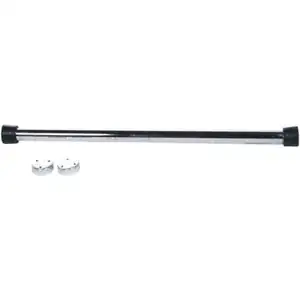
I have a bar attached to the doorpost

enter image description here

I can do only 5 pull-ups so it takes less than a minute. Or I make a cup of tea.

Lukasz Madon
  • 1,496
  • 13
  • 22
6

For me, the way to keep my focus is to be ruthless about maintaining a clean work space, whatever that workspace might be. Anything that isn't part of my current project is noise in the hallowed signal-to-noise ratio. A vital part of maintaining focus is about keeping the signal-to-noise ratio high.

When I'm coding, this means closing programs that I haven't used recently, regularly pruning my browser tabs, and keeping my desktop clear of items that aren't immediately relevant to my current projects. I use the ten second delays to "make the rounds", so to speak--closing tabs, closing programs, deleting temporary files and archiving what needs to be archived, etc.

Getting in the habit of "making the rounds" helps prevent rabbit trails, too, because it forces me to continually evaluate--and be reminded of--any current tasks.

There's a small price to be paid when you have to re-open a tab that you've already opened 5 times today or re-launch a command prompt with elevated privileges for the 15th time, but leveraging accelerators like keyboard shortcuts can cut this to a very small price indeed.

Caleb
  • 21
  • 1
    The problem with closing browser tabs, (or programs or so on) is that it's too easy to get distracted by them when you go to close them. Such as returning to a Stackoverflow question after implementing the answer, then seeing an interesting link in the sidebar, and clicking it.... – Bobson Apr 06 '12 at 02:32
6

I find it helps to track the actual time I spend not working

You can use any number of things for this. I know there are many free apps out there you can download to do this for you (can't think of any off the top of my head right now, but if someone gives me some I'll add them to this answer), or it's very easy to create your own. I usually use one I created which is a tiny window in the corner of my screen with buttons for Working/NotWorking, and I just click whichever one I'm on whenever I switch focus.

A chess clock also works

The very act of tracking your time makes you more aware of how much time you are wasting that you should be spending working, and I find it makes me more productive because I'll force myself to leave that super-interesting stackoverflow question, or blog article, and get back to work

Rachel
  • 24,029
5

For keeping my attention up I use doodles. I always have a pen and a notepad lying behind my keyboard and doodle away. It isn't more then scrabbling on a piece of paper without any meaning but it keeps my attention up just enough and doesn't get me distracted so I can snap right back to what I was working on.

I've done this all my life unconsciously but recently found a wiki about it: http://en.wikipedia.org/wiki/Doodle

Pieter B
  • 13,220
4

Whatever you do don't go on any of the StackExchange sites. They will suck you in :)

More seriously, browsing the web while waiting for something to finish it's not good for the productivity (unless you're researching something related to the current task).

I usually do few minor tasks that will not take longer than 1-2 min. (cleaning something, writing comments, notes).

Christian P
  • 1,954
  • 2
  • 20
  • 24
1

During those 10-30 seconds go and do something :

  • that doesn't require lots of mental activity
  • open the code you are compiling, and check it again (you might find something wrong, or a way to improve it)

During that time, do not do stuff that you know it is going to take you long (unless you can afford to spend some time) like :

  • starting to read a book
  • read emails if you know it can take you long
  • etc

Also, do not install some audio alarm to signal the end of compilation. Your colleagues will appreciate it.

BЈовић
  • 14,031
  • 8
  • 62
  • 82
  • 12
    Personally, checking email is a terrible idea. You see, it can become such a time sucker that your 30 seconds can easily become 30 minutes. – Adriano Carneiro Apr 05 '12 at 16:56
  • Checking e-mail at the beginning and end of the day is one those tips a lot of exec-types like to give. Depends on how large your company is I suppose. – Erik Reppen Apr 05 '12 at 23:11
  • If it takes you 30 minutes to check your email - do not do it. I do not go to a post office to fetch my emails, therefore for me it is 30 sec - 3 minutes operation. – BЈовић Apr 06 '12 at 08:24
  • 1
    @ErikReppen, if I did that, I wouldn't have a job. – HLGEM Apr 06 '12 at 15:22
1

In your case, get up and walk around a little. If it's hard to get back in "the zone" it's probably because you're too far in. Doing stuff on the web is just another zone and one that's easy to lose track of time in. Give your brain the break it clearly wants and go for a walk, take a wiz, ideally in a restroom, or talk to a random co-worker. We do a lot of stuff behind the scenes on auto-pilot. Breaks are not bad for coding, they are good, but the idea is to stop firing on all cylinders for a while and see what your back burners come up with while the more conscious part of your mind gives it a rest. Good devs aren't human calculators. Let the parts of your brain that do all the intuitive and pattern-matching stuff on autopilot do their thing for a while.

If this isn't just a coding problem, you might want to consider ADD.

Erik Reppen
  • 6,253
  • 31
  • 34
1

The suggestions to get up and walk around etc. are good if your cycles are long (an hour or so). But when cycle times get short, and I find myself popping back and forth between vim and make every few minutes, then I stay in the zone by staying in the pipeline: While the build or test suite is running, I tend to go back and review the code, then start working on the next chunk that I'd be doing anyway if the build or tests do succeed.

stevegt
  • 111
1

Make a plan at the beginning of each day as to how to use this "spare time". It might involve

  • catching up on some documentation tasks,
  • working out unit test cases for the class that you're going to write next,
  • studying some new piece of technology that you've been meaning to learn,
  • writing a letter to your favourite aunt,

or just about anything really.

Have this secondary task always open in a window somewhere on your desktop. As soon as you hit the "compile" button (or whatever it is that's taking you more than 30 seconds), switch to the secondary task, and put in enough time to actually move forwards on it, which could be a couple of minutes, or could be less.

While you're doing the secondary task, keep it in the back of your mind that this not what your brain should be focussed on. Keep thinking about programming. This isn't easy; you'll still suffer from the context switch more often than not.

If you do this, even if you lose context many times, your lost time isn't actually wasted time, and you've got something to show for it at the end of the day. But the most important thing is to plan, at the beginning of the day, what the day's secondary task is going to be.

1

I suppose we can use the compile time to document the code, code cleanup, aligning the code properly, so that we dont move away from our IDE and still improving the quality of code.

saiy2k
  • 131
  • 3
1

I usually just try to look for bugs, typos, or ways to improve the style of the code in the meantime. That keeps me looking at the code, but I don't (always) get distracted by something interesting. Also, this!

samson
  • 101
1

It's conceivable you've got a bit of ADHD. Lots of people do. Coping mechanisms are as given in the other answers (or possibly medication).

Mike Dunlavey
  • 12,835
0

For internet distraction during work in general, i suggest The Pomodoro Plugin if you are using Google Chrome

I personally think that you can't be productive during all your working time ! since you are compiling, it means that you made enough efforts to take a breath ... to not abuse or get out of the context, keep thinking on the next step if the compilation doesn't generate errors ... Or clean your working area : Desktop, Tabs, Explorer ...

Mehdi
  • 101
0

What you are describing is perfectly normal.

When we were doing usability studies, we would look at delays by order of magnitude. When a user clicks a button, how long do they have to wait?

  • 0.1 sec: no perceived delay
  • 1 sec: no change in focus
  • 10 sec: attention lost
  • 1 min: user switches to another task
  • 10 min: user will get up and leave

There are plenty of exceptions, such as compound operations, like typing.

When we were doing performance work, we often asked the question "how fast should operation X be?" The answer is, as long as the user can perceive a delay, faster would be better.

In your case, you're hitting that 10s threshold, and your attention drifts away. The best thing you can do is reduce the delay. The shorter the delay, the greater your productivity. Imagine you had the code on the left side of your screen, and the running app on the right. As you edit the code, the app changes in real time. Until you're there, you have room to improve.

See also Jeff's recent blog post (the tons of good content it leads to): http://www.codinghorror.com/blog/2012/03/visualizing-code-to-fail-faster.html

If you are going to switch to something else, pick something that doesn't engage your brain in the same way as the work you were doing. Clean your desk, meditate, stretch, push-ups, art, look out the window.

Jay Bazuzi
  • 1,604
0

When doing ad-hoc work in SAS, I find the following line very useful:

dm log 'postmessage "Code finished"' continue;

This produces a pop-up dialogue box once all preceding code has finished executing. I'm sure there are equivalents in other languages. I would have posted this as a comment to retracile's answer but I don't have enough reputation.

user46745
  • 101