Questions tagged [ribbon]

A ribbon is an interface with set of toolbars placed on several tabs.

A ribbon is a set of toolbars placed on several tabs. It is a technique used by Microsoft and was released in the Office 2007 version. Since 2007 the ribbon have the standard interaction container in Microsoft products. An example of the ribbon:
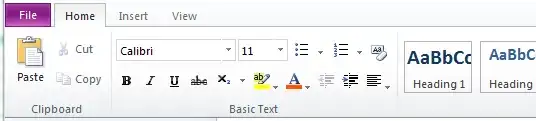
Screenshot of a One Note ribbon from SkyDrive

Questions having the ribbon tag refers to design and development of the ribbon.

More to read: http://en.wikipedia.org/wiki/Ribbon_(computing)

535 questions
18
votes
3 answers

Ribbon gets hidden by default. How to fix that?

I have the following problem: the ribbon bar gets hidden by default for the users of a site collection, so they must enable it manually by using the "Show Ribbon" link on the site action menu. This is only added noise for most of the user, and make…
SPArcheon
  • 6,868
  • 1
  • 30
  • 47
10
votes
9 answers

How do I enable a greyed out datasheet button?

On my list the datasheet button is greyed out. How do I go about enabling it?
Ricky
  • 335
  • 2
  • 4
  • 11
8
votes
3 answers

Change Title in Sharepoint Ribbon

In the above image i need to change the title "Sharepoint" in ribbon. Is it possible to change? If yes, then please let me know how to change.
Ishani
  • 109
  • 3
  • 11
7
votes
2 answers

Buttons not appearing in custom ribbon group

I'm trying to add a new group to the list form display ribbon that contains a few buttons. The group is created but it's blank. Here's the Elements.xml that defines the CustomAction:
Bil Simser
  • 3,470
  • 2
  • 22
  • 26
6
votes
2 answers

Show standard Sharepoint Ribbon in a custom list form

I developed in VS 2010 a custom list form and I want to use the "standard" Sharepoint Ribbon, ie, the same Ribbon used in all list forms withe the same buttons. It's possible do this? Any help will be appreciated.
cpinheiro
  • 61
  • 2
6
votes
3 answers

Show Ribbon always to Visitors

Is there any way to show Ribbon for visitors, in all pages, by default? Normal Page View for Visitors: (No Ribbon) Normal Page for Editors: I am looking for a solution to display the ribbon for Visitors by default (even though only alertme and…
Shoban
  • 1,061
  • 1
  • 11
  • 32
5
votes
6 answers

Strange issue with SharePoint 2010 'Ribbon' Tabs

I am running SharePoint Server 2010 Beta on Windows Server 2008 R2 as a standalone installation. I have a wierd problem that only seems to occur on the team site template, sites based on other templates seem to be fine. The tabs on the ribbon bar at…
None
4
votes
3 answers

Enable/Disable ribbon button based on current item value of a field

Lets say I have a field called locked, which is boolean on a document library. And I want to make a workflow to Lock or Unlock an item. The Lock button should be enable only if its unlocked and the unlock if its locked. The lock button will be a…
Luis Valencia
  • 5,201
  • 22
  • 118
  • 219
4
votes
2 answers

Adding a ribbon button using the object model

I'm trying to register a custom action on a site collection that adds a button to the SharePoint ribbon. I want to do this using the object model and not declaratively in XML. Does anyone know of this is even possible? I've been looking at…
None
4
votes
1 answer

Custom ribbon tab contents don't appear

Here is my custom ribbon tab definition:
Élodie Petit
  • 1,267
  • 3
  • 22
  • 35
4
votes
1 answer

Custom ribbon tab on all pages

I want to create my own Ribbon Tab that will appear on all kinds of pages. What should I do to register this CustomAction? There is not a location setting for this.
Élodie Petit
  • 1,267
  • 3
  • 22
  • 35
3
votes
2 answers

Disable (Not Hide) Ribbon Button Server Side

If you use the SPRibbon.TrimById() method on a specific button, it hides the button from the UI, which is okay. However in my case I think it would be nicer to simply disable the button and leave it in place. I've seen a lot of articles using…
RJ Cuthbertson
  • 8,342
  • 6
  • 38
  • 76
3
votes
2 answers

Setting the ribbon to default Browse instead of Edit

How do I set the ribbon to default Browse mode instead of default to Edit mode? It is annoying to see the item details in view mode all the time and then click Browse to remove it...
erik404
  • 191
  • 2
  • 5
3
votes
1 answer

Ribbon tabs not visible in document library unless I click any document

In my document library the ribbon tabs (Documents and Library) is not visible unless I click any document. Earlier all the tabs were visible as soon as I navigate to the document library. Why this is happening... Even one of our client is…
Zakir HC
  • 3,650
  • 3
  • 32
  • 63
3
votes
2 answers

Add button to Ribbon.PublishTab.Publishing

This question is for anyone who wants to add a custom button to the Ribbon under the WikiPage or PublishTab tabs. The methods out there for adding a button that is associated with a list or library or file type do not seem to work for this…
hitdrumhard
  • 243
  • 2
  • 8
1
2 3 4 5