Questions tagged [document-set]

Document Set is a feature introduced in SharePoint 2010 as part of content/document management. Document set helps to manage group of documents as a single entity.

Document Set is a new feature introduced in SharePoint 2010 as part of content/document management. Document set helps to manage group of documents as a single entity. Actually Document set is a content type that can be attached to any document library and make use of it's features.
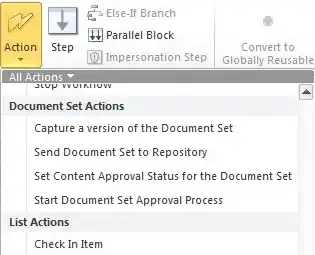
enter image description here

Questions tagged regards development, implementation and maintenance of Document Sets in SharePoint.

Reference: What is Document Sets in SharePoint 2010?

475 questions
11
votes
2 answers

How Can I Set a Custom 'Default View' for a Document Set?

I have allowed the Document Set content type in my Document Library, and nested it inside a Folder hierarchy. I want to have a separate View as the Default when inside of a Document Set inside the library. I don't want users to have to change it…
April Drake
  • 1,095
  • 6
  • 32
  • 62
4
votes
3 answers

Document Set created programmatically doesn't work properly

I have a document library using a document set content type. I can create a new document set through the UI and it works perfectly. I'm now trying to create a document set in this library programmatically and it's not working properly. Here is the…
Alex Angas
  • 5,961
  • 9
  • 49
  • 89
3
votes
1 answer

Problem Creating Document Set Programatically

I'm having difficulty creating a document set programmatically from a custom list item edit form. (My goal is to create a document set linked to this list item) Instead of creating an item of content type "Document Set" I am getting a folder, albeit…
3
votes
2 answers

Rich Text in description of Document Set

Is it possible to have rich text (bold, hyperlinks, ...) in the description of a document set? I tried to change the column type, to add a new one but nothing seems to work. Update: Ok I understood that I should not adjust the system content type;…
Manfred Ramoser
  • 141
  • 1
  • 4
2
votes
1 answer

How do I add web parts to a document set's welcome page that depend on metadata set in each individual document set?

We are using custom content types that inherit from document sets. These document sets have metadata, which we would like to use in web parts on the document set's welcome page. For example: we would like a tag-based content search in our site…
danieldekay
  • 332
  • 3
  • 17
2
votes
1 answer

Check Document Set files columns and dialog box

I have a Document Library with Document Set Content types and hence Document Sets. The document library has a date column called LiveDate next to the Document Sets Within the Document Set I have documents (contracts) and a column called ContractDate…
Orange Juice Jones
  • 1,535
  • 2
  • 29
  • 65
2
votes
1 answer

SharePoint 2010, document set shared column settings aren't displaying all columns

I have a custom content type based on the Document Set content type. I have several custom columns added to this content type. For some reason one of them doesn't show up in the list of Shared Columns within the Document Set settings. This…
2
votes
2 answers

Edit form for document set missing columns

When I am trying to edit a document set, the Edit Properties form only shows the Name field and no other properites from the document set. View Properties shows all the properties of the document set just fine, I've checked and the columns are set…
Roy Varghese
  • 21
  • 1
  • 3
2
votes
1 answer

Remove View and Edit Properties Links in Document Set Properties Web Part

I have a Document Set and have customized the Welcome Page. I'd like to remove the 'View All Properties' and 'Edit Properties' links from the Document Set Properties Web Part. This seems like it should be simple, but I cannot figure out how to do…
Julie
  • 21
  • 2
2
votes
1 answer

Add as a new version to existing files?

In SharePoint 2013 when I upload a document what does this option mean "Add as a new version to existing files?" Thanks
SharePointNY
  • 1,272
  • 5
  • 24
  • 38
2
votes
2 answers

Update document set item programmatically

In the code below I am getting the following Exception : Unhandled Exception: Microsoft.SharePoint.SPException: The file Audit/0003 has been modified by contoso\sp_install. Does the file need to be checked out first? Anyone has got any idea how to…
Imir Hoxha
  • 1,905
  • 6
  • 28
  • 55
2
votes
1 answer

Get the EncodedURl of the document added to a Document Set through Client Object Model

I refer several blogs for this issue , they said there will be a column named as EncodedAbsUrl for the document set but I can't find that column. How can I get the URI to the document?
user27178
  • 372
  • 1
  • 5
  • 18
1
vote
0 answers

How can I share the Document Set title column?

I have a Document Set Content Type (let's call it, Request Packet). Request Packet Content Type has the following fields Title (single line of text) [from Document Set] Description (multiple lines of text) [from Document Set] Request Code (single…
1
vote
2 answers

change the same field in a document-set and the document inside

I have a document set and I added a choice option column to it. I also have a document content type for this document set. I added that choice option column to the document content type too. Is it possible to do something with workflows that when I…
d d
  • 223
  • 2
  • 5
  • 13
1
vote
1 answer

How to extract an old version of a Document Set?

I had this idea to use a Document Set for release management. Within the Set, we have a number of documents related to a system - not the source code but almost everything else: specifications, requirements, manuals et cetera. At some point in time,…
1
2 3 4