14

It is quite common to use "Assigned To = [Me]" in SharePoint views to list the tasks / items which are assigned to the current user. This of course includes both the items which are directly assigned to the current user, as well as those items which are indirectly assigned to the current user (i.e. as a member of a Group).

I can happily do this in Server Side API code using the following CAML Query:

<Where>
    <Or>
        <Eq>
            <FieldRef ID="Assigned To" />
            <Value Type="Integer"><UserID/></Value>
        </Eq>
        <Membership Type="CurrentUserGroups">
            <FieldRef Name="AssignedTo" />
        </Membership>
    </Or>
</Where>

Does anyone know how I can do this using the REST API?

Martin Hatch
  • 1,303
  • 3
  • 13
  • 26

4 Answers4

12

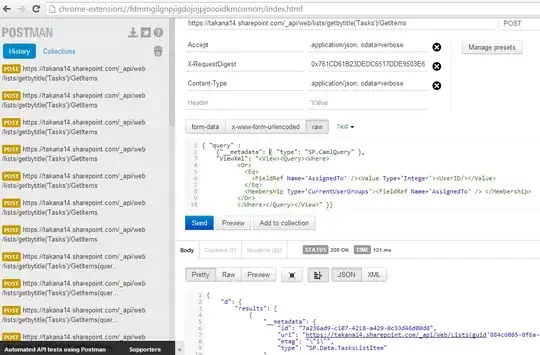
Very interesting question and good answers. I have tested it on a usual Tasks list and got it working after trial and error. The link provided above, Using CAML in REST requests, is good, although it contains syntax errors and unintroduced variables that makes it harder to try out the examples. Robert Kaucher has a working solution, even though it contained a little misspelling, that's why it caused a 500 error for me. I'd rather recommend to not to put the whole CAML query into a URL query string, it can stop working in an older IE browser due the url length restrictions. It is better to put the CAML query into a request body.

In my out-of-the-box Tasks list, the following CAML Query works:

<View>
   <Query>
      <Where>
          <Or>
              <Eq>
                  <FieldRef Name="AssignedTo" />
                  <Value Type="Integer"><UserID/></Value>
              </Eq>
              <Membership Type="CurrentUserGroups">
                  <FieldRef Name="AssignedTo" />
              </Membership>
          </Or>
      </Where>
   </Query>
</View>

Pay attention to <FieldRef Name="AssignedTo" />, not <FieldRef ID="Assigned To" />.

Here is the working jQuery.ajax-code:

var viewXml = "<View><Query><Where><Or><Eq><FieldRef Name='AssignedTo' /><Value Type='Integer'><UserID/></Value></Eq><Membership Type='CurrentUserGroups'><FieldRef Name='AssignedTo' /> </Membership></Or></Where></Query></View>";
$.ajax({
  url: "/_api/web/lists/getbytitle('Tasks')/getitems",
  method: "POST",
  data: "{ 'query' : {'__metadata': { 'type': 'SP.CamlQuery' }, \"ViewXml\": \"" 
      + viewXml + "\" }}",
  headers: {
    "X-RequestDigest": $("#__REQUESTDIGEST").val(),
    "Accept": "application/json; odata=verbose",
    "content-type": "application/json; odata=verbose"
  }
});

If you prefer to use SP.RequestExecutor and be independent of jQuery, just replace data with body in the request options. Make sure you have the SP.RequestExecutor.js loaded into your page first:

executor.executeAsync({
  url: "/_api/web/lists/getbytitle('Tasks')/getitems",
  method: "POST",
  body: "{ 'query' : {'__metadata': { 'type': 'SP.CamlQuery' }, \"ViewXml\": \"" + viewXml + "\" }}",
  headers: {
    "X-RequestDigest": $("#__REQUESTDIGEST").val(),
    "Accept": "application/json; odata=verbose",
    "content-type": "application/json; odata=verbose"
  }
});

SP.RequestExecutor will make it easier to rewrite the code to an app and use it in a cross-domain scenario.

To try this request I have used PostMan. enter image description here
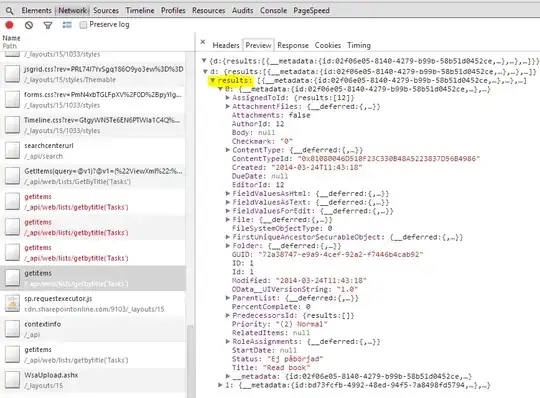
And Developer Tools in my browser, to see results without writing ajax callbacks. enter image description here
Anatoly Mironov
  • 5,750
  • 2
  • 29
  • 56
6

Try the following. Notice that you need to use POST as you are sending data. You also need the <View>and <Query>tags.

<View>
   <Query>
      <Where>
          <Or>
              <Eq>
                  <FieldRef ID="Assigned To" />
                  <Value Type="Integer"><UserID/></Value>
              </Eq>
              <Membership Type="CurrentUserGroups">
                  <FieldRef Name="AssignedTo" />
              </Membership>
          </Or>
      </Where>
   </Query>
</View>

Here I am sending a POST to 'Test List' with the view XML from above.

var viewXml = "<View><Query><Where><Or><Eq><FieldRef ID='Assigned To' /><Value Type='Integer'><UserID/></Value></Eq><Membership Type='CurrentUserGroups'><FieldRef Name='AssignedTo' /> </Membership></Or></Where></Query></View>";

$.ajax({
    type: "POST", 
    headers: { 
            "accept": "application/json;odata=verbose",
            "content-type": "application/json;odata=verbose",
            "X-RequestDigest": $("#__REQUESTDIGEST").val()
        }, 
    url: 'https://mysharepoint.com/_api/web/Lists/GetByTitle(\'Test List\')/GetItems(query=@v1)?@v1={"ViewXml":"' + viewXml + '"}', 
    success: function(data){console.log(data); },
    failure: function(data){console.log(data); } 
});
Robert Kaucher
  • 6,469
  • 7
  • 41
  • 80
4

The GetItems method in the REST api accepts a CAML query. Have you tried that?

http://msdn.microsoft.com/en-us/library/office/dn531433%28v=office.15%29.aspx#bk_ListGetItems

Paul Schaeflein
  • 5,048
  • 1
  • 20
  • 29
1

This should get you what you need.

$.ajax({
    url: '/Accounting/_api/web/Lists/GetByTitle(\'Tasks\')/Items?$filter=AssignedTo eq ' + _spPageContextInfo.userId,
    method: "GET",
    headers: { "Accept": "application/json; odata=verbose" }, 
    success: function (data) {
        console.log(data);
    },
    error: function (data) {
        console.log(data.responseText);
    }
});
Asad Refai
  • 5,971
  • 8
  • 34
  • 57