3

I've moved some common code into a class library for my SharePoint Feature.
I added it to the feature dependencies, I fooled with the package to make sure that the DLL is deployed correctly. I marked everything as 'WebApplication' deployment.

Everything compiles correctly, but when I go to deploy it...

Error occurred in deployment step 'Activate Features': Could not load file or assembly 'SPSureCommon, Version=1.0.0.0, Culture=neutral, PublicKeyToken=6422b3acc455bdc9' or one of its dependencies. The system cannot find the file specified.

Can any one tell me how to troubleshoot this? I mean, IF it actually deployed and crashed at runtime I could at least feature out what DLL is missing.
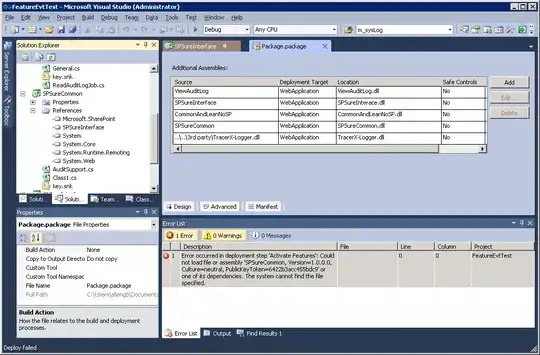
Package

Alex Angas
  • 5,961
  • 9
  • 49
  • 89

4 Answers4

2

First, check the GAC (C:\windows\assembly), is your dll there?

If it is, check that the token/version is the same as the one your a referencing in code.

Also, you might be deploying to a different web application, do a full IIS reset

If the DDL isn't in the GAC, then there is something wrong with your package.

Check the pkg/pkgobj directories to see if the dll is there, also open up the wsp (rename to cab) and check it is inside.

Try activating though central admin

djeeg
  • 4,619
  • 20
  • 33
  • I was trying to be a good citizen and keep everything in the web application folder. That said, I was able to get it to work if I put this single library in the GAC. –  Jan 30 '11 at 14:54
1

Double click your Package folder and Add the assembly from a the appropriate option (file or project output)

Once you have that referenced you should be able to deploy no problem.

ChiliYago
  • 2,166
  • 9
  • 45
  • 70
0

Use the Assembly Binding Log Viewer to see what is going on.

Jeroen Ritmeijer
  • 4,897
  • 1
  • 23
  • 33
0

Set deployment target to GAC and see if it works. Might be another issue somewhere else.

James Love
  • 25,512
  • 2
  • 45
  • 77