3

I have to make a SharePoint-hosted-app for creating subsites and applying a theme on created subsites programmatically.

my app is installed on root site (site collection) and I want to change subsites theme(change subsite looks) from this app.

But when I exceute the applyTheme function I receive below error:
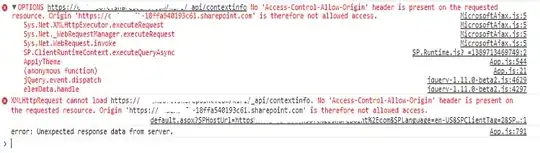
enter image description here

Here is my fucntion:

function ApplyTheme() {
        var clientContext = new SP.ClientContext(subSiteUrl);
        var web = clientContext.get_web();
        var colorPaletteUrl = subSiteUrl + "/_catalogs/theme/15/palette011.spcolor"; 
        var fontSchemeUrl = subSiteUrl + "/_catalogs/theme/15/fontscheme002.spfont";
        var backgroundImageUrl = imageUrl;
        var shareGenerated = true;

        web.applyTheme(colorPaletteUrl, fontSchemeUrl, backgroundImageUrl, shareGenerated);
        web.update();

        clientContext.executeQueryAsync(onApplyThemeSuccess, OnFailure);
}

even i tried this way, but it doesn't work too:

var api = subSiteUrl "/_api/web/applyTheme([parameters])";

var executor = new SP.RequestExecutor(appweburl);
executor.executeAsync ({
        url: api,
        method: "POST",
        headers: { "Accept": "application/json; odata=verbose" },
        success: onApplyThemeSuccess,
        error: OnFailure
    });

have you any idea or solution?

Thank for your helps!

Robert Lindgren
  • 24,520
  • 12
  • 53
  • 79

2 Answers2

2

You get this error because of the cross site scripting protection. To work around it you have to use sharepoints own library for cross-site access, namely "SP.RequestExecutor.js". Also make sure your app has tenant scope permissions.

var scriptbase = $scope.hostweburl + "/_layouts/15/";

$.getScript(scriptbase + "SP.RequestExecutor.js", function(){
  var context = new SP.ClientContext(appweburl);
  var factory = new SP.ProxyWebRequestExecutorFactory(appweburl);
  context.set_webRequestExecutorFactory(factory);
  var appContext = new SP.AppContextSite(context, profileUrl);
  var subsite = appContext.get_web();
  context.load(subsite);
  context.executeQueryAsync(...)
}
Truckarn
  • 41
  • 4
0

everytime you deploy an app it gets a different id/url. Us the following to setup the correct URL details.

 //Get the URI decoded URLs.
hostweburl =
    decodeURIComponent(
        getQueryStringParameter("SPHostUrl")
);
appweburl =
    decodeURIComponent(
        getQueryStringParameter("SPAppWebUrl")
);

Then the following to access the theme

// resources are in URLs in the form:
// web_url/_layouts/15/resource
//My examples
var scriptbase = hostweburl + "/_layouts/15/";
var themebase =  hostweburl + "/_catalogs/theme/15/";
var colorPaletteUrl = themebase + "palette011.spcolor"; 

Stick it all in the document ready.

S

Stephen
  • 1,812
  • 8
  • 35
  • 56