What tools do you consider essential in your SharePoint development toolkit?
One answer per tool please so the community can vote!
What tools do you consider essential in your SharePoint development toolkit?
One answer per tool please so the community can vote!


SharePoint Manager is a SharePoint object model explorer. It enables you to browse every site on the local farm and view every property. It also enables you to change the properties (at your own risk). This is a very powerfull tool for developers that like to know what the SharePoint holds of secrets.

SPDisposeCheck - to check for any dispose mistakes that could result in a memory leak.
Good to have hooked up to a build target as a post-build step so that the build fails if any problems are found.
U2U CAML Query Builder - who in the SharePoint world can live without this one! It helps you avoid commoin CAML mistakes.

WSPBuilder - for an easier, faster and more troublefree way to create new SharePoint solutions/features.
Can't do any serious development/debugging without Fiddler
It's a great tool for examining all HTTP(s) traffic of your apps.

I've found .NET Reflector (now from RedGate) to be an indispensable tool when developing, and with SharePoint in particular. In some cases it has saved me from spinning wheels when it is clearly a "bug" or "feature" in the SP codebase, but it most cases it has just been invaluable from a learning perspective (oh, that's how that works!)

Firebug! Useful in so many ways:
Maybe not SharePoint specific, but I don't write code without ReSharper. Countless ways it improves productivity.
I use IE8's Developer Tools whenever I work with JavaScript, CSS or HTML in SharePoint.

PowerShell! I use PowerShell more and more for small POC's where I would normally use console apps. Also for automation PowerShell is a great tool!

@glapointe's STSADM custom extensions. The tools rock, and also looking at his code and seeing how he writes the functions helps you understand the API too!
It asked for only one product per answer but I will group a couple as they work together.
NUnit - for your unit testing. I also use MSTest but find NUnit has less clutter (VS2010 removes this for MSTest)
TestDriven.Net - great tool for running the tests and include the open source version of NCover for your coverage needs.

Another one that's not really a tool but nevertheless very handy; in my quick launch bar I always add a Shortcut and a Toolbar to the 12 hive:
C:\Program Files\Common Files\microsoft shared\Web Server Extensions\12


Visual Studio
SharePoint Designer
TypeMock http://typemock.com
it's the only way to write unit tests for sharepoint. Somthing we all should be doing.
http://www.qualitysharepoint.com/2009/03/options-for-unit-testing-sharepoint.html
The content deployment wizard: The SharePoint Content Deployment Wizard is a tool for SharePoint 2007 which provides the means to deploy the following content:


I'm suprised no one has brought up STSDev from codeplex. I like the way it sets up the project and set ups all the files and build tasks. Worth a look.
SPTraceView is awesome for seeing errors that occur on SharePoint server, especially if it's your dev box as they happen via the System Tray! Also when you double click on tray it shows the exceptions...rather than you opening whole ugly ULS log ;-)
Sure fiddler is good, but Visual RoundTrip Analyzer (VRTA) gives you a nice graphical illustration and can also help you with advice in solving the problems. It has issues regarding virtual environments though, but a great tool never the less (thanx Spence for introducing it to me:-) download VRTA
DebugView from Sysinternals/now Technet combined with System.Diagnostics.Debug.WriteLine, System.Diagnostics.Debug.Assert etc is very good especially in events or workflows where you cannot do trace.
Slight bias here. But I can't build SharePoint Lists, Content Types, Site Columns and Module files without SPSource written by myself (@jthake) and @richfinn!
I recommend using VSeWSS 1.3 March 2009 CTP and hopefully RTW soon.
http://social.msdn.microsoft.com/Forums/en-US/sharepointdevelopment/thread/b0987b13-a8c5-47d7-a242-61deef134f6b
– Oct 08 '09 at 23:50Microsoft Live Mesh is a great tool to handle all your other tools. I've set up a folder that I have all my tools in and then use Live Mesh to have these tools synchronized into my VM's and other machines. As soon as I add or update a tool, they are all "copied" to my other machines.
TypeMock Isolator - essential if you are doing unit testing and need to fake out the calls to SharePoint
Ehm, noone said MetaMan yet? Doint BDC by hand is such a pain... MetaMan is the best tool out there. And now also web based. (ok Nick you can cough up a with a dev license now ;-) Nah seriously, its an expensive tool, and the licensing model sux (for devs at consultancy companies that has lots of different customers) but the tool is top notch and saved me more times than i care to remember from doing tedious XML
What? Noone said SQL Server Profiler yet? How the heck do you guys find out what goes on behind the scenes without it? :-)
Especially good when you are after better performance. A quick profiler run will find those pesky SharePoint "specialities" in .NET like using foreach instead of for loops, or the difference in performance of doing SPContext.Current.List.ItemCount and SPContext.Current.List.Items.Count, finding deadlocks, timeouts etc
I use sharegate to deploy sites from DEV to QA to Prod and Prod to QA to Dev.
From their website :
sharegate is a light yet powerful tool to compare and synchronize your SharePoint environments in only three steps. It quickly detects the differences between your sites and allows you to send your chosen selections to your desired destination from anywhere in your organization. Our tool accelerates your SharePoint deployments by significantly reducing the time consuming manual process. The power of sharegate resides in its simplicity and its cost. We all agree that we need a simple tool for SharePoint synchronization.
SharePoint Skinner for creating CSS styles and themes for your site visually
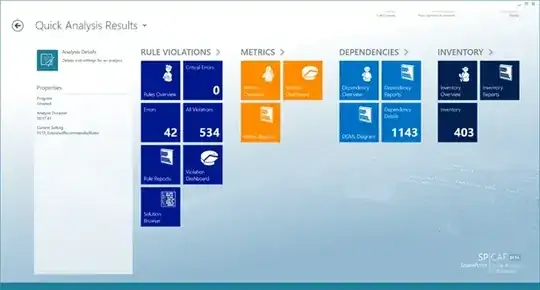
SP|CAF : SharePoint Code Analysis Framework
Essential tool to ensure SharePoint code quality. SPCAF analyses SharePoint code from .wsp and .app files and checks all contained code incl. XML, ASPX, JS, CSS for correctness, best practices etc.
It creates dependency Graphs, calculates code metrics and creates an inventory.

http://smtp4dev.codeplex.com/ - "Sets up a dummy SMTP server. Sits in the system tray and does not deliver the received messages. The received messages can be quickly viewed, saved and the source/structure inspected. Useful for testing/debugging software that generates email."
Perfect for small develop environments.

Gallio and MBUnit testing frameworks
HyperV! I love doing dev work on my pumped up 2008 server where i can spawn as many virtual servers as i need with performance that leaves VMWare in the dust!
I would recommend the SharePoint Software Factory which not only allows you to develop for SharePoint 2007 and 2010 from either VS2008 or VS2010, but also supports you with wizards to create the usual SharePoint artefacts.
Have a look at the video on the codeplex page.

Spencer Harbar's Application Pool Manager, for speedy and specfic App Pool resets.
SysInternal's (now Microsoft) Process Monitor is essential for troubleshooting security and other problems related to access to the file system, registry etc. Not SharePoint specific, but I find myself using it in combination with SharePoint on a frequent basis.

I use SPVisualDev. Integrates with wspbuilder and now apparently allows remote development (did not try this yet).

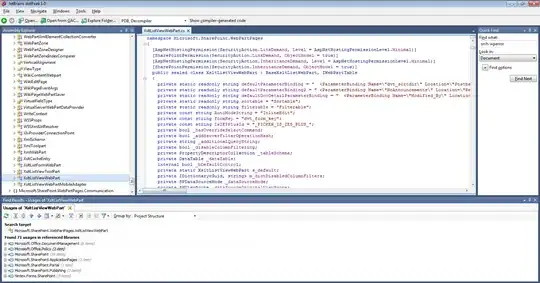
Yet another great decompiler for investigation of inner working of SharePoint - dotPeek
Main features
and dotPeek is free!
Main Window

Great tool for exporting content types, site columns and lists definition in XML; available on Codeplex.

On the nerdy side, but when Reflector gives up due to obfuscation, and you just need to know what happens behind the scene, enter ildasm.exe True you need to be able to read IM language, but its pretty self explanatory, and have helped me many times. For example when i wanted to know what exactly happend behind the scenes when you use -force (bad bad practice!) in stsadm.exe operations (bonus info: -force basicly swallows all exceptions, so you never will see those other code issues your callouts or similar had)
One app, that allows me to navigate the SharePoint folders and having shortcuts to them, walk in and out of WSP's, quickly view the content of the files etc is Total Commander.
Using Windows Explorer and walking down into the 12-hive, right-click, select open with really takes to much precious time. Using Total Commander I have shortcuts to the different folders in the 12-hive and then uses the builtin quick search to find the file and the builtin viewer program.
This is one tool I can't live without, and is the first thing I install on all machines (if I don't use Live Mesh, which contains my Total Commander installation folder).
I like Crimson Editor as an alternative to notepad. Lightweight (no waiting time to start like visual studio), tabbed interface, macros, "column mode".
Great for quickly creating xml files, csv files, or transforming an xml file into a set of c# lines (using macros)

Cruise Control .NET to allow nightly builds of your SharePoint solutions.
Web Development Helper or some similar tool, to track the communication between the browser and the SharePoint Server. Especially usefull when developing with Ajax, jQuery, Silverlight, or any other RIA technology.
Here is a very relevant thread from a few years ago before 2010 was released: List of SharePoint development tools

User Profile Service application Debugging:
if you couldn't set up User Profiles service application in the correct way, you might not get to the actual error straightaway during the sync. The right way to get the actual error message is to use the Synchronization service manager (MIIS Client) and debug User Profile service application.
Path to MIIS Client can be found at:
C:\Program Files\Microsoft Office Servers\14.0\Synchronization Service\UIShell\miisclient.exe

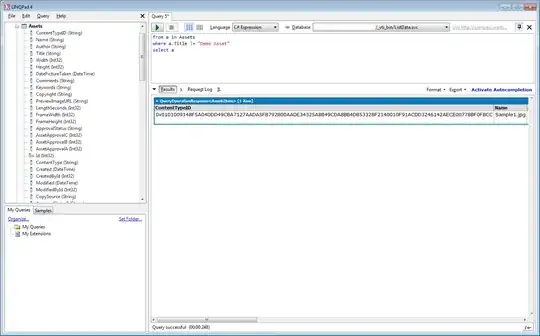
LinqPad - free development tool for learning and testing Language Integrated Query (LINQ) against SQL, ODATA, or an Entity Framework solution
Great way to learn to Query the SharePoint List Data Service with LinqPad
Main Window
MOSS BDC Design Studio. Cheaper than Metaman but I found to have all the tools I need to create ADFs for the Business Data Catalogue.
a bit of shameless self-promotion, but SharePoint InlineSiteSettings is a small jQuery script I put on CodePlex that saves a developer (or admin) a significant amount time by shortening the navigation paths and limiting the amount of mouse clicks required to get to a particular admin page in SharePoint. It's all about keeping the momentum going :)
I'm going to demonstrate a bias too, but then, I do lots with SharePoint search and I'm always using it:
Helps you write and quickly test search queries.

Moss Query Tool - Excellent tool to test search queries against the MOSS search database. The application helps you build queries as well.
I can't seem to find the download link anywhere but after a quick Google search, I found this tool SharePointSearchServ which apparently replaces MOSS Query Tool.

Fxcop for static code analysis, in case you are using a VS prof edition
If you want to create an on the go, Standalone SP virtual server, use 'VM Player'. It's free and easy to use :D!!
CAML Designer for SharePoint 2013
VirtualBox - the poor man's virtual machine maker (an alternative to HyperV).

A tool usefull for sites content migration: WssAnalyzeFeatures
This tool allows to verify if the feature definition files for all installed features are present on the file system. Also allows to verify if the features used in site collections an sites are installed on the server. In addition it can create a checklist file which can be used to verify if a server has all features installed required to act as destination for a content deployment job of an existing sitecollection.
Usage:
WssAnalyzeFeatures -url http://server:port
More about it here: WssAnalyzeFeatures

SharePoint Feature Admin Tool - for taming and nuking rogue features orphaned during caffeine fueled development sessions.
Along with the following handy powershell commands to force delete broken features.
Get-SPFeature | ? { $_.Scope -eq $null }
Get-SPFeature | ? { !$_.Scope } | % { $_.Delete() }

Here are a few helpful tools I use:
Here's a list of other useful tools:


