4

Can someone please once and for all explain to me clearly how it is with SharePoint hierarchy?

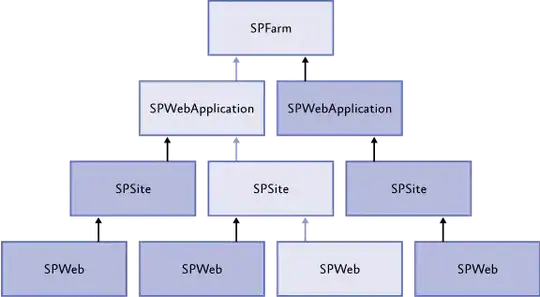
The names that are displayed are all mixed up, the names of classes are all mixed up and the diagrams like this:
enter image description here

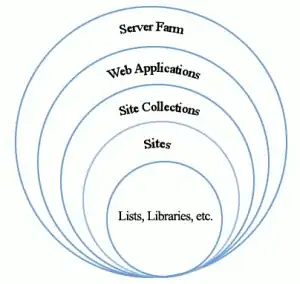
or this:

enter image description here

never covers both names at once on one diagram, leaving me guessing which is which. Perhaps, the confusion is caused by all of these synonyms: site, web, page (and website, web page).

The main questions are:

  • when I'm in browser, is it possible to determine from the URL if I am on the Site Collection, on Site, on Web, on Page? If so, how is this possible? e.g. http://sharepointtest.com/sites/abc/def/Pages/default.aspx
  • from which location I can go "up" one level and from which it's not possible?
  • if a Site can be placed within a Site Collection but also Site Collection can be placed within Site Collection then what is the difference? Is "Site" always some sort of a previous to last navigation level in which only single pages resides?
  • which class represents which name?

Right know I'm guessing that:

  • Web Application is SPWebApplication (http://sharepointtest.com/)
  • Site Collection is SPSiteCollection or SPSite? (/ or /sites/abc?)
  • Site is SPSite or SPWeb? (/def/?)
  • Page is SPWeb or ...? (default.aspx???)

Pardon me if the question is silly but I really feel like I'm walking in the fog even after a few months of SharePoint developing...

If the question seems vague, I could elaborate in comments.

Thanks.

Mariusz Ignatowicz
  • 687
  • 1
  • 9
  • 25

1 Answers1

3

Both diagrams are correct though the first is far more usable. To answer your questions :

  1. Without specific knowledge of the farm, no. However, generally anything that appears under /sites/ is in a unique site collection. Whether it is a page or a document would depend on the URL and that is pretty easy to identify as the url ends with .ASPX for pages and .DOCX, .XLSX or .PPTX (etc) for documents.
  2. You can always go up to the nearest site collection. Anything beyond that would require some type of navigation customization.
  3. No. A Site Collection is a data boundary and it contains all data related to that site collection. However, it is possible to construct a hierarchy that appears to have Site Collections within another site collection. In reality, no data is shared between the two site collections.

as to the definitions

  • SPFarm represents the very top of the hierarchy and provides access to configuration and features that can affect every web application in the entire SharePoint farm. This is a very dangerous object to work with but it is also very rare that one ever actually needs to do so.
  • SPWebApplication always points to the root web application in the URL. This is what a non-SharePoint person normally thinks of as a 'site.` However, SPWebApplications cannot have data in an of themselves. To actually store data, at least one Site Collection must be created in that web application.
  • SPSiteCollection is just a collection of SPSite objects and not really an entity itself. The 'NNNCollection' naming convention is common for SharePoint object collections but is confusing in this context
  • SPSite is a Site Collection and is a data boundary. It can exist at the root of the web application or be elsewhere in the hierarchy. It always has at least one SPWeb object at the root, known as RootWeb.
  • SPWeb refers to an individual site within a site collection. Any sites below the root are known interchangeably as subsites or subwebs
  • Most 'real' data such as lists, libraries, pages and so forth exist within the SPWeb objects.

I should also point out that even though SharePoint appears to be structured in a hierarchy, there is seldom any need to treat it as such. The Site Collection is the major data boundary so almost all interactions with the object model start by instantiating an SPSite object in some form.

Dave Wise
  • 13,181
  • 18
  • 19