3

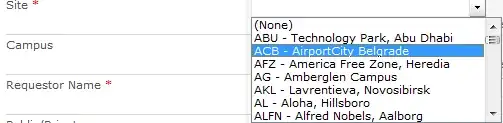
I am using SP2010. In one of the lists I have several lookup fields as dropdowns in the forms, and I have a weird issue: 3 of 4 dropdowns, which are rendered as input (>20 items) are opened in a wrong location after opening one of the dropdowns in the form. Maning that after I opened dropdown#1 options, and then opened dropdown#2 options - dropdown#2's options will open under dropdown#1 field. See example below.

Few more important details:

  1. It happens in IE9, but Chrome works fine.
  2. Other dropdown which is rendered as select, works fine.
  3. As i said, this mishmash happens only after one of the 3 dropdowns was opened.

Example, notice Site & Campus fields. Both lookups with >20 items hence rendered as inputs.

Normally opens 'Campus':

https://i.stack.imgur.com/QJxoP.png

Mislocation of 'Campus' options under 'Site' field: https://i.stack.imgur.com/4QNTn.png
Stu Pegg
  • 4,623
  • 7
  • 48
  • 91
user2633360
  • 131
  • 1
  • 3
  • You appear to have a third party Cascading Lookup installed, is that right? If so, you'll need to consult the provider for a resolution. – Stu Pegg Jul 30 '13 at 10:38
  • Actually no, it happens even in the 'natural' form if I neutralize all external code. – user2633360 Jul 30 '13 at 10:46
  • This rendering logic is baked into the lookup field for IE and +20 items. I once wrote a ControlAdapter that would bypass this. If you're interested drop me a note. Are you using a modified master page or injecting custom script ? – Steven Van de Craen Jul 30 '13 at 10:57
  • Thanks, do you have any solution based on JS. I'm not so familiar with C# customizations. I am currently working with injected JS. – user2633360 Jul 30 '13 at 11:20
  • @user2633360, to work around this issue I've created autocomplete lookup (pure js + jQuery). If you are interested, I'll assist you tomorrow. – Sergei Sergeev Jul 30 '13 at 11:47

3 Answers3

3

If you'd like to convert the "complex dropdown" (20+ options in IE only) to a "simple dropdown", SPServices has a function called SPComplexToSimpleDropdown which will do it for you. http://spservices.codeplex.com/wikipage?title=%24%28%29.SPServices.SPComplexToSimpleDropdown

Marc D Anderson
  • 9,686
  • 2
  • 36
  • 51
1

It happens only in IE because the IE render the dropdowns with 20+ items as if it is auto complete and then it causes many problems because it is uncontrollable.

I was having the same issue. After trying a lot of solution, I followed this link http://sharepointegg.blogspot.com.au/2010/10/fixing-sharepoint-2010-lookup-drop-down.html

The code snippet works like charm, you just have to add it to the page and specify the drop downs you need to fix.

Hope it works for you.

0

There is no need for compiled code to resolve this issue - Simply add 2 lines of CSS to fix this.

select
{
    position: inherit !important;
    display: block;
}

From here CSS solution to the lookup column drop down list select area positioning

Robert Lindgren
  • 24,520
  • 12
  • 53
  • 79