Backup strategy depends on
- Environment
- Time to recover backup in case of disaster
- Resources one can afford
- What you want to recover or what's most important for you to recover
If its a development environment with just single box with everything on it then people prefer to virtualize it and keep a copy of VHD, as it takes couple of minutes to restore a full working backup copy.
If it's a production environment then best thing would be to follow best practices as provided by Microsoft,
Plan for backup and recovery in SharePoint Server 2010
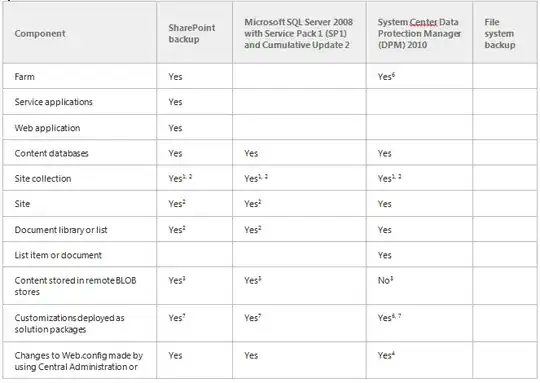
The following table lists components of a SharePoint environment that
you might decide to protect, and the tools that can be used to back up
and recover each component.
One thing people always forget is that SharePoint is a combination of technologies and simply backing up through CA or SQL will not give them advantage to fully recover whole environment back to how it was before disaster. Best example would be if you got custom site definitions deployed to 14 hive folder or a custom list feature which was installed directly (like you didn't deployed a solution but put feature straight into hive folder) to hive folder will not be backed up unless you manually back them up.
You might also need to backup GAC folder if custom assemblies have been deployed to it, but it totally depends on backup strategy.


Also, forgive my newbie-ness, but what is CA?
– Andrew Talbot May 01 '13 at 19:09