1

In my list, I want a column to have a custom hyperlink.

I create a Calculated column that has the following formula.

="<a href='/_Layouts/tf.intranet/TFLutakastPage.aspx?LutakastId="&ID&"'>"&Title&"</a>"
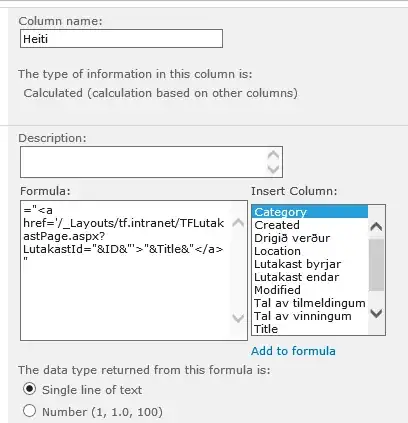
enter image description here

I set the returned data type as Single line of text.

When the column renders, it renders like this. enter image description here

If i set the column to render as a number, I can get the hyperlink to render correctly.

enter image description here

But then the problem is that the text is right aligned. Customer wants it left aligned.

I then tried changing the column formula to

="<DIV align=""left""><a href='/_Layouts/tf.intranet/TFLutakastPage.aspx?LutakastId="&ID&"'>"&Title&"</a></DIV>"

This will solve the problem with the link, but the header text is still right aligned.

enter image description here

How can i:

A. Get the hyperlink to render as a text field.

or

B. Leave it as a number field and left align the header column.

I'm Using Sharepoint 2010

Oddmar Dam
  • 337
  • 6
  • 15

3 Answers3

2

I have changed the calculated column display format to "Date and time" "Date Only" Option. it will Right Align the values.

Robert Lindgren
  • 24,520
  • 12
  • 53
  • 79
user994521
  • 581
  • 6
  • 13
1

This article is a bit dated, but it shows you how to properly do HTML in your calculated columns: http://blog.pathtosharepoint.com/2008/09/01/using-calculated-columns-to-write-html/

I would avoid using the number column method as your alignment issues would be impossible to fix adequately without affecting other columns.

John Chapman
  • 11,941
  • 6
  • 36
  • 62
0

Not sure this will work in 2010, but in 2013 the simplest (and most limited) solution is to add a CEWP to the page, click Edit Source and add css to left align the header text:

.ms-numHeader {text-align: left;}

...enclosed in style tags. Worked for me anyway...and thanks for the tip on how to left align the calculated field!

Waqas Sarwar MVP
  • 57,008
  • 17
  • 43
  • 79
Quasimodo
  • 77
  • 2
  • 12