How to create and write XML file in below URL using visual studio(programmatically).
web.Url + "/_layouts/MyPoject/Generated.xml"
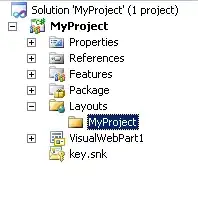
I want to generate XML programatically inside MyProject Folder. Once it generate, how to write into that XML?
How to create and write XML file in below URL using visual studio(programmatically).
web.Url + "/_layouts/MyPoject/Generated.xml"
I want to generate XML programatically inside MyProject Folder. Once it generate, how to write into that XML?


I don't believe this is a supported model, also I wouldn't recommend it.
The layouts folder should be as 'static' as possible. A few cons for using the layouts folder:
Instead of using the layouts folder, save your XML to a document library, or save the XML in a property bag within the farm somewhere. This way, it's centrally available and is being backed up as part of the farm's existent management solution.
HTH

i think first find it out Layouts Directory file using SPUtility.GetGenericSetupPath
  string templatePath = SPUtility.GetGenericSetupPath("TEMPLATE");
  string Paths = Path.Combine(templatePath, @"LAYOUTS\MyProject");
and than create xml or update your xml.
like this:
   SPSecurity.RunWithElevatedPrivileges(delegate()
        {
            string templatePath = SPUtility.GetGenericSetupPath("TEMPLATE");
            string Paths = Path.Combine(templatePath, @"LAYOUTS\MyProject");


            XmlDocument doc = new XmlDocument();
            XmlNode ServiceRequestNode = doc.CreateElement("XMLNode");
            doc.AppendChild(ServiceRequestNode);
            XmlNode RequestorName = doc.CreateElement("XMLChildNode");
            RequestorName.InnerText = "this is testing";
            doc.DocumentElement.AppendChild(RequestorName);
            byte[] bytes = Encoding.UTF8.GetBytes(doc.OuterXml);
            MemoryStream ms = new MemoryStream(bytes);
            XmlDocument xdoc = new XmlDocument();
            xdoc.Load(ms);

            DirectoryInfo FolderName = new DirectoryInfo(Paths);
            try
            {
                FolderName.Create();
            }
            catch { }

            string fileName = Paths + @"\" + "MyXML.xml";
            xdoc.Save(fileName);

        });
its working on my local
Hope it helps!!!

By default the "MyProject" portion of the url is based on the solution name (project name)
