Parent List has a lookup with multiple promotional items. Once user chooses a promotional item, I want user to be able to add a quantity to that specific item. User should be able to select Multiple items, and assign unique quantities to each item. Any help would be great!!
Asked
Active
Viewed 1,046 times

2 Answers
3
I would suggest to consider the following solution:
- Create a list "Quantities" with three columns: Title, Promotional item, Quantity. The Promotional item column, obvioulsy, is the lookup to the list with promotional items.
- Create a multilookup column Items with quantities in the Parent List, which points to Title column of the "Quantities" list
- Create a special control for editing the Items with quantities column (see details below)
- Using custom ListFieldIterator, override standard control with your custom control.
The most curious thing here is the mentioned custom control for displaying "Items with quantities" column. It would look something like this:
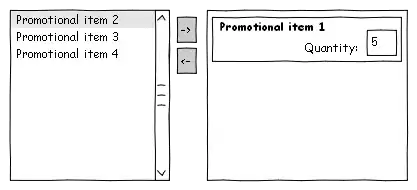
When you press -> button, the control should create a new item in the "Quantities" list, by using EcmaScript client object model, and set initial values as follows:
- Title = PromotionalItemTitle + "(" + DefaultQuantity + ")"
- Quantity = DefaultQuantity
- Promotional item = PromotionalItemId
Each time you change quantity, the control must update the corresponding item in the "Quantities" list, following way:
- Title = PromotionalItemTitle + "(" + NewQuantity + ")"
- Quantity = NewQuantity
- Promotional item remains unchanged
Thus, since the Items with quantities column is linked to the Title column of the "Quantities" list, values of this column will be displayed by default as "[Title] ([Quantity])", this is I assume quite acceptable. Hence, you will be able to avoid any display customizations.

Andrey Markeev
- 16,286
- 3
- 40
- 70
1
In order to do this you would have to add the following components:
- A third list containing lookups to the other two lists, and the quantity.
- A custom form on the parent list to display the add/edit interface, and update the third list.
- A custom form on the parent list to view the item, and related items/quantities
But this would still not display the quantities on the list view.
Alternatively, you could create a multi-valued Custom Field Type to handle input and display, but this is is likely to be even more difficult.

Stu Pegg
- 4,623
- 7
- 48
- 91
I am also working in Sharepoint Designer, do I need to create custom controls in Visual Studio first? then apply them in Designer?
– Brenton Pierce Feb 03 '12 at 19:59<script>tag there. To achieve this, you will need to edit HTML source (Ribbon -> Editing tools -> Format Text tab -> HTML -> Edit HTML source) – Andrey Markeev Feb 03 '12 at 20:45