10

I found that the SPFieldChoice has mappings

<Field ID="{c15b34c3-ce7d-490a-b133-3f4de8801b76}" Type="Choice" Name="Status" DisplayName="$Resources:core,Tasks_Status;" SourceID="http://schemas.microsoft.com/sharepoint/v3" StaticName="Status">
  <CHOICES>
    <CHOICE>$Resources:core,Tasks_NotStarted;</CHOICE>
    <CHOICE>$Resources:core,Tasks_InProgress;</CHOICE>
    <CHOICE>$Resources:core,Tasks_Completed;</CHOICE>
    <CHOICE>$Resources:core,Tasks_Deferred;</CHOICE>
    <CHOICE>$Resources:core,Tasks_Waiting;</CHOICE>
  </CHOICES>
  <MAPPINGS>
    <MAPPING Value="1">$Resources:core,Tasks_NotStarted;</MAPPING>
    <MAPPING Value="2">$Resources:core,Tasks_InProgress;</MAPPING>
    <MAPPING Value="3">$Resources:core,Tasks_Completed;</MAPPING>
    <MAPPING Value="4">$Resources:core,Tasks_Deferred;</MAPPING>
    <MAPPING Value="5">$Resources:core,Tasks_Waiting;</MAPPING>
  </MAPPINGS>
  <Default>$Resources:core,Tasks_NotStarted;</Default>
</Field>

But how can I work with this mappings in code? For example, how can I retrive mapping value for complited task status based on item field value and compare with "3" ?

Thx

Alexander
  • 8,139
  • 2
  • 27
  • 42
  • Alexander, your question seems to be a dupe of one of my older questions. Unfortunately, as now no concrete answer was found. Fell free to refer to the original question for further details about my current discovery. – SPArcheon Dec 19 '11 at 07:35
  • @SPArchaeologist, may be I'm stupid... I don't undestand how can I use solutions in your question. ((( – Alexander Dec 19 '11 at 07:46
  • Problem is... I haven't found any solution at the moment. The other question is still open to answer. I was just providing a link with some more info on the issue - as now, that is all I can do I fear. – SPArcheon Dec 19 '11 at 09:14
  • I haven't tried this so I don't know if there are any caveats here, but instead of trying to rely on an out of the box column type perhaps try creating your own? – SpartanDonut Jan 31 '12 at 14:37
  • @tylerrrr07, the main question is what are the mappings? how could we use it? – Alexander Jan 31 '12 at 14:46
  • Right and based on @SPArchaeologist comments it sounds like how to work with these mappings is unknown. I was throwing out an alternative if you need similar behavior. I realize I didn't answer your question hence me leaving a comment and not an answer. – SpartanDonut Jan 31 '12 at 15:39
  • @tylerrrr07... I had also tried to ask around to see if I can work out anything about the mappings schema element but with no luck at all (as you may see in my question linked above). As now the only way to use that mapping seems to be to manually process the SPFieldMultiChoice.Mappings property of the field, extract the mappings xmlelement and process it to perform the mapping. – SPArcheon Feb 01 '12 at 09:16
  • I can also add that most of my current finding would indicate that no out-of-box way to use the mappings element exist in the object model (or at last it doesn't seem to be used at all). I would post that as an answer, but that would bring us to the Russell's teapot problem: I did not see the "mappings usage teapot", does that mean it doesn't exist?? – SPArcheon Feb 01 '12 at 09:38
  • You should not use comments as chat. Please move this thread to the SharePoint chat instead please :-) – Anders Rask Feb 04 '12 at 22:36

4 Answers4

11

Why do you need mappings

First things first: let me explain, why do you need to use mappings at all.

With some accuracy it can be said, that a Choice field in SharePoint represents a DropDownList control. And in the ASP.Net DropDownList control, each item (ListItem, to be precise) has two essential properties: Text and Value. Obviously, Value property acts as an identifier for the corresponding Text property.

This is very convenient, because you can use some display values, separated from actual values which you can bind to enums, or store somewhere, etc. Thus, if a customer wants to change how a certain item is displayed, developer is able to change the display value safely, nothing else in the code gets involved.

The purpose of mappings is absolutely the same, essentially they intend to bring analogue for the Value property to Choice fields.

Particularily, mappings are useful in multilanguage environments, to disengage from localized display values.

Hope it's clear now, and now let me show how you can deal with SharePoint Choice field mappings.

How to use mappings

Unfortunately, SharePoint is able to store only display values in the database, while mappings seem like a late attempt to add the missed Value property to Choice fields.

Even worse, while you can create and store mappings, there is no existing functionality for retrieving them, and honestly I can't imagine any reasons for that: the implementation doesn't seem to be complicated.

I think the following syntax for retrieving values from mappings could be quite convenient:

Guid fieldGuid = new Guid("put-your-field-guid-here");
SPListItem listItem = // get the list item from somewhere
var mappedValue = listItem.Fields[fieldGuid].GetMappedValue(listItem[fieldGuid]);

, there GetMappedValue method is a custom extension method.

This could be implemented using the following code:

public static class SPExtensions
{
    public static string GetMappedValue(this SPFieldMultiChoice field, object value)
    {
        return GetValueFromMapping(field.Mappings, Convert.ToString(value));
    }
internal static string GetValueFromMapping(string mappingsXml, string fieldMultiValue)
{
    var result = String.Empty;
    foreach (var value in fieldMultiValue.Split(new string[] { &quot;;#&quot; }, StringSplitOptions.RemoveEmptyEntries))
    {
        XDocument document = XDocument.Parse(mappingsXml);
        var mapping = document.Element(&quot;MAPPINGS&quot;).Elements(&quot;MAPPING&quot;).FirstOrDefault(m =&gt; LocalizedEqual(m.Value, value));
        if (mapping != null)
            result += &quot;;#&quot; + mapping.Attribute(&quot;Value&quot;).Value;
    }

    return result.TrimStart(';', '#');
}

private static bool LocalizedEqual(string mappingValue, string value)
{
    if (mappingValue.TrimStart().StartsWith(&quot;$&quot;))
        mappingValue = SPUtility.GetLocalizedString(mappingValue, &quot;core&quot;, (uint)Thread.CurrentThread.CurrentUICulture.LCID);

    return mappingValue.Equals(value);
}

}

GetValueFromMapping method is separated from the rest of the code for testing purposes.

The testing result:
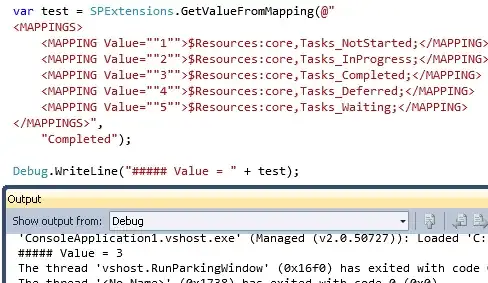
enter image description here

So, as you could have noticed from the screenshot, "Completed" display value was successfully resolved to "3".

Andrey Markeev
  • 16,286
  • 3
  • 40
  • 70
  • Nice... now I don't need to implement my proposal myself ^_^. BTW, are you sure that the aforementioned method really doesn't exist? Seems that SharePoint defines some enums for the HealdScope and Task Status fields, so perhaps somewere a (private/internal) mapping method exist. Anyway, at the moment the extension method is our best bet. – SPArcheon Feb 06 '12 at 09:30
0

Not sure I fully understand the question, but perhaps SPField.SchemaXml gives you access to the info you need.

Jaap Vossers
  • 5,040
  • 2
  • 24
  • 28
0

From the above - I presume by "SPChoiceField has mappings" you mean SPFieldChoice (& not SPChoiceField).

SPFieldChoice inherits the Mappings property from SPFieldMultiChoice and this is a string that represents the canonical values for the (multi)choices using XML & key/value pairing is not used.

Here's SPFieldMultiChoice example to get/set choice field.

The class SPFieldMultiChoiceValue is used to contain SPFieldMultiChoice values. Internally, it's just a mapping string and not a key/value pair.

Another example - Working with SPFieldMultiChoiceValue: Saving and Loading

I have to agree with the response below (from Jaap Vossers) & that the question is not too clear. My presumption is that you are seeking examples (some posted above) in using SPChoiceField and/or using the XML obtained by the 'Mappings' property and working with it using its Canonical form.

Supriyo SB Chatterjee
  • 2,911
  • 14
  • 22
0

Using your example of list "Resources" (objList) with SPFieldChoice "Status", where multiple selection is not allowed. objItem is an item in objList where you want to know the index of the Status field:

int i;
i = ((SPFieldChoice)objList.Fields["Status"])Choices.IndexOf(objItem["Status"].ToString());
CigarDoug
  • 1,063
  • 2
  • 16
  • 44