I am hoping that someone can help with the following scenario. Basically the error I am getting is that when I click on my dynamicly created button it is not firing its corresponding function.
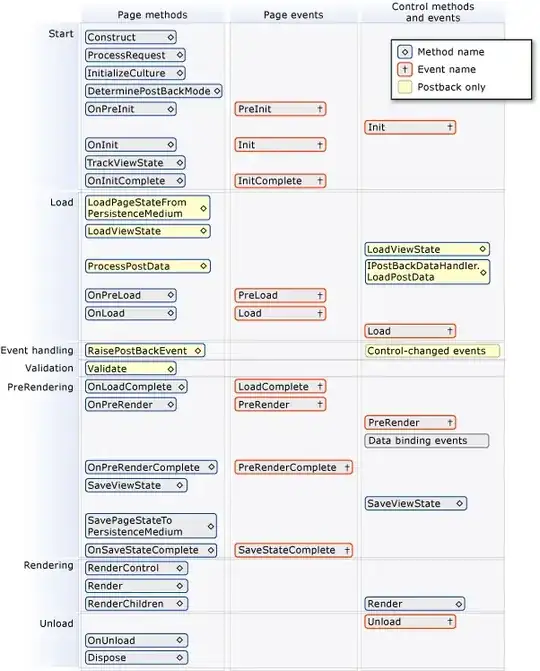
The scenario is as follows. It is a visual webpart, but on page load a whole bunch of controls are dynamically created and added to a placeholder. Everything is loading fine, but when I click on the button control that was dynamically added it posts back, but doesnt hit my function and all my controls dissapear too, even though they set to be recreated everytime on page load (not checking for IsPostBack).
The code for adding the button is as follows:
Button _imageButton = new Button();
_imageButton.Click += new EventHandler(this.btn_ExpandCollapse);
_imageButton.CausesValidation = false;
_imageButton.ID = "m_img" + ItemId;
_imageButton.CssClass = "PlusImageButton";
_imageButton.CommandArgument = ItemId;
the function is as follows
protected void btn_ExpandCollapse(object sender, EventArgs e)
{
    //do stuff - get command argument and expand or collapse right one.
}
I've tried not using "this" in the EventHandler I've tried not specifying the ID property I've tried not setting the CommandArgument property
It was originally an ImageButton, and that had the same issue, so it got changed to a normal Button thinking that that was the problem.
If I add a hardcoded button on the page, it triggers the function, but the moment I do it dynamically it doesnt work.
I used the same button creation code that was in a sandbox solution and the button and function gets run, but I suspect I have to do something extra as its a visual webpart. Do I have to add anything to viewstate extra? I've started doing it with the placeholder but so far no luck.
Does anybody have any ideas on what I need to do extra? Unfortunately I have to create the buttons dynamically as there is one for each list entry thats listed.
Any help would be much appreciated.