I've just setup SharePoint on a dedicated server and I am now going through setting up the backup plans before we start really using it.
Because SharePoint does not have an "automated" backup solution, I have had to use Scheduled tasks and the PowerShell cmdlet Backup-SPFarm.
When running this manually, it appears to work perfectly fine, but when running it via a Scheduled task that is setup to run under the Administrator, it fails with a number of errors similar to that below.
[11/11/2011 01:04:52] FatalError: Object SharePoint_Config_63c9c78d-7c3d-4b6f-bad3-8f5c448e787d failed in event OnBackup. For more information, see the spbackup.log or sprestore.log file located in the backup directory.
SqlException: Cannot perform a differential backup for database "SharePoint_Config_63c9c78d-7c3d-4b6f-bad3-8f5c448e787d", because a current database backup does not exist. Perform a full database backup by reissuing BACKUP DATABASE, omitting the WITH DIFFERENTIAL option.
BACKUP DATABASE is terminating abnormally.
It seems pretty obvious that it's telling me to perform a "full" backup first, but the problem is, I already have and it appears within the backup history within SharePoint central administration.
I am using two variations of the PowerShell script below, one for Full and one for Differential. As standard, I am performing a full backup on Sunday and then a differential backup on each of the other days.
Clear-Host
$Error.Clear()

$BackupDir = 'c:\Backup\Sharepoint'
$FromAccount = 'administrator@domain.co.uk'
$ToAccount = 'gavin.roberts@domain.co.uk'
$smtpServer = 'smtp.gmail.com'

$snapin = (Get-PSSnapin -name Microsoft.SharePoint.PowerShell -EA SilentlyContinue)
IF ($snapin -ne $null)
{
    write-host -f Green "SharePoint Snap-in is loaded... No Action taken"
}
ELSE
{
    write-host -f Yellow "SharePoint Snap-in not found... Loading now"
    Add-PSSnapin Microsoft.SharePoint.PowerShell
    write-host -f Green "SharePoint Snap-in is now loaded"
}

Write-Host -f green "Staring Backup process"
Backup-SPFarm -Directory $BackupDir -BackupMethod Differential -BackupThreads 10 -Force -ErrorAction SilentlyContinue
Write-Host -f green "Exit: Backup process"
IF($Error[0] -ne $null)
{
    $xmldata = [xml](Get-Content ($BackupDir +'\spbrtoc.xml'))
    $Node = $xmldata.SPBackupRestoreHistory.SPHistoryObject | Where-Object {$_.SPErrorCount -gt '0' -and $_.SPStartTime -gt (Get-Date -DisplayHint Date)}
    $FailureMsg =  $Node[0] | % {$_.SPFailure}
    $Att = ($Node[0] | % {$_.SPBackupDirectory}) + 'spbackup.log'
    $msgBody = 'An Error occurred while trying to backup your SharePoint Farm. Details : ' + $Failuremsg + 'Attached is the Error Log for additional reference.'

    $SMTPClient = New-Object Net.Mail.SmtpClient($smtpServer, 587)
    $SMTPClient.EnableSsl = $true
    $SMTPClient.Credentials = New-Object System.Net.NetworkCredential("gavin.roberts@domain.co.uk", "password");
    $SMTPClient.Send($FromAccount, $ToAccount, 'Error Occured in SharePoint Backup', $msgBody)
}
Write-Host -f Green "Operation Complete"
Can anyone see what I am doing wrong?
Edit:
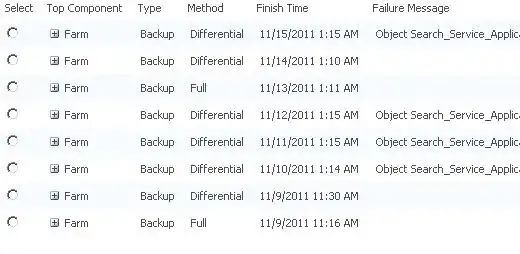
It appears that after a full backup was performed on Sunday morning, and a differential successfully on Monday morning, but this morning, it failed with the same error. Hope this helps?
Cheers


