I am holding responsive CSS file. And I would like it to apply my CSS
file for my site collection and its subsites, so that lists and document
libraries also get responsive.
Can anyone help me in knowing how can I achieve it using PowerShell.
I am holding responsive CSS file. And I would like it to apply my CSS
file for my site collection and its subsites, so that lists and document
libraries also get responsive.
Can anyone help me in knowing how can I achieve it using PowerShell.
Instead of ruining MasterPages or running PS scripts, you can do it all ClientSide (with a little help of a Chrome Extension)
You can load a CSS file as UserCustomAction for the whole Site Collection (or one Web)
Install the SPEditor: https://chrome.google.com/webstore/detail/sp-editor/ecblfcmjnbbgaojblcpmjoamegpbodhd?hl=en
Open your site
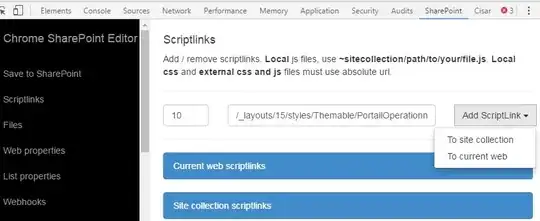
Note: Your CSS could be loaded before SharePoint CSS, so you need to set your CSS Specificity right on all selectors so they overrule the later loaded CSS files
This is also the best way to load any JS Library

You can try the below powershell script:
Ensure that css path is valid and everybody has permission to access it.
$site = Get-SPSite https://sitecollectionurl
foreach ($web in $site.AllWebs)
{

    $web.AlternateCssUrl  = $site.Url + "/SiteAssets/custom.css"
    $web.Update();
    Write-Host "applied responsive css at - " + $web.Url
}
$site.Dispose()


