I have list with multiple views , i want to add button in each view to show the total numbers assigned to the current user
is it possible?
I have list with multiple views , i want to add button in each view to show the total numbers assigned to the current user
is it possible?

Whatever you are using task list or custom list, I don't think you need to use javascript to achieve your requirements also you can't add a button to each view simply as OOTB. you will need to customize it.
So my suggestions get the total items based on the login user as the following:
At filter section > select the assigned to field equal to [me]

At total section > Count with any column as you need.

[Output]

Regarding other views you can repeat the above steps,
Regarding new views you can create a view from existing view that has the same configuration and starts from it :)

Create a CSR - Client Side Rendering file that highlights (green) the Items Assigned To the current user
SP.SOD.executeFunc("clienttemplates.js", "SPClientTemplates", function () {

  function assignedToMe(ctx){
    if (user = ctx.CurrentItem.AssignedTo[0]) {
        color = (_spPageContextInfo.userId == user.id) ? 'lightgreen' : 'inherit';
        return String.format("<span style='background:{0}'>{1}</span>", color, user.value);
    }
    return "";
  }

  function init() {
    SPClientTemplates.TemplateManager.RegisterTemplateOverrides({
      Templates: {
        Fields: {
          "AssignedTo": {
            View: assignedToMe
          }
        }
      }
    });
  }

  RegisterModuleInit(
    SPClientTemplates.Utility.ReplaceUrlTokens("~siteCollection/Style Library/myfile.js")
    , init);
  init();
});
JavaScript Notes:
user and color variables are not declared, so JS hoists them to local variables within the function
the user.id is a string, while the userId is Number, comparing with == works fine, while comparing with === will not
String.format is provided by SharePoint SP.js code, it can do lots more
see: Changing date format using javascript
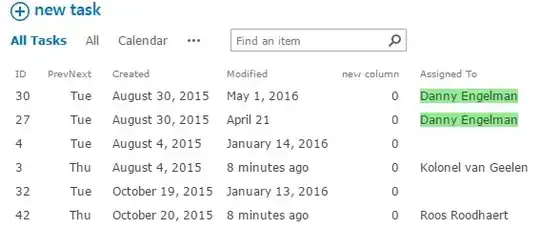
you do have to add the file to the JSLink definition of every view (open Cisar in every View and link your file, Cisar creates the JSLinks for you)
If you execute the JS file as UserCustomAction (or load it in the MasterPage), it will be applied to every AssignedTo field in every View
