I added a choice field "IsMainframe". Business unit only want Blank and Yes. How do I incorporate blank in a choice field?
Asked
Active
Viewed 7.1k times
24

-
I would just tell the business unit to reconsider their request and use a more explicit option, considering that SharePoint doesn't handle blanks. – Christophe Sep 10 '11 at 04:35
10 Answers
18
You could use a unicode character that does not print anything. I tried it with U+205F and it seemed to work as expected. To put this character in, open up the charmap (Start->Run->charmap) on your machine, then select a font that has unicode support (I chose calibri), scroll almost to the bottom and find the U+205F. You can then double click the character and it will place it in the textbox below. You can then copy that value and put it in a choice field option and it will appear as blank to the user.
EDIT: Make sure you also put it in as the default value, otherwise you will get three choices (NULL, U+205F, and YES). Also, if you have any existing rows in the list, you will see three choices if the row has a null value currently assigned.
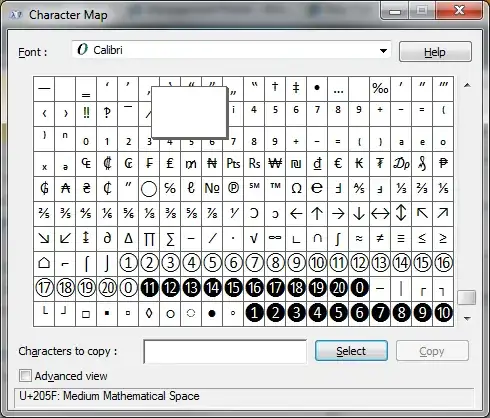
As you can see the test column now appears to have a blank option.


John Koerner
- 386
- 1
- 5
-
I copied and pasted the blank in the choice; but I still see "Yes" to be the only option. – Mary Rivers Sep 14 '11 at 20:30
-
Did you try this on the EditForm? because by default a blank will appear with Yes in the NewForm. – Mary Rivers Sep 14 '11 at 20:36
-
I was testing on a document library, where it worked as expected. I tried it on a normal list and I am seeing what you are seeing. It seems to be if nothing is selected (the value is null) it will have a spot to allow you to keep the null value. Once you select a value, then it will only allow you to select from valid choices. – John Koerner Sep 16 '11 at 00:18
-
I am so positive i am doing something wrong. Please see the link for the column setup screen and editform screen shots. http://imageshack.us/photo/my-images/17/setupcolumn.png/ http://imageshack.us/photo/my-images/833/editornewformresult.png/ – Mary Rivers Sep 16 '11 at 13:59
-
Are you typing "U+205F" in the field? Read the description of what I said above. Copy and paste using the Charmap to copy the value from the charmap and paste it in as an option and as the default value on your column. – John Koerner Sep 16 '11 at 17:42
-
@John: I can copy and paste it from charmap to both as an option and default value. oh well. I guess I will have to move on. Thanks for all you help. – Mary Rivers Sep 19 '11 at 13:10
5
The Right Way To Do This
Using: SharePoint2013
Current Answer Not Acceptable
I've seen several answer similar to the above. Everyone saying use ALT0129 or the blank font character. I found these workarounds unacceptable because they would create a disconnect from the default SharPoint column filter (Empty) and instead create a new check box that is just blank.
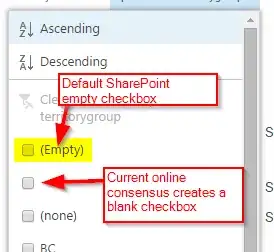
This is because the field is still holding a character and is not truly empty. Which causes more work because anything else you setup, like views have to account for this blank character. Even if a user is just doing a simple filter on the column they will need to know that they have to check (Empty) and the blank value to get all the empty fields.
A Better Way
I spent two days on and off looking around the internet and was about to give up, when I was looking through the ASCII character sets and came up with this solution.
First clear out your list of any of the blank entries(the space or the ALT0129) characters, leave the list with the actual values you want in it.
Now switch your Deafult value setting to Calculated Value and enter CHAR(127) in the field. This value is akin to Delete on the character map, thus it enters no actual character hidden or otherwise and only creates one blank value in the drop down list, which for some reason the other online methods I've tried create two blank fields in the list.
Once you fix that just go to your list and update your records. I would suggest just filtering all those blank answers and using the Edit to do a mass change. Set the first one then just drag from there. Once you replace all the blank character values, you'll see the blank column filter is gone and you will just have the SharePoint (Empty) default one.
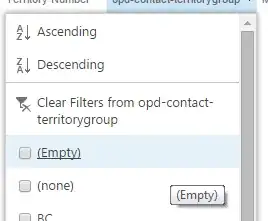
Note: Please note I had to update this post. I can't remember why I had put CHAR(160), but I ended up using CHAR(127). I may have just been in a rush when typing this up.
--cubesmind


Andrew Cuber
- 51
- 1
- 2
-
1This solution assumes the item will never be edited to change the value back to blank, which seems to be the biggest challenge. – Francisco Aquino Dec 22 '15 at 17:35
5
- Go to the column drop down list in question.
- At the first entry on the list do a return to create a blank space.
- Inside that blank space place your cursor and press and hold down the ALT key while typing 0129 on the NUMERIC KEYPAD. This will enter another type of “blank character” that SharePoint cannot wipe away.
- In the Default Entry setting do the same.
- Save and you are done.

Amay Kulkarni
- 631
- 8
- 10
4
Just create the Choice field as a drop down list with the only option of Yes and set no default value. When an item is submitted an empty value will be set in the list.
If a user sets the field and wants to revert back to no value, they'll be forced to go into datasheet mode to remove the selection. THe regular editform will not give them a means to deselct the only value in the list.
You could use some jQuery to set it back to empty. Here's a basic example.
<script type="text/javascript">
$(document).ready(function(){
 $("[title$='YourDDLColumn'] option:selected").val();
});
</script>
You'll probably want to wrap it in some sort of click function or wrapped in logic that checks for a query string value to exist.
Alternatively you could create it as a Yes/No field with the default value being No (unselected). It would save into the list as No, not a blank value though.

Eric Alexander
- 43,293
- 10
- 53
- 93
-
@Eric: That's exactly I have it. But user accidentally picked "Yes" from the choice box and were not able to go to back to blank. (Business unit dont want Y/N bool field type. They just want blank and Yes). – Mary Rivers Sep 09 '11 at 20:02
-
Rather than having an empty choice, you could have a string called 'null', or 'blank'. That would mean the user didn't make a selection. – Tim Gabrhel Sep 09 '11 at 20:06
-
Only problem, they (business users) only wants to see blank (null) or Yes. – Mary Rivers Sep 12 '11 at 16:20
-
I've tested my example above, Choice column, no default value with Yes as the only option. On my NewForm and EditForm, the default value is blank and when the drop down is activated, there is a blank line then Yes. – Eric Alexander Sep 12 '11 at 16:25
-
1@Eric: you are correct. default is null. sometime biz users accidentally picks Yes and then wants to go back to Null or blank and that's what I am trying to accomplished. – Mary Rivers Sep 13 '11 at 14:35
-
1It can be unset via the datasheet view. Workflows can't unset it as it gathers all the items available for it to be set or updated to. It could be unselected via javascript or jQuery. – Eric Alexander Sep 13 '11 at 14:46
-
@Eric: jQuery or JS sound good. hmm, any tip or link you have in mind for this? – Mary Rivers Sep 13 '11 at 16:53
-
Added some additional info to my answer based on our discussions here. – Eric Alexander Sep 13 '11 at 17:04
3
Probably no help but this could be done as a lookup to another (very short) SP list, with 'Yes' in the looked up column. Yes can then be selected but it's also possible to delete it to be blank.

Andy
- 31
- 1
-
This is the easiest, best solution for a Yes/Blank choice field. You can de-select either option in the future, and the filters are also binary: Empty or Yes. – Quasimodo Dec 03 '21 at 17:56
2
Take look at second answer (no up votes @MarcelBernards) to this StackOwerflow question:
blank option in drop down disappears from custom Sharepoint list
I was exploring similar possibilities when I stumbled across it. Didn't test it myself but I think it is worthwhile.
Edited:
There is also alternative: You can use standard Yes/No field and write custom event handler to convert No value of your field to null (eg. on ItemAdding and ItemUpdating). Sure this is overkill but if you really need it...

Vedran Rasol
- 8,768
- 26
- 52
-
-
@Christophe - filters would not act as expected. You would have 2 options [nothing] and Yes, and default (empty) option would return nothing. – Vedran Rasol Sep 10 '11 at 15:13
-
I tried 129 or 81 but SP shows them as 129 or 81. Unless I have to put it in a right format. – Mary Rivers Sep 12 '11 at 16:14
-
I added U+205F and Yes to the choices and it shows up as U+205F and Yes. I dont see blank or Null – Mary Rivers Sep 15 '11 at 15:50
1
We had an issue where users had selected values in a choice field and wanted to clear them out. Even though the field was not defined as mandatory, you couldn't delete the value in the normal item editing screen, or in datasheet view, or editing the list as a linked table in Access.
I ended up writing a small SharePoint 2010 workflow attached to the list, and adding it to the item menu. A workflow step won't let you set the value of the field to null either, but it will let you set the field to the same value as another field in the record. I picked a field that was empty as the source for setting the value and that worked to clear out the choice field selections.

CageySea
- 11
- 1
0
Convert the choices to check boxes, and then you can uncheck if needed.

Amanda
- 1
-
@TrevorSeward while this answer isn't probably the correct nor has the best description, it still attempts to answer to the question. Hence, it's an answer. – moe Feb 06 '18 at 06:42
-
1Sorry, I was looking for the answer myself and I was in a bit of rush to get a project out the door. Thought I would just share my work around here, since there doesn't seem to be an answer as yet. The check boxes also show up in the drop down under quick edit and once you uncheck the field becomes blank again, if needed. This works for me hopefully someone looking for an answer can you use this until one is found. – Amanda Feb 06 '18 at 13:11
0
I had the similar issue and did not want to implement CHAR(127). In my case one of the columns was showing the blank option and the other was not. I compared the SchemaXML but they were identical. Finally I added the column to a new list. It showed the blank option. Long story short, some how SharePoint keeps info about the column even-though you delete it. So I had to re-create the list to solve this problem.
hope it helps...

Aslan
- 532
- 1
- 6
- 23
0
I was unable to find a good way to do this even with using the character maps. I ended up deleted the option in quick edit mode to leave the field blank

-
Welcome to community. You should not post comments in this section. This section is meant for solution/answer to problem.You need to wait till you get commenting rights to comment on answers – Ankitkumar Malde Aug 06 '18 at 11:10