1

I have a calculated column which returns YES NO. I want to color code the entire row based on these values. Below is my code using CSR

**(function () {
    // Initialize the variable that stores the objects.
    var overrideCtx = {};
    overrideCtx.Templates = {};
    //OnPostRender call postRenderHandler function.
    overrideCtx.OnPostRender = postRenderHandler;

    // Register the template overrides.
    SPClientTemplates.TemplateManager.RegisterTemplateOverrides(overrideCtx);
})();
function postRenderHandler(ctx) {
    var rows = ctx.ListData.Row;
    for (var i = 0; i < rows.length; i++) {
        var CALOUTPUT = rows[i]["Start of Month"] === "YES";
      //alert(isApproved);
        if (CALOUTPUT) {
            var rowElementId = GenerateIIDForListItem(ctx, rows[i]);
            var tr = document.getElementById(rowElementId);
            tr.style.backgroundColor = "#ada";
        }
    }
}**

CALCULATED Formule

=IF(AND([Due Date]<TODAY(),TODAY()<[0-30days]),"YES","NO")
Gaurravs
  • 3,558
  • 12
  • 22
  • 33
santosh kondapalli
  • 892
  • 2
  • 23
  • 60

2 Answers2

1

Try this code

SP.SOD.executeFunc("clienttemplates.js", "SPClientTemplates", function() {

   SPClientTemplates.TemplateManager.RegisterTemplateOverrides({
     OnPostRender: function(ctx) {

       var calcColors =  {
          'Yes' : '#FFFFFF',  
          'No' : '#FF0000' 
       };

       var rows = ctx.ListData.Row;
       for (var i=0;i<rows.length;i++)
       {
          var calculatedCol = rows[i]["Start of Month"];
          var rowId = GenerateIIDForListItem(ctx, rows[i]);
          var row = document.getElementById(rowId); 
          row.style.backgroundColor = calcColors[calculatedCol];
        }
      }
   });
});

Related article to CSR :

Gaurravs
  • 3,558
  • 12
  • 22
  • 33
1

Your code will only work if you Update ALL Items EVERY day

As explained in: How to use Today and Me in Calculated column

You have to do the Today comparison in the JavaScript code

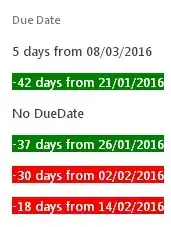
I whipped this up quick, works on a standard Task List.

function ColorCodeDueDate(ctx) {
  var fieldname=ctx.CurrentFieldSchema.RealFieldName,
      datevalue=new Date(ctx.CurrentItem[fieldname]),
      days=GetDaysAfterToday(datevalue);
  if (!days) return 'No '+fieldname;
  if (days<5) style="background-color:red;color:white";
  if (days<-30) style="background-color:green;color:white";
  return String.format("<div style='{0}'>{1} days from {2:dd/MM/yyyy}</div>",style,days,datevalue);
}

Notes:

  • Use the Chrome Extension Cisar (by Andrei Markeev) to code CSR files.
  • Should be easy to spot how to change it to your 180 days
  • Do not hardcode internal fieldnames; this function can be applied to any DateTime field
  • Try to code with only one exit point (return) in your functions; makes it a lot easier to read
  • GetDaysAfterToday() comes from SharePoints own sp.datetimeutil.js library, but you might have to load it as extra JSLink first; because SP loads it after your CSR code executes
    (OR copy that function code into your own CSR file)
  • String.format() comes from SharePoints msajaxbundle.js; which is loaded before your CSR code executes

With the https://iCSR.github.io Library you do not have to write a function at all

If you declare the View as:

'MaxEndDate':{
  View : iCSR.DueDate({
                        ranges:'[msRed],0,#FFF1AD,90,[msGreen]'
                        ,rowcolor:true
                        })
}

You get this: (screenshot from another post)

  • msRed and msGreen are iCSR tokens matching the colors from the new Microsoft Planner
  • iCSR adjusts the textcolor contrast for you (on each cell, you can't set a textcolor on a TR row)
  • and more

Danny '365CSI' Engelman
  • 21,176
  • 7
  • 35
  • 79