I have this specific requirement to color code the due date field if it's value is less than 180 days (6 months) compared to today's date.
Is this possible with Javascript/JSLink ?
Thanks
I have this specific requirement to color code the due date field if it's value is less than 180 days (6 months) compared to today's date.
Is this possible with Javascript/JSLink ?
Thanks

Yes absolutely. Here's a quick code example that I mostly borrowed from here:
(function () {
    var statusFieldCtx = {};

    statusFieldCtx.Templates = {};
    statusFieldCtx.Templates.Fields = {
        "DueDate": {
            "View": ColorCodeDueDate
            }
    };

    SPClientTemplates.TemplateManager.RegisterTemplateOverrides(statusFieldCtx);
})();

function ColorCodeDueDate(ctx) {
    var dueDate = new Date(ctx.CurrentItem.DueDate);

    var now = new Date();
    var then = new Date();
    then.setDate(now.getDate() + 180);

    // if there's no due date don't render anything
    if (dueDate == 'undefined' || !dueDate) {
        return '';
    }
    else if (dueDate >= now && dueDate <= then) { // we are within 180 days
        return "<div style='background-color:red;color:white'>" + dueDate.toLocaleDateString() + "</div>";
    }
    else {  // we are outside of 180 days
        return "<div>" + dueDate.toLocaleDateString() + "</div>";
    }
}
If your field's internal name is "MaxEndDate", change the line
"DueDate:" {
to
"MaxEndDate": {
and then change the line
var dueDate = new Date(ctx.CurrentItem.DueDate);
to
var dueDate = new Date(ctx.CurrentItem.MaxEndDate);
The color is just defined using the inline CSS style of the div markup you are returning. In the code example above, I am returning a div with a red background and white text. If all you need is red text on the default background, you would do something like
return "<div style='color:red'>" + dueDate.toLocaleDateString() + "</div";

I whipped this up quick, works on a standard Task List.
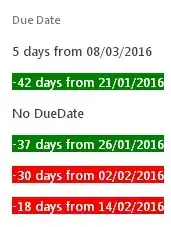
function ColorCodeDueDate(ctx) {
  var fieldname=ctx.CurrentFieldSchema.RealFieldName,
      datevalue=new Date(ctx.CurrentItem[fieldname]),
      days=GetDaysAfterToday(datevalue);
  if (!days) return 'No '+fieldname;
  if (days<5) style="background-color:red;color:white";
  if (days<-30) style="background-color:green;color:white";
  return String.format("<div style='{0}'>{1} days from {2:dd/MM/yyyy}</div>",style,days,datevalue);
}
Notes:
sp.datetimeutil.js library, but you might have to load it as extra JSLink first; because SP loads it after your CSR code executesmsajaxbundle.js; which is loaded before your CSR code executes
If you declare the View as:
'MaxEndDate':{
  View : iCSR.DueDate({
                        ranges:'[msRed],0,#FFF1AD,90,[msGreen]'
                        ,rowcolor:true
                        })
}
You get this: (screenshot from another post)


date.ToLocaleDateString()method. You should investigate other ways of getting formatted dates from JavascriptDateobjects in order to get the formatting that you want. https://developer.mozilla.org/en-US/docs/Web/JavaScript/Reference/Global_Objects/Date – Dylan Cristy Mar 02 '16 at 14:20dueDate.toLocaleDateString("en-GB"). Please also read this web page abouttoLocaleDateString()so you can learn about how to usetoLocaleDateString()https://developer.mozilla.org/en-US/docs/Web/JavaScript/Reference/Global_Objects/Date/toLocaleDateString – Dylan Cristy Mar 02 '16 at 14:38