2

I installed SharePoint Language Pack but I can't see the 'Language Settings' link under Site Administration.

From CA I can see that the pack is installed without problems, no errors, no critical issues...

Any ideas?

Élodie Petit
  • 1,267
  • 3
  • 22
  • 35
  • Which language pack? (sounds obvious, but if you had just installed US English no other others [as a practice run], then no extra options appear anywhere). – James Love Jul 27 '11 at 11:12
  • http://www.microsoft.com/download/en/details.aspx?displaylang=en&id=4731 This is the one I installed and I suppose it has support for various languages. – Élodie Petit Jul 27 '11 at 11:19
  • Ah ok, disregard my comment then :) – James Love Jul 27 '11 at 11:20
  • Actually, I believe you need to select the language from the dropdown on that page (default is set to English). It's confusing, because the UI language of that page changes too when you change the selection of the dropdown! For each language, you need to download and configure an individual language pack. – Jaap Vossers Jul 27 '11 at 12:33
  • Unfortunately there is not a link on the dropdown. The package I downloaded supports all the languages I suppose. So no need to download individual packages for each language. – Élodie Petit Jul 27 '11 at 12:47
  • I know this question is quite old now, but worth correcting - you MUST download a different language pack for each language that you wish to support. SharePoint 2010 support dozens of languages, and each language pack is 200+ MB, so it's not feasible to provide a single package for all languages. To download, follow the link above, select the language you wish to download, wait for the page to refresh, and then click the Download button. – Dexter Aug 11 '14 at 12:37

1 Answers1

3

Step by Step instruction to install and configure language pack for SharePoint 2010. http://virtualizesharepoint.com/2011/07/21/installing-language-packs-for-sharepoint-2010/
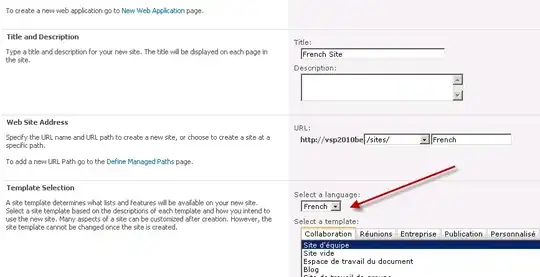
enter image description here

enter image description here Once the configuration is completed, navigate Central Administration -> Upgrade and Migration –> Check product and patch installation status.
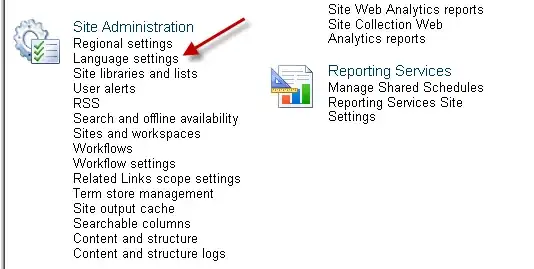
enter image description here Now Open the SharePoint site -> Site Settings -> Site Administration -> Language Settings

Aryan Nava
  • 114
  • 2
  • I think the package I downloaded doesn't include French so that's the problem. It includes, by default, English support so I don't see any language preference anywhere. Product installation status shows that the package is installed. – Élodie Petit Jul 27 '11 at 13:54
  • Oh, I love an answer that includes a dead link and no explanation. – Christine Nov 17 '17 at 19:41